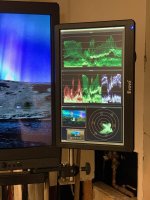
Do waveforms in budget field monitors accommodate video levels and full range levels

Imamacuser

Veteran
I've noticed that budget field monitors are starting to include waveform, scopes, and false color, but the descriptions and specs don't make it clear whether the waveform can be set to correctly display video levels and full range levels, and accommodate 8-bit and 10-bit signals.

I'd assume that budget monitors are limited to 8-bit 16-235 video levels, but I'm curious if anyone has tried them and can speak to whether they can be set to 16-235 video levels and 0 to 255 full levels for 8-bit footage, 64-940 video levels and 0-1023 full levels for 10-bit footage.

Can the false color gauge be mapped for different camera profiles, e.g. 32 IRE for middle gray in S-Log2.

I see Portkeys, FeelWorld, Neewer, Fotga, and Desview monitors on Amazon that all claim to have waveform and scopes, so I'm just wondering if they're implemented in a usable way or just thrown in for marketing hype.

Thanks.

P.S. I remember reading that SmallHD isn't as good as they used to be, is that correct? If that's the case, maybe I'm better off rolling the dice with a budget monitor.
 
It's unlikely most budget models have that extensive capability when some of the more expensive ones may not, but maybe one of them will surprise you/us.

I would check/reach out about the specs in question (although I know sometimes they aren't detailed).
 
“ P.S. I remember reading that SmallHD isn't as good as they used to be, is that correct? If that's the case, maybe I'm better off rolling the dice with a budget monitor.”

Subjective, but I do not think SmallHD has slipped in quality. It may well depend upon the model of product.

Generally speaking, GENERALLY, SmallHD monitors are more oriented towards focus-pulling than color accuracy. Focus-pulling and a “wow!” image. Also daylight viewing ability, the “bright” and “high bright” series.

Maybe it is more accurate to say SmallHD mons are more about Operating than accurate color reproduction. I’ve had many Hollywood AC’s tell me they love their SmallHD, but don’t get one for perfect color accuracy. I’ve also heard it said more than once that the SmallHD 703 is the best on-board monitor ever made and worth every penny of its hefty price tag.

I cannot vouch for the more budget-friendly monitors. Newsshooter recently reviews monitors often.
 
I'm surprised that you didn't mention that almost all waveform monitors in field gear seem to be unreferenced and just have a bunch of random lines with no scale measurements, leaving you to guess "What is 100 vs 105ire, does that line
3/4 of the way up represent 60/65 or 70 IRE?" IMHO, this issue is more important than any of the other issues. Esepcially shooting LOG and RAW formats, we are often trying to achieve very specific IRE settings for skin tones and middle gray charts
and without calibration scale, who knows what you are seeing? Generally a bunch of random horizontal lines?

Guess I'm just spoiled fromn the days of having a calibrated scale Tektronix Waveform monitor sitting in my edit bay. The ones we have now in most field gear are actually pretty lame and primitive, although still a lot better than the useless for video Histogram and
takes too long to visually orient to false colors (I have to stare at it and mentally process what color is what level, terrible for run & gun shooting in a hurry).
 
Yep, the tiny picture-in-picture waveform displays are nonsense, along with false colors with no reference scale; ughh, most frustrating. I'd like a button that punches up a bright, full frame waveform monitor that doesn't have me counting lines to guess what percentage a line represents.

Next to the image on the monitor, the waveform is the most important feature on a monitor. Why it gets second-thought treatment befuddles me. Clearly, the fact that they include a histogram, which is completely useless and a waste of developers time, shows that manufacturers have no clue as to why they are including features other than they are the buzz words they've heard.

Ahhh! Crusty old dudes like me who spent many an hour shading cameras for live broadcast with the CCU using the trusty old Tektronix. Nothing but stuck in the past.
 
I have a zebra and he is my good friend.


If one is anal about proper exposure, why not just use a light meter? Besides, you score points with clients when you get out a light meter. Especially if it is a spot-meter with one of those gun-sight caps that are spring-loaded.

“What’s he doing with that device?”

“Shhh! You’ll distract him! I don’t know exactly what he’s doing. Some sort of mysterious art. He’s a genius. Our last guy never used one of those thingies. But this guy is bigtime.”
 
I know a guy who once tried to use that mysterious thing called a light meter...he was told no vaping on set.
 
I'm surprised that you didn't mention that almost all waveform monitors in field gear seem to be unreferenced and just have a bunch of random lines with no scale measurements, leaving you to guess "What is 100 vs 105ire, does that line
3/4 of the way up represent 60/65 or 70 IRE?" IMHO, this issue is more important than any of the other issues. Esepcially shooting LOG and RAW formats, we are often trying to achieve very specific IRE settings for skin tones and middle gray charts
and without calibration scale, who knows what you are seeing? Generally a bunch of random horizontal lines?

Guess I'm just spoiled fromn the days of having a calibrated scale Tektronix Waveform monitor sitting in my edit bay. The ones we have now in most field gear are actually pretty lame and primitive, although still a lot better than the useless for video Histogram and
takes too long to visually orient to false colors (I have to stare at it and mentally process what color is what level, terrible for run & gun shooting in a hurry).

Yep, the tiny picture-in-picture waveform displays are nonsense, along with false colors with no reference scale; ughh, most frustrating. I'd like a button that punches up a bright, full frame waveform monitor that doesn't have me counting lines to guess what percentage a line represents.

Next to the image on the monitor, the waveform is the most important feature on a monitor. Why it gets second-thought treatment befuddles me. Clearly, the fact that they include a histogram, which is completely useless and a waste of developers time, shows that manufacturers have no clue as to why they are including features other than they are the buzz words they've heard.

Ahhh! Crusty old dudes like me who spent many an hour shading cameras for live broadcast with the CCU using the trusty old Tektronix. Nothing but stuck in the past.

The waveforms on smallHD monitors are really damn good. Super customizable. Size, color, scale... If someone can’t get the waveform on a smallHD monitor set-up in a fashion that pleases them, the monitor/software isn’t the problem...

Waveforms on cameras suck. Stupidly small and often not real time/full frame rate. Histograms are 1000% useless for video. A waste of bits in the software/memory. I’d rather have the dancing hampsters in there. It’d be more useful.
 
I wouldn't know what to do with those thumbnail versions of waveforms on onboard monitors other than laugh at them. This is my downsized version of scopes which lives on my lightweight cart (the full size cart has the same display on a 21" monitor, also vertically), generated from Scopebox running off a Mac Mini. Works great.
 

Attachments

  • IMG_0294.jpg
    IMG_0294.jpg
    67.8 KB · Views: 0
My current Lilliput 664/O/P has false color, but the scale is only on screen for a fraction of a second, and it doesn't display corresponding IRE levels, so I just use zebras.

An incident light meter makes sense when you have the time, but modern camera's built-in reflective spot meter make stand alone spot meters less relevant.
 
My current Lilliput 664/O/P has false color, but the scale is only on screen for a fraction of a second, and it doesn't display corresponding IRE levels, ...

How is it possible that someone goes through all the trouble of developing a false color feature, yet has no clue as to how it should work? Geez, spend an hour with any DP, camera operator, first AC, would get them the information they need. Or is this some sort of plot to make camera crew prematurely grey or to send me to an early grave?
 
I wouldn't know what to do with those thumbnail versions of waveforms on onboard monitors other than laugh at them.

Personally I like to squint myopically and debate punching it up to full size, before punching it up to full size.

What really annoys me is when they're not full frame rate, but try to fudge it by doing some sort of awful interpolation. Unacceptable!

What further annoys me is that few if any of them have a steerable region-of-interest box which superimposes over the waveform itself, so you can tell exactly what level someone's phiz is indicating. Has anyone ever seen anything like that?
 
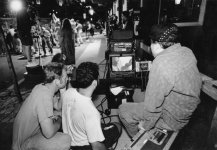
Maybe scopes less matter to me because I never had them in the field for the first 30 years of my career. They were something video engineers and maybe editors used, but not DP’s. They were expensive, heavy devices the size of a shoebox and you didn’t have them on location unless it was a truck-shoot.

A local cameraman I know just goes by eye alone, looking at the image in the VF, the VF roughly calibrated using color bars. No zebra, even. And he keeps getting jobs so his rudimentary method must be working out.

The spot-meter feature of the Odyssey was brilliant. Has any other monitor maker incorporated a spot-meter feature like that?
 
Maybe scopes less matter to me because I never had them in the field for the first 30 years of my career. They were something video engineers and maybe editors used, but not DP’s. They were expensive, heavy devices the size of a shoebox and you didn’t have them on location unless it was a truck-shoot.

We used to cart them around to field shoots all the time. This pic is from '93 (I'm in white shirt).
BBBbts.jpg

A local cameraman I know just goes by eye alone, looking at the image in the VF, the VF roughly calibrated using color bars. No zebra, even. And he keeps getting jobs so his rudimentary method must be working out.

Put a gun to my head, I can light a set to eye--at 800 ISO anyway, much higher than that I get fooled by the ratios. Viewfinders have enough subtlety these days to be able to rely on them, as long as you know the particulars of how it renders values which just becomes a "mental LUT". I do most of my fine tuning to the monitor (Sony A250, calibrated and light protected) but I use each of the scopes for specific things and it would be frustrating for me not to have them in those instances. If I have to go super portable I'll deal with the little silly ones on an onboard monitor but mostly rely on eye and the image at that point.
 
I more meant typical productions, Charles. Not productions with a large crew and budget for such things. The two-person crews that by far comprised, and comprise, most shoots.

For the first 25-30 years of my career I never saw a scope-box in the field other than on remote-trucks.
 
I find even the smallest wfm useful - open the iris- observe a flattening on the top line. Close the iris until there is no flat top. Shoot.
 
I find even the smallest wfm useful - open the iris- observe a flattening on the top line. Close the iris until there is no flat top. Shoot.

I ask because of my lack of knowledge...

Doesn’t that method ignore the exposure on your subject? Sure, you backed down to where the windows behind the subject are not clipping. But that might leave your subject 4 stops under.

Doesn’t one have to expose for the subject and not just for the overall image?
 
I over simplified. Of course if you have for example some windows or spotlights in the scene you may choose to leave them “popping out” ( or clipping) to normalise the base exposure
 
Back
Top