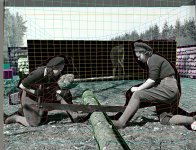
Did this one 2 weeks ago: camera mapping

Looks good!
Is this all 2D planes in 3D space or did you actually map the parts of the photo to 3D geometry...?
 
Thanks! :)
It is partially After Effects and partially 3d geometry.
I would have put up a high-res version, but I had a massive peak in my data traffic last month which I was warned for.
 
Using 3D layers for this kind of a effect really gets my blood pumping. It adds so much depth, while retaining all of the portions of the original photo.

Great work.


3D camera mapping is a completely different animal, and can do much more, but is also much more of a job to set up.

Nice work.
 
That's really excellent work. There's a lot of layered 2D stuff out there, but what you did goes beyond that. Maybe you could elaborate a bit on how you put it together.
 
That's really excellent work. There's a lot of layered 2D stuff out there, but what you did goes beyond that. Maybe you could elaborate a bit on how you put it together.

It's mainly rebuilding backgrounds which is a pain and then cutting out foreground elements which is also a pain. But this like you said goes beyond that. Maybe a null with the camera's interest parented to it? There are places where entire sections are completely exposed, not something you usually see. And the movement for these kinds of things is usually on in one direction, where here it actually pans.

Great stuff. I imagine he spent a lot of time recreating an entire background plate. But there even seems to be parallax down the length of the log. Don't see how you would do that with flat planes.

Wow.
 
Thanks guys,

I used After Effects for the intro, showing the photographs and the transition into the 3d photo. From there on it is mainly 3D stuff.

I did it pretty quickly actually. Must have been about an hour work or so. The most time was spent taking out the layers and restoring the background plate. From there on it was simply positioning the elements and rendering away :)

The way this was done, though, could be done inside After Effects too. It just takes a little longer I guess.

I'll post some screenshots of the scene in a moment.

Edit: oh btw, I also exported the 3D camera from Max to After Effects to be able to add the text in After Effects relative to the camera.
 
Last edited:
screenshot

screenshot

Here is a screenshot.

As you can see it is a pretty simple scene which can be easile recreated in After Effects. For the log in the foreground you could use about 5 planes to make it a basic tube, the rest could easily be plain planes. However this project was a test project and I decided to see what difference it would make if I would also model the characters in the foreground (very basic). I found out that it really doesn't make a difference though.
 

Attachments

  • scene.jpg
    scene.jpg
    148.4 KB · Views: 0
No, it's funny I never realized the intro was the same. I actually got the idea from a camera mapped city and started searching the net for pictures with quite some depth in it to test my skills. However, I thought it was kinda boring without an intro. So I just started experimenting and came up with this.
 
Back
Top