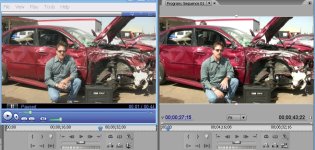
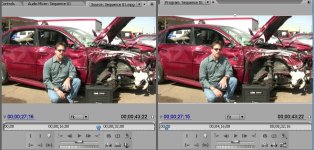
I'm having a problem when exporting from PremPro CS3. No matter what format or settings I use, the exported file has decreased saturation and contrast. The image is washed out. I've tried dozens of different formats and settings (h.264, mpeg 2, mp4, and on and on). Even uncompressed formats are washed out.
I thought maybe it's the YUV color space to RGB color space conversion. So then I tried exporting from After Effects CS3 and I have the same problem. I've tried multiple players (WMP, VLC, QT, FLV Player, etc.) to see if that was the problem. But that didn't solve it.
No here's the kicker. I imported the exported file back into PremPro. So this is now a compressed file. I drop it on the timeline and the saturation and contrast is almost identical to the original file. So it seems to me it's not the file but how it's being interpreted. I can't figure out what setting I'm missing. I don't use CS3 too frequently but I'm trying to complete this project for our company (which will be a web video) and can't figure out what I'm missing.
Any help would be greatly appreciated. I've attached two images so everyone can see the problem.
I thought maybe it's the YUV color space to RGB color space conversion. So then I tried exporting from After Effects CS3 and I have the same problem. I've tried multiple players (WMP, VLC, QT, FLV Player, etc.) to see if that was the problem. But that didn't solve it.
No here's the kicker. I imported the exported file back into PremPro. So this is now a compressed file. I drop it on the timeline and the saturation and contrast is almost identical to the original file. So it seems to me it's not the file but how it's being interpreted. I can't figure out what setting I'm missing. I don't use CS3 too frequently but I'm trying to complete this project for our company (which will be a web video) and can't figure out what I'm missing.
Any help would be greatly appreciated. I've attached two images so everyone can see the problem.