DEAFENING bursts of static on FCP

dv416

Well-known member
So, I was editing on my laptop the other day using headphones. I click somewhere arbitrary on the timeline and SSSSSNSNNNNPPPP - one of the most painfully loud sounds I have ever heard in my life shoots straight into my ear drums. My reflexes to get the headpnones off wasn't a "oh thats loud, I should take this off" sort of thing it was a SURVIVAL INSTINCT. instantaneous, no-thinking-required sort of reflexes. it was even loud to my friend, sitting across the room (remember, it was headphones)

anyway, it seemed like some sort of static interference - definitely not a sound file on my timeline. Though if I recall correctly, the static did register on FCP's audio monitor. To me, this would mean that FCP was processing the audio, even if the sound did not originate from the timeline.

Problem is, I have sensitive ears and tinnitus to begin with, so I can't have there even a remote chance this happens again. OH and this has happened to me more than once, so its probably not just a one off glitch. I am afraid of editing on my laptop now. My theory is that some sort of random access to the hard drive caused a glitch in the timeline's audio. Anyone have any ideas or experience anything like this?
 
Last edited:
I had virtually the same experience last week. What kind of system are you running? For me it was FCP 5.1.4 on a 17" MBP running 10.6.2.

I now know the feeling of ears bleeding and heart pounding...


Jason
 
I thought it was my speaker system until I realized that my tool bench reader was registering it.

This is a serious problem, even though it doesn't ultimately affect the file. I have severe tinnitus and hyperacusis (physical pain hearing loud noise). When this happens it is both painful and leaves my ears ringing. Additionally, it's not good for my speakers.

I have no idea what is happening, just that it sucks.
 
Are you sure you did not engage the internal mic input on the notebook? It's quite a sensitive microphone. It could have been done via a hotkey.
 
This has happened to me. Mac Pro with 10.6.4, FCP 7.0.2. I will be cutting and go to playback and I get that noise, which is deafening. I'll play the same edit point back again and it's gone. Weird.
 
Same thing has happened to me before, only happens once in a long time when FCP is choking on playback. Hurts pretty bad though when it happens, i didnt know my headphones could be so loud.
 
Definitely not a feedback issue, DJdecay. No microphones were attached or turned on. It sounds more like violent static than midrange or high pitched feedback.


Jason
 
Was the machine MBP doing a lot of work then, overheating or using WiFi/AirPort at the time?
The only thing I could think of suggesting at the moment, is disabling the default dialogue recording device in FCP to avoid a repeat incident. Did you use any AudioUnits plug-ins in FCP while editing?

One of the things I'm suspecting is this : http://www.kenstone.net/fcp_homepage/basic_voice_over.html
The other is the AD1988 HiDef audio interference with other hardware located right near it, or stutter and audio buffer loss due to a race condition and overheat, specifically with MBP.
 
This has happened to me. Mac Pro with 10.6.4, FCP 7.0.2. I will be cutting and go to playback and I get that noise, which is deafening. I'll play the same edit point back again and it's gone. Weird.

Yep. Me too, same set up in a Soho post house.
 
>Did you use any AudioUnits plug-ins in FCP while editing?

No, but overheating could be the deal. I am full-fledged dictator to my Mac. Just mean. I run it all day and night.
 
Was the machine MBP doing a lot of work then, overheating or using WiFi/AirPort at the time?
The only thing I could think of suggesting at the moment, is disabling the default dialogue recording device in FCP to avoid a repeat incident. Did you use any AudioUnits plug-ins in FCP while editing?

One of the things I'm suspecting is this : http://www.kenstone.net/fcp_homepage/basic_voice_over.html
The other is the AD1988 HiDef audio interference with other hardware located right near it, or stutter and audio buffer loss due to a race condition and overheat, specifically with MBP.

Airpot/wifi was on. MBP may have been hot, but not like my older MBP that used to boil. I use FCP's Compression/High Pass/Low Pass plugins often, but cannot see how that would cause the issue. I have also used a Tascam US122, but can guarantee that it was not hooked up. Also, the V.O. option was not enabled...Even if it was, I was wearing AKG headphones. I am pretty confident it is not a feedback issue and pretty confident that it has nothing to do with the 'default dialog recording device in FCP'


Jason
 
Airpot/wifi was on. MBP may have been hot, but not like my older MBP that used to boil. I use FCP's Compression/High Pass/Low Pass plugins often, but cannot see how that would cause the issue. I have also used a Tascam US122, but can guarantee that it was not hooked up. Also, the V.O. option was not enabled...Even if it was, I was wearing AKG headphones. I am pretty confident it is not a feedback issue and pretty confident that it has nothing to do with the 'default dialog recording device in FCP'


Jason

I'm taking a shot in the dark here, I've gotten this type of issue in about 4 different conditions. (One of them was engaged MBP internal audio mic.)

The behavior you described, I got with some AudioUnits plug-ins that went out of clock or had AU reset/rescan etc.. esp with DSP card assisted ones or ones that were "wrapped" from the VST archetecture into AU - like UAD-2 or TC Powercore.

You have to do split-half troubleshooting to isolate and possibly be able to reproduce it - if you value your hearing :-).

The other "possible" causes outlined in thread, my MBP did this when overheating on its default audio out, Protools m-powered and Logic on my MBP did this with my M-Audio 1814 due to a lost clock on the firewire cable etc...
 
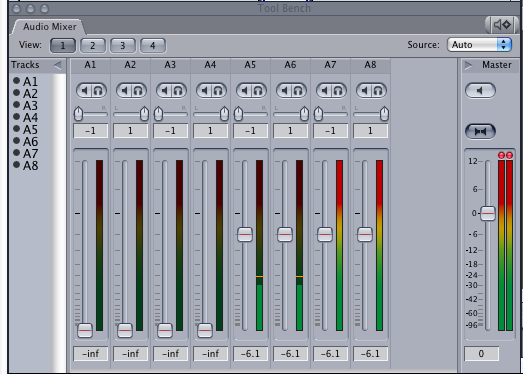
Got one today. I slapped my spacebar to stop the noise and noticed it was coming through A7 & A8, an independent wav file, but not through A5 & A6. With it paused I took a screenshot:

pic4.png


Very frustrated, because my hearing is already very damaged. This is a flat out liability for Apple because this bug is physically harming people whose hearing is their livelihood.
 
Whoa! Now I'm getting it in my renders! My timeline is clean, but the .mov render is not. What the heck?! Second render (without changing ANYTHING) came out clean.

Has anyone gotten these blasts in your renders?
 
Im having the same problems and I have been having them whenever I edit on a mac with canon 5d footage. I edit weddings on a mac for a company that shoots on sony ex1 and a canon 5d and this loud noise happens only on 5d footage. it will play fine and all of sudden its like a train whistle going off in your room. I noticed that you can lower the volume of the clip and the noise will be just as loud. I have to lower the volume of the clip all the way just to edit it.. but whats the point without audio? I am really not impressed with final cut and its abilities. I mean who programs this crap to happen? Is anyone else having this trouble based on certain camera footage?

so I kept looking around and someone said it had to do with audio rate and sure enough the 5d footage I was using was 44.1 while 7d and ex1 were at 48
 
Last edited:
I convert all my 5DII footage to ProRes and 48khz, but I have had the sound bursts as well. I wonder if extra audio, say H4n at 44.1 could also be the cause in a timeline set for 48khz?

Something further to explore. Thanks for adding more info on this.
 
my machine is psychic, it knows exactly when I'm working with headphones and when I'm not
and even though I seldom use headphones ... plus the deafening static burst does not come often ...
the damn thing somehow knows exactly the right moment to hurt me the most
 
I have never experienced this and normally edit ProRes at 48khz in FCP7 using Snow Leopard - HOWEVER - this thread makes me extremely nervous since my hearing is already damaged to being borderline with the same hearing problems as the OP and others. I sure don't need anything that would push it over the edge.

Apple needs to step up and do something about this - especially since it appears to be happening to more than just a few. Bunch of posts on various forums, including Apple's, but with no real solutions as far as I can see. As soon as someone reports having solved it, someone else says they're still experiencing it using that fix. And it's apparently not limited to FCP since some Logic users have reported the same thing.

I, unfortunately, can't risk using headphones until this is resolved. How sad. And I recently switched back to FCP after having used Premiere for a couple of years. This is almost enough to convince me to go back.
 
Back
Top