De-Interlace issue with AVC-Intra 50

wolfi

Member
Hi,

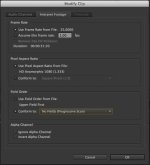
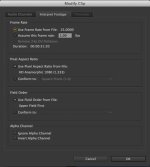
It looks like there is an issue with Premiere CC and AVC-Intra 50 files. I can't manage to get the clips correctly de-interlaced. Look at the pictures I added.
I tried it with different settings, but even when the clip is being interpreted as progressive, it won't work.

Never had any problems with Premiere and AVC-Intra 100, only happens with AVC-Intra 50 Footage.

After Effects has the same problems..

.. but Final Cut X will do the de-interlacing correctly.

Has anyone experienced this issue and found a solution to this (without the workaround with FCPX)?

Thanks a lot,

Best,
Wolfgang
 

Attachments

  • FCPX-1.jpg
    FCPX-1.jpg
    160.4 KB · Views: 0
  • PP Progressive-1.jpg
    PP Progressive-1.jpg
    231 KB · Views: 0
  • PP Use fields from file-1.jpg
    PP Use fields from file-1.jpg
    201.9 KB · Views: 0
Last edited:
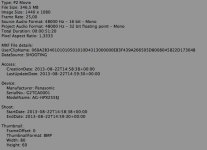
Can you post a screen shot of the Clip Properties from Premiere?

Can you also post a screen shot of the dialog box from the method you used to deinterlace?

(Why did you shoot interlaced in the first place?)
 
Here are the screenshoots..
 

Attachments

  • Bildschirmfoto 2013-09-22 um 23.43.16.jpg
    Bildschirmfoto 2013-09-22 um 23.43.16.jpg
    51.9 KB · Views: 0
  • Bildschirmfoto 2013-09-22 um 23.43.07.jpg
    Bildschirmfoto 2013-09-22 um 23.43.07.jpg
    48.9 KB · Views: 0
  • Bildschirmfoto 2013-09-22 um 23.42.18.jpg
    Bildschirmfoto 2013-09-22 um 23.42.18.jpg
    47.4 KB · Views: 0
Try putting the footage into a 25p sequence, do not Interpret at all, and then export as 25p. Try it with Frame Blending both on and off (most likely OFF will give you better results).

But again, why are you shooting interlaced at all? If you want 25p, which is what you get by deinterlacing, shoot 25p. The results will be superior in just about every way.
 
thanks david,

tried this, with frame blending on and off, both with not so great results. As long as FCPX handles the exact same clip without any problems and in perfect quality i can't stop thinking that Premiere is doing something wrong or I am doing something wrong with premiere.

Why interlaced? I got this footage - shot interlaced - and it wasn't a big deal for me as working with interlaced footage for progressive output has never been a problem with AVC-Intra 100. Worked perfectly ever since.
Why not with AVC-Intra 50?
 
Word in the forums -- even the Adobe site forums -- is that deinterlacing isn't really Premiere's strong suit. I can't speak to that personally, as it's been quite some time since I shot interlaced footage and had any need to deinterlace it.

After Effects is said to be better, but again, I can't put any personal experience behind that.

I would put it to whomever's giving you the footage, then, that they should be shooting 25p if that's the delivery they want.
 
Don't Interpret the footage. Leave it interlaced in PP. Work in an interlaced sequence. When you export, set it to no fields.
 
Back
Top