Day for night in close ups

Lynos

Well-known member
Hi guys

I have a tricky problem. I have a scene which was shot during the day under less-than-friendly light conditions. The sky were gray and it was pretty dark but still day time. On the other end, we didn't blow out the footage.

It is mainly a dialogue scene between two people with a lot of close ups and medium shots. The footage is extremely grainy and I couldn't get rid of i.

I decided to turn it into a night scene to give it a more stylish look and integrate the grain in a better way. All the tutorials I've seen so far for "Day for night" effects addressed mainly wider, panoramic shots.

When I apply those settings to my composition everything turns very dark and you can't really see anything.

I need a subtle way of doing that - mimic dusk or early morning, make the grain disappear as much as I can and give the scene a more romantic, stylish look, without making it so dark you can't see anything.

Any ideas?

Thanks
 
post a frame or two and some here will have a go at it. The good thing about what you wrote is that "the sky was gray" and by that I am taking to think you mean it was overcast. That's really a help in this case, overcast means diffuse shadows, and not hard shadows you would get on a clear day.

You also don't get hard shadows at night outside, unless the moon is very very bright. So being overcast is a help in this case.

The noise issue can be fixed.
 
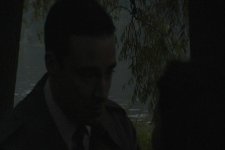
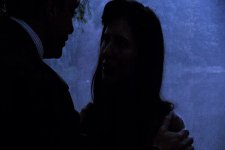
Alright, so here are three frames from the film.

The first one is the original footage. As you can clearly see it looks like crap, dark and grainy. It was shot at 4 PM with an overcast sky.

Second frame is the the first one again, only after applying many effects to it such as levels, remove grain, color profile converter (for a film-like look), photo filter, exposure, and hue/saturation. You can see more details, but the grain is scary.

Last frame is a different shot but has the same effects I mentioned earlier plus curves to give it a bluish/nighttime feel. The grain is more muted, but the picture's very dark and you can hardly see anything. This is the best I was able to make it.
 

Attachments

  • Shot 1.jpg
    Shot 1.jpg
    69.6 KB · Views: 0
  • Shot 3.jpg
    Shot 3.jpg
    100.9 KB · Views: 0
  • Shot 4.jpg
    Shot 4.jpg
    81.3 KB · Views: 0
The problem is that your footage is underexposed, and, having not played with it yet, there's not much you can do to bring it back without bringing out more grain, etc.
 
Yeah, I realized that...

It's a trade-off between grain and detail. I'm willing to take the grain as long as the image has some "character", that's why I'm opting for the Day for Night look.
 
There is not a whole lot of information in the image to work with, so your corrections are going to be limited.

You might try the Neat plug in to help remove some of the grain.
 
Would you say that the image will look better as a night scene, though?

Or it doesn't really matter?
 
Fire the DP. Even if you were under a cloud of volcanic ash shooting with a Logitech Quickcam it shouldn't look that dark in the daytime.

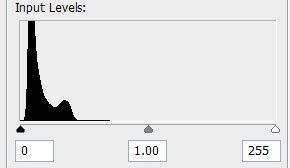
histogram.jpg

At a minimum this is three stops underexposed.

Trying to go day-for-night is tough when the background is brighter than the subject. And by the time I can get the noise out of the stills this starts looking like watercolor. Video might be slightly better because of the temporal filtering, but this footage is basically unusable.
 
you need to use levels to bring up the shadows without bringing up the highlights or midtones as much as possible. it looks like if you stuck with the levels for your shadows you had in the second image while bringing your highlights down, and then add your color change without changing the levels again, youll be better off. ..but yeah. this appears to be some really horrible footage to work with. good luck.
 
Thanks. I will try all your suggestions.

Anyway, lessons learned. I can tell you as much.
 
Back
Top