Rehdarh
Active member
Hi,
I recently downloaded Resolve and I am having issues with the viewer, specifically in color mode. The viewer is really small and this prevents me from accurately seeing what I am doing. Here are some photos of what I am dealing with:
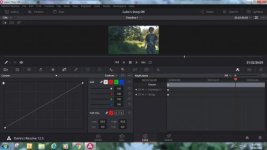
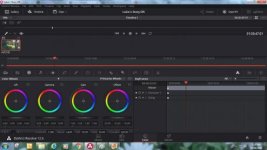
I the first photo my RGB curves take almost a 1/3 of the screen, with the viewer taking up 10%. The second photo has the Timeline and the Clips viewers enabled; the playback viewer disappears completely.
My screen resolution is 1366x768. Can someone explain to me why that would be an issue, if it is?
Thank-you
I recently downloaded Resolve and I am having issues with the viewer, specifically in color mode. The viewer is really small and this prevents me from accurately seeing what I am doing. Here are some photos of what I am dealing with:
I the first photo my RGB curves take almost a 1/3 of the screen, with the viewer taking up 10%. The second photo has the Timeline and the Clips viewers enabled; the playback viewer disappears completely.
My screen resolution is 1366x768. Can someone explain to me why that would be an issue, if it is?
Thank-you