
tommygdawg
Well-known member
Hey all,
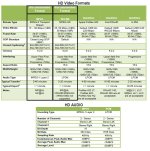
Some of you may have seen me posting in the audio section about my first TV Spot gig that I'm doing. I'm getting the audio under control now, and really what I want to do is make sure I'm getting my encoding settings right. I'll be encoding using MPEG-2. My question is, how do I make sure that Media Encoder CS6 is using an IBBP Closed Long Gop? Also, does anyone know what it means in the notes section by "MP@HL" and "HP@HL"? Here's a screenshot of the requirements:
Thanks!
- Tommy
Some of you may have seen me posting in the audio section about my first TV Spot gig that I'm doing. I'm getting the audio under control now, and really what I want to do is make sure I'm getting my encoding settings right. I'll be encoding using MPEG-2. My question is, how do I make sure that Media Encoder CS6 is using an IBBP Closed Long Gop? Also, does anyone know what it means in the notes section by "MP@HL" and "HP@HL"? Here's a screenshot of the requirements:
Thanks!
- Tommy
 So, it's saying I can use either main profile OR high profile? Doesn't matter? Also, as an aside...do you have an idea why premiere labels the I frames and P frames as M frames and N frames? This confused me for the longest time until I realized they were synonymous.