
[FONT=arial, verdana, tahoma, sans-serif]I'm currently editing a music video and am trying to mask out a background window. I've worked with AE before but am far from an expert.
Basically, the camera doesn't move at all during the shot, and the only area I am concerned about is where the artist's shoulder crosses over the area in point. I've tried tracking but had little success. I was hoping you guys could provide me with some tips or pointers to make it as smooth and seamless as possible. Here's what I've been doing so far with sub-par results. Mask the window and put points where the subject's shoulder meets the window frame and his arm meets the couch. I have about 3-5 points in between.
At first I was almost trying to keyframe each frame but that was obviously taking too long so I started doing about every 5th frame.
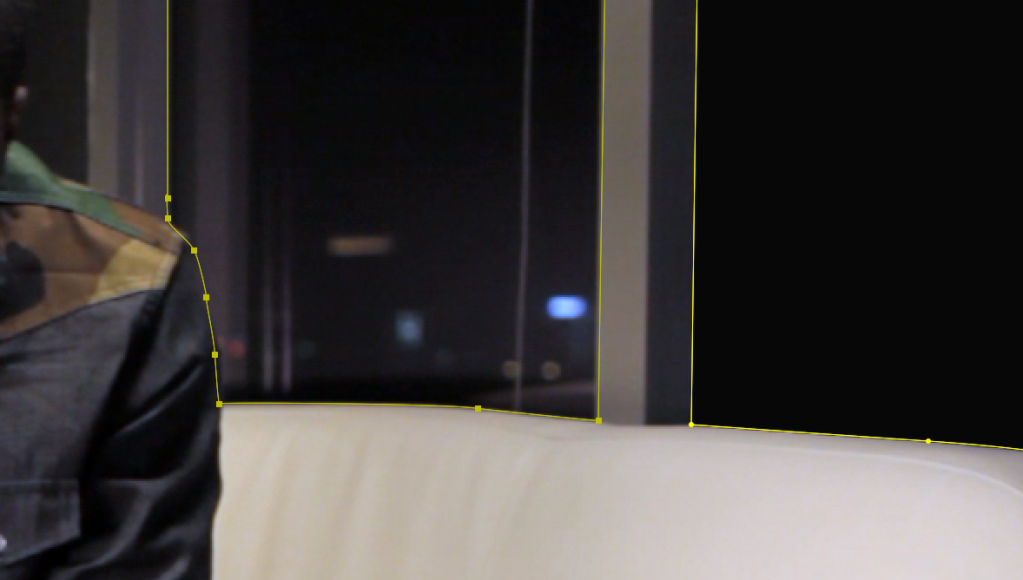
Small example of my results:
http://vimeo.com/36731811
My questions to you:
Should I be using "Rove Across Time"?
Should I have more points?
Feather the mask? How much?
Any tips or advice would be greatly appreciated.
Thanks,
-AP[/FONT]
Basically, the camera doesn't move at all during the shot, and the only area I am concerned about is where the artist's shoulder crosses over the area in point. I've tried tracking but had little success. I was hoping you guys could provide me with some tips or pointers to make it as smooth and seamless as possible. Here's what I've been doing so far with sub-par results. Mask the window and put points where the subject's shoulder meets the window frame and his arm meets the couch. I have about 3-5 points in between.
At first I was almost trying to keyframe each frame but that was obviously taking too long so I started doing about every 5th frame.
Small example of my results:
http://vimeo.com/36731811
My questions to you:
Should I be using "Rove Across Time"?
Should I have more points?
Feather the mask? How much?
Any tips or advice would be greatly appreciated.
Thanks,
-AP[/FONT]

