
Good evening,
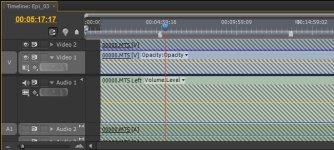
Can anyone tell me what these grey diagonal hash marks mean? I'm trying to copy an AVCHD project to an external drive, and this is the error I'm receiving. Premiere CS4 (v4.2.1), Win 7, 2.66 GHZ Core2Duo, 4 GB RAM.
The Project Manager won't work because it doesn't preserve the file structure necessary for proper AVCHD playback. My backup plan was to simply copy/paste the entire folder containing the project to the new hard drive and relink the first several files.
I copied the entire file structure exactly, and I've linked the project with the first file in the series. Some files appear normally, and some have these strange gray hash marks across them.
Any help would be very appreciated.
Russ
Can anyone tell me what these grey diagonal hash marks mean? I'm trying to copy an AVCHD project to an external drive, and this is the error I'm receiving. Premiere CS4 (v4.2.1), Win 7, 2.66 GHZ Core2Duo, 4 GB RAM.
The Project Manager won't work because it doesn't preserve the file structure necessary for proper AVCHD playback. My backup plan was to simply copy/paste the entire folder containing the project to the new hard drive and relink the first several files.
I copied the entire file structure exactly, and I've linked the project with the first file in the series. Some files appear normally, and some have these strange gray hash marks across them.
Any help would be very appreciated.
Russ