CS4 Glitch? Or just me?

Fliques Osman

Well-known member
I'm hoping some one can give some insight.

I'm using PPro CS4. But the footage in the Source monitor and Program Monitor is blocky and pixilated.

My Footage from tape is:

DVX
Squeeze Mode
24pa

My project setting are:

DV - 24p Preset
Frame size: 720 x 480
Frame Rate: 23.976 Frame/second
Pixel Aspect Ratio: D1/DV NTSC Widescreen 16:9 (1.2121)
Fields: No Fields (Progressive)

Also, I have adjusted the Draft Quality to Highest and I have interpreted footage.

However if I create a project that is not widescreen the footage is not pixilated or blocky in the source monitor or the project monitor.

Whats going on? I thought that if you shoot squeeze 24pa then you edit in widescreen 23.976 mode?

Thanks.
 
Last edited:
Hey David,

I don't have any capturing software to take a snap shot. Is there any way to take a snap shot of the source monitor and program monitor using Ppro CS4

Thank you
 
Hey David,

I don't have any capturing software to take a snap shot. Is there any way to take a snap shot of the source monitor and program monitor using Ppro CS4

Thank you

If you're on a Windows machine, with the image on the screen you want to capture, press the print screen key (prt scrn on my keyboard) - nothing should happen visually, but then open Windows Paint and do a "paste" - you should see the screen grab.

Save as a jpeg and there you go...

Also, I noticed you said you "interpreted footage" - if you've got 24pa footage, and a 24p timeline, you shouldn't have to interpret any footage. What did you change?
 
Hey Eric118 I interpreted the footage because Ppro CS4 could not do pull down automatically (in prior versions it could).

I shot DVX footage: 24pa, squeeze.

My project settings are:

DV - 24p Preset
Frame size: 720 x 480
Frame Rate: 23.976 Frame/second
Pixel Aspect Ratio: D1/DV NTSC Widescreen 16:9 (1.2121)
Fields: No Fields (Progressive)

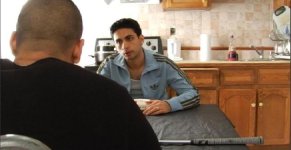
When I import the footage into the source monitor or program monitor with the above settings the image is blocky and pixilated (as seen in the left screengrab)

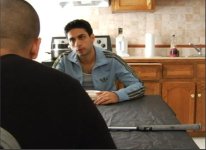
However, if I import the footage in a new project with the letterbox preset the footage in the source and program monitor are fine (as seen in the right screengrab)

I was under the assumption that if you shoot squeeze 24pa then you edit in widescreen 23.976 mode?
 

Attachments

  • widescreen_blocky_pixilated.JPG
    widescreen_blocky_pixilated.JPG
    42.2 KB · Views: 0
  • letterbox_normal.JPG
    letterbox_normal.JPG
    33.3 KB · Views: 0
PhantomVideo: I captured in Ppro

David Jimerson: I upgraded -- started a fresh project but still the same thing.
 
Phantomvideo: All 24pa footage yeilds the same result. I contacted Adobe Support - but nothing.

Anybody in DVXuser World ever experience the same thing.

Thanks
 
I was experiencing the same thing when working with some SD DV footage. It looked terrible in the source window. But when i exported it using encoder it looked perfect.
 
So I am correct that when you shoot squeeze mode 24pa on a DVX100 you edit in DV - 24p NTSC DV Widesceen Preset

Thanks
 
Hey,

I can get it to render normally, its just cutting the footage in the source monitor and program monitor that was the problem. Nevertheless, I have switched to Avid.
 
Back
Top