Crossing the line when filming vehicles

rc444

Well-known member
I'm shooting a short film in a couple of months. There is one scene in my script in particular. It goes like this:

1) Car drives into frame and stops several metres in front of camera
2) Two characters start talking inside the car once the car stops
3) Character A hands character B a toy rabbit inside the car
4) Character B hops out with the rabbit, and the car drives off.

The dialogue inside the car is important and we need to see the exchange of the rabbit.

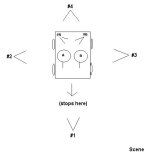
I can shoot this scene from 6 set-ups/positions. What are the best set-ups to choose that don't violate the line rule. I don't know how the line applies to moving vehicles etc, so perhaps some different creative thinking is required in this situation.

My set ups are:
#1 = Establishing shot of vehicle driving into frame (or two shot of two characters behind the wheel facing camera)
#2 = MCU side profile of A
#3 = MCU side profile of B
#4 = Reverse neutral angle of vehicle from rear of car
#5 = MCU rear profile of B
#6 = MCU rear profile of A

See the diagram in this message to see what I'm getting at.

Thanks,
David
 

Attachments

  • example.JPG
    example.JPG
    13.3 KB · Views: 0
You've got to have a "neutral" camera to cut to before cutting to a camera on the other side of the line.. I don't know what would be best in your situation, though.. I'm not very into this kind of stuff.
 
yeah, a neutral shot of the car driving along the road at a reasonable distance (i.e. too far away to see the characters lips move as they talk) would be a good idea - and will also be useful as a general cutaway to cover camera/acting glitches.

I do however think you can get away with crossing the line in a car setting far more so than in many other settings - so long as the audience sees the proper establishing shots, they're more likely to accept a sudden change in shot, as they 'know' the characters are still sitting in the car, so long as you don't confuse them with sudden shifts in background noise
 
But where is the best placement of this neutral camera in this situation? Trying to learn this myself, but it is kind of confusing..
 
I'm guessing Setup #4 would be for when they exit the car? because otherwise, it might ot even be necessary.

Depending on the type of angle for #1 (Low, High, eye level, etc.), that could also be your neutral angle. Once the car stops, you could keep cutting back to that (ideally an eye-level shot). Close-ups from 2 or 3 could show the exchange of the bunny.

You could scratch the setups in the back seat, and make the 180 line just around the front of the car (1, 2, & 3). I do agree though that the audience might be a little more lenient of the rule in a car, but it helps.
 
Hi RC,

How about closing wide enough on #5 so subject A is in the frame, cutting a bit wide on #6 with B & A in frame and pulling in on A with your MCU? This seems less clumsy than cutting from #5 back to #4 before finishing with #6.

Good luck, Michael
 
Try and stray from a direct profile of the talent, but instead opt for an angle; see reference.

The good thing about a car is that is is very easy to establish every persons placement. Crossing the line isn't as drastic nor confusing especially if used for dramatic pause.

One could easily go from Camera Position 2 to 6 without stressing out your audience but going from the NOT reccomended Camera A to Camera B would be disorietating even though we know where our characters are sitting.

Also stay away from moving camera 1 to 6, or any direct 180 Degree flip. This is where you stray not close to the line, but RIGHT ON TOP OF IT.

Also remember, everytime you move to a camera position, it creates a new line for you to use.

Accepted combinations with Camera POS

Any combination of - 1 > 2 > 3
Any combination of - 4 > 5 > 6
Any combination of - 3 > 4 > 5 > 6
Any combination of - 2 > 5 > 4 > 6

Not reccomended combinations with Camera POS

A > B
1 > 6
2 > 4
3 > 5

(DO not go from Camera POS 3 to 5 or 2 to 4. )

This is a generalization of course. One can experiment and see what actually works and I can't go through every possible equation in this time, but most Camera POS's are obvious as well as when to actually cross or create a new line.

Alsp, the orange circle represents 2 Axis's combinded. Once on either side an axis, the camera can really be ANYWHERE along that HALF ARC as WELL AS Moving the camera forward and backwards inside/outside the radius.

carjk0.jpg
 
Last edited:
Back
Top