Convert to YV12 in VDUB for DVD?

Hal2

Active member
My Current Workflow:

1) Render out 1280X720 Cineform "highest" Intermediary file from Vegas 9C as Cineform .avi (use .709, up convert to 4:4:4, Higher HD, Progressive, square Pixels 1.0)

2) Import into Vdub using Avisynth 2.5 script (Dan Isaacs - hd2sd("filename.avi", Interlaced = false) and use Lanczo3 to re-size to 720X480

3) Export using Lagarith lossless Codec

4) Import into HCEncode using Avisynth 2.5 and script provided by "Fit2disc"

I've been pretty happy with the results so far, but one thing that I seem to have to do in HCEncode is add "ConvertToYV12() "

Today messing around in Vdub I noticed that in the Lagarith settings I can tell it to output in YV12.

My question is, should I do this in Vdub or just do it in HC encode or am I totally daft here?

Thanks in advance for help!
 
What are you input files into vegas?

Why don't you use lagarith export from vegas? It is mathematically lossless, as opposed to cineform (which is very close in the mode you are using), but still....

Since this is progressive content, you gain very little by using the hd2sd script. A straight resize using spline36 or lanczos4 will be about the same

If you still want to use hd2sd, there still is no reason to use the intermediate vdub step. You can use converttoyv12() at the end of the hd2sd script and feed it directly in to HCEnc

I would leave lagarith in RGB mode always (even if it is YV12 content, it will auto select YV12), and if necessary, do the color space conversion in avisynth
 
Last edited:
My input files are AVC HD, converted to Cineform "Highest" and enable Smart Rendering...

I've tried both, thought maybe the Cineform would be the better choice but that's why I'm putting the question out here as I'm trying to produce the best DVD's I can...

I'm also now a little confused about PAR, I understand that you want a 1.78 ratio for 16:9 but not sure how to set it?
 
You set the AR in the final stage of your MPEG2 encoding. There is a setting for that in HCEnc

You would be hard pressed to see the differences in quality between Cineform 4:4:4 and Lagarith, but Lagarith is lossless, cineform is lossy. You will see some quality loss by examining with difference masks or objectively if you did PSNR or SSIM testing. Since you were using lagarith in that intermediate step (which you don't need), I only suggested to use it for "best practices"

The only reason to use cineform as an intermediate in your case would be if you are doing farther editing in another application (lagarith doesn't edit very well, very laggy on the timeline), but I assume you've already done all the editing in Vegas.

It seems to me the only reason you are using this workflow is to avoid the vegas MPEG2 Mainconcept encoder, and to specify your own resize algorithm with avisynth
 
You are correct I am trying to avoid the main concept encoder on Vegas as I was very dissatisfied with the output.

When I said PAR I meant the pixel aspect ratio, not the aspect ratio. With even my current work flow I am still seeing 4:3 not 16:9.
 
The PAR is actually 32:27 for a 16:9 NTSC, if you really mean pixel aspect ratio as in width:height of the pixels

Display Aspect Ratio = Frame Aspect Ratio x Pixel Aspect Ratio

DAR=FARxPAR

PAR is sometimes called the sample aspect ratio as well or SAR, but it means the same thing (w:h of pixels) and the math is the same

FAR is the w:h of the frame size, or 720:480 in NTSC land

16/9 = 720/480 x 32/27

Avisynth assumes 1:1 square pixels, in which case you should be seeing 1.5, not 1.3333, because 720/480 = 1.5

None of this matters, as you just enter 16:9 in HCenc, which corresponds to the DAR flag. Or are you saying your final output isn't 16:9 ?

What bitrate are you using?
 
This is my HC .ini file

*BITRATE 5800
*MAXBITRATE 7000
*FRAMES 0 24515
*PROFILE best
*AUTOGOP 18
*AQ 4
*DC_PREC 10
*PROGRESSIVE
*BIAS 20
*AVSMEMORY 1024
*MATRIX fox1
*LUMGAIN 4
*PRIORITY high


and no I'm not getting 16:9 out even though I have it selected...

This is the .avs script I used to render with HC:


# -= AviSynth v2.5.8.5 script by Fit2Disc v1.2.8 =-
AVISource("F:\Sherry\Working\SherryFinal-Convert.avi",pixel_type="RGB32")
TemporalSoften(1,4,5)
BicubicResize(672,448,0,0.6,0,0,720,480)
AddBorders(24,16,24,16)
#Trim(0,24515).FadeOut(150)
ConvertToYv12() # For VirtualDub or CCE

Now I know I want to add the HDSD script in here, but I'm getting over my head here :(

Bottom Line, I want to out put a good looking DVD from both 1280X720 and 1920X1080 any help in getting my settings right would be greatly appreciated :)

(then we move on to blu-ray) :P

Thanks again for taking the time...
 
Last edited:
Temporal soften and BicubicResize will give you softer results...is that that look you are going for?

Is difficult to give "good" generic advice, because I haven't seen the content, or what type of look you are going for

But in general, you would export your project out of vegas with a lossless format e.g. lagarith, although cineform would be very close too

Code:
AVISource("movie.avi")
LanczosResize(720,480)
ConvertToYV12()

You could add the fade and borders into the script if you want, but you have them commented out in your script above (any line with "#" means it's just a comment and not an actual command).

If this was interlaced footage, that is when you need special treatment. You would need to deinterlace, resize, and re-interlace. That is when you would use the HD2SD script. You don't need any special interpolation when downsizing progressive footage. For your purposes, I would skip the HD2SD script.

Also, 5800kbps is lowish for a high quality DVD. Did you get that from a bitrate calculator? Is this for DVD5 or DVD9? Consider using DVD9 that will allow you to use a higher bitrate

Finally, how are you determining that it is NOT 16:9 ? The frame size will be 720x480, only the flag will be set as 16:9

If you want to just do some tests first, so as not to waste time, encode a few hundred frames instead of the whole project while sorting out your testing. Just add Trim(0,1000) at the end of the script, and the 1st 1001 frames will be encoded
 
The 5800 as the average bit rate I got from advice here http://www.precomposed.com/blog/2009/07/hd-to-sd-dvd-best-methods/

which in hindsight is referencing 60i footage not progressive as I am using so I don't need to do any "special" handling since it is already progressive?

Then I also assume the extra stuff I'm getting from "Fit2Disc" perhaps is also assuming that I am using Interlaced footage so that may explain why my output still looks "soft" although not as soft as it looked when I tried using the mainconcept out of Vegas... Even though It does have settings to state that it is not Interlaced?

I'm determining that is is not 16:9 based on "visual" watching it on my TV - it fills the entire screen like full screen would and does not have the "widescreen" look.

I'm outputing to single sided DVD +R and DVD -R which I believe is DVD5? Again I used the 5800 average and 7000 max in HC based on what I read in the blog referenced above. I do know when I've tried higher max bit rates I've seen some stuttering on playback on my test DVD TV so I've tried to stay around a max of 7000, should I be making the average higher? What is a good way to determine the average and max bitrates as i know the longer the "movie" the less bit rate you can use overall.

Thanks again!

side note, it would be nice if my NLE - Vegas that I paid good money for - would do this for me :) but since it doesn't thanks for all the guidance!
 
Correct, there is no special handling required for a progressive downsize.

But if your footage is has special requirements, you might use different filters. e.g. if it's noisy, or shaky, you might use denoise filters or stabilization filters etc... If it's soft to begin with, you might sharpen it. etc...

But for your "normal" HD progressive footage => SD is a straight resize and usually very sharp. There are differences in resizing algorithms. Lanczos is sharper than bilinear for example. There are many others to choose from.

Your previous script from fitcd uses temporalsoften and bicubic resize, both which will give you smoother/blurrier results.

How are you watching it on your TV? Did you author a DVD? If so , what software? Did you author 16:9 ?

It should have a 16:9 flag out of HCEnc, if you chose that radio button.

Yes, you should use a higher bitrate. If this is hand held footage, noisy, or lots of motion it will likely look very poor unless you use a higher bitrate. MPEG2 compression is just that bad. But HCenc is probably the best MPEG2 encoder at low bitrates. Noise and motion "eat up" bitrate in terms of compression efficiency - so if you have those to some extent, you will get worse results. You might consider pre filtering in that case.

Use a bitrate calculator to optimize your DVD. You want to use as much as possible . Don't forget to add audio bitrate. If your running time is <1hour you should be able to use close to the maximum. Higher bitrate means less lossy = more quality. Use a google search for DVD bitrate calculator. There should be dozens online.

You should see no studdering on DVD players if within legal limits, unless it's a very very cheap player. Try average 8Mbps , max 9 Mbps or even 9.5Mbps

Also if you are watching this on an upscaled DVD player/ HDTV, don't expect good results. Even with the best upscaler, you are limited by the low resolution DVD format. DVD just doesn't look good compared to HD formats. Period. Get a blu-ray player, PS3, HTPC, media box etc... It's a world of difference.
 
Last edited:
Thanks, I will try this...

Don't have time to render it back out and watch this morning damn real jobs, but I took a quick look at my authoring software (DVDA 5.0b) and notice in my default properties it is set for 8MB and 448KB audio 0.o) I know it should be AC-3 Stereo (192) but what should the bit rate be set for here? There is no "average" or "min" just the bit rate...
 
I haven't used DVDA in a while, so maybe check your manual

You would enter whatever bitrate your audio was. If it's 192, enter 192. Higher audio bitrate means less for video - again check with the bitrate calculator to make sure everything will fit

Make sure things are being passed thru without re-encoding (I think they show up as green light), or you lose quality. Assets that are non compliant usually get re-encoded. If you pressed "make DVD compliant" button in HCenc, it should change non-complaint settings for the video stream. You never mentioned what you did with the audio.
 
Last edited:
Sorry, the audio I'm rendering out of Vegas as .ac3 Dolby @ 192kb

But what about the video bit rate? Should that match the max or min that I set in HC? I know DVDA isn't rendering but wonder if the bit rate as it's set in DVDA is also making issues?

Having the audio bit rate that high somehow I'm sure that was...
 
Set it to what ever the average was in HCEnc, and the audio to whatever your audio was. It won't matter if it's passed through. I think those settings only matter if assets are re-encoded using DVDA (e.g. if they are non compliant, or you screwed up your bitrate calculator and it goes over)

But I haven't used DVDA in a long time, maybe things have changed. I would check the manual too.

There is a 16:9 setting in DVDA as well. To troubleshoot where you are going wrong, view the HCEnc output in a software media player e.g. KMPlayer, VLC etc... to see if it is 16:9. You can also use mediainfo (view=>text). If that output is ok, you probably messed up the DVDA settings.
 
Last edited:
OK, this is strange, at least I think it is :)

Code:
AVISource("F:\Sherry\Working\SherryFinal-Newrender1120-2.avi")
ConvertToYV12()
LanczosResize(720,480)

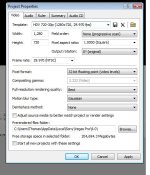
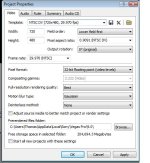
is the code I used for a 1280x720 Progressive file as seen in "original progressive" ran it through Vdub and ended up with an interlaced file? See Afterresize.

Is that too be expected?
 

Attachments

  • Origprogressive.jpg
    Origprogressive.jpg
    52.8 KB · Views: 0
  • AfterResize.jpg
    AfterResize.jpg
    50.8 KB · Views: 0
Back
Top