

Tim Nitsch
Well-known member
I'm not having good luck finding good compression settings for youtube or vimeo.
It seems like all the videos I watch on youtube or vimeo look great where as mine seem to have blocky artifacts
Obviously I must be doing something wrong.
My Workflow:
C100 - AVCHD
Transcode to ProRes LT via 5D to RGB
Edit in FCP7
Export Master to ProRes LT
Compress in MPEG Streamclip
Upload to YouTube
The footage looks perfect going into MPEG and looks fine coming out, but as soon as I upload it, it looks like absolute crap.
I heard recently that youtube upped their data limit to 50,000 Kbps so I tried that with little improvement.
Here are my MPEG Streamclip Settings:
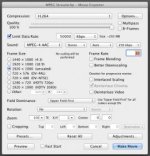
What am I doing wrong? :crybaby:
It seems like all the videos I watch on youtube or vimeo look great where as mine seem to have blocky artifacts
Obviously I must be doing something wrong.
My Workflow:
C100 - AVCHD
Transcode to ProRes LT via 5D to RGB
Edit in FCP7
Export Master to ProRes LT
Compress in MPEG Streamclip
Upload to YouTube
The footage looks perfect going into MPEG and looks fine coming out, but as soon as I upload it, it looks like absolute crap.
I heard recently that youtube upped their data limit to 50,000 Kbps so I tried that with little improvement.
Here are my MPEG Streamclip Settings:
What am I doing wrong? :crybaby:


