Color Correction fix low lighting problem?

J.Malhotra

New member
Hi guys,

I have a couple of scenes that are kind of dark and need some correcting in post. I wanted to know if I send out my project for color correcting or do it my self would this fix my low lighting issues?

Thanks
 
Probably something can be done, but it depends how low is low, what camera you shot on, and how much noise/ grain you're willing to live with.

Start with the 3-way color corrector and bring up the mids.

A screen grab would help.
 
Footage can be corrected, but there is no magic bullet for obtaining perfect exposure from 'bad' footage (seriously bad joke, I am sorry...)

I don't know what you're shooting on, and without seeing the footage I can't tell you if it's unfixable or what, but as a general rule of thumb you'll see best results if you're only a stop to a stop and a half out (either up or down). After this, you might start seeing loss of detail in shadows/hightlights, banding, noise, bizarre contrast issues, artefacting and other nasties.

Try playing around with some of the filters to see if you can't push the levels up a little bit, whilst retaining a similar contrast amount to the rest of your footage.
 
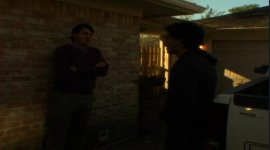
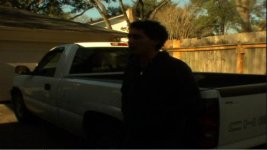
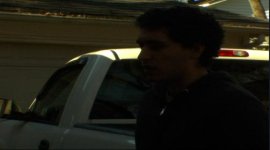
I shot on a dvx100b. I wasn't the one directing these scenes that were low light so you can be critical I don't care.

I am attaching some screen grabs.
 

Attachments

  • Screen shot 2010-03-31 at 12.03.49 PM.jpg
    Screen shot 2010-03-31 at 12.03.49 PM.jpg
    11.9 KB · Views: 0
  • Screen shot 2010-03-31 at 12.04.11 PM.jpg
    Screen shot 2010-03-31 at 12.04.11 PM.jpg
    17.2 KB · Views: 0
  • Screen shot 2010-03-31 at 12.04.40 PM.jpg
    Screen shot 2010-03-31 at 12.04.40 PM.jpg
    11.9 KB · Views: 0
oi I think you maybe in trouble. Before adding the 3 way color try the regular color wheel and bring up the Whites. Then apply the 3way and get some of your contrast back. Still won't look to great.
 
Okay, so I am having some trouble with the color corrector. I messed with the mids and whites, but it is still real grainy.

I might have to re shoot this, unless I someone knows of a way to fix the grainy texture.
 
Yeah that's a write off. There's no amount of CC that'll fix that to match with the footage cut around it.
 
Hi J.
Difficult one, however, it is a wee easier to savage underexposed images than bleached ones.
I used a plugin of mine that I will be releasing in about two weeks time that allows the user to add light
just in the area you want.

Here is a VERY quick sample done on one of your low res stills, a lot more can be done on actual clips:

b4AfterCCDVX.jpg


having said that it is hard to make promises or being able to effectively help you without testing on actual footage at
its highest resolution. Do drop me an email if you wish further help.

Luca

luca visual fx ltd.
http://www.videonline.co.uk/Luca_Plugins.htm
 
Last edited:
Back
Top