Color Correction Advice

PhilC

Member
Shot with HVX200 in 720pN 24 fps. Editing on FCP X. I am facing challenges with color shifts in my short film. Basically, one location with natural light spilling in to store through all glass front. The back corner of store becomes VERY blue. I understand the one wall is painted differently but the look is too drastic. May have missed white balance. It is very jarring to watch. I have tried to color correct and balance but it becomes "cartoonish". Any suggestions would be much appreciated.
Thank you.

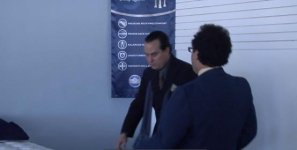
I have major color shifts as you can see from this sequence.
In this shot the back left wall is blue (painted this way)

Screen shot 2012-09-13 at 1.03.36 PM.jpg


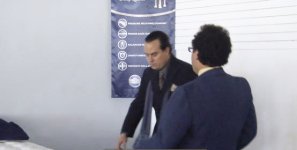
Back to this shot, mostly white background
Screen shot 2012-09-13 at 1.04.10 PM.jpg


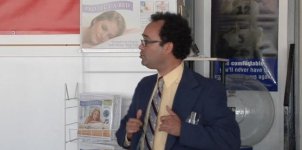
This corner is WAY too blue

Screen shot 2012-09-13 at 1.04.31 PM.jpg
 
What NLE are you using? And what is the process you used to try to correct these?
 
I do not know what tools are available in FCPX. However, my approach with any kind of software would look like this -

1) Raise mids - if you use an HSL or YUV tool, this will help correct for some of the oversaturated blue; else,
2) Desaturate blues
3) Raise highlights to 100 IRE (image is a bit underexposed)
4) Then perhaps add a slight, slight warmth boost to the highs.


The mantra with color correction is subtlety. I do it almost daily for images and video, and most of the time I will grade an image twice - once for the first pass, jacking around with every slider, curve, and wheel until the image is "cartoonish"; then I walk away, come back, and grade it in a matter of moments with a fresh set of eyes.

Don't try to reshoot the scene with coloring tools. You can only adjust so much with sliders and curves. Try to make it look better than it is rather than trying to make it something it can't be (unless you reshoot). Hope that makes sense.
 
FCP X
I have tried to match clip, balance, and manually adjust color, saturation, and exposure.
Is this common?
 
Screen shot 2012-09-13.jpg

Here's my very, very rough quick attempt at it.

From here, I would adjust the magenta bias on the walls. This would get the image to something of a "neutral" place. Then I could decide if I wanted to add a warm cast to it or tweak the color of the blues.

Granted, I did this in Camera Raw - not something you would really use for grading video - but the principles are the same. I did exactly what I listed in the steps above - although I did play around with the red, orange, and blue sliders a touch.
 
Back
Top