
Navigation
Install the app
How to install the app on iOS
Follow along with the video below to see how to install our site as a web app on your home screen.
Note: This feature may not be available in some browsers.
More options
You are using an out of date browser. It may not display this or other websites correctly.
You should upgrade or use an alternative browser.
You should upgrade or use an alternative browser.
Color correcting problem
- Thread starter FilmBoy77
- Start date

jcskeeter
Well-known member
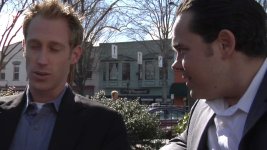
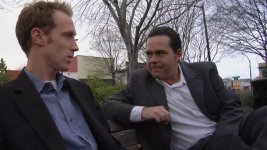
Sounds like a good place for cover footage. (feet shuffling, hands gesturing) Oh wait that would be in a perfect world when you can snap your fingers and have the piece of footage you want. Woops forgot. LOL... Unless you do have something like that?
I guess I don't really have a good answer but maybe just try the 3-way CC and try layering them or brightness/contrast. Chances are, depending how long the shot, is you just knock it down a little and people won't even notice anyway. Unless it's like 2 minutes long or something. Try layering multiple video clips and playing with opacity too. I don't know??
I guess I don't really have a good answer but maybe just try the 3-way CC and try layering them or brightness/contrast. Chances are, depending how long the shot, is you just knock it down a little and people won't even notice anyway. Unless it's like 2 minutes long or something. Try layering multiple video clips and playing with opacity too. I don't know??
ya, i don't have any footage to switch to on this particular line he is saying which is kinda critical. the shot is only about 5 or 10 seconds long so maybe people won't notice. jus wanted to fix it if there's a way....because on i cloudy day i notice when the sun comes from behind the clouds it changes everything pretty quickly.
jcskeeter
Well-known member
I don't know much about this but play around with some of the image control filters and see if there is one where you can pulldown the highs or something like that. I know in the 3 way cc instead of playing with the wheels adjust the slider under the highlights wheel and see if that takes it away. Someone on here should be able to give more of an exact answer. 3rd party Filter maybe?
hey what's up blaine, what are 'silks'? i want to know how i can avoid this type of bad shot in the future. you're talking to a guy who's still wet behind the ears with this filmmaking thing. :happy:Blaine said:Well, it's a little too late now, but that's what silks are for. I once tried to correct for the same problem and could never do it satisfactorily. Now, outdoor shots like that are silked.
jcskeeter
Well-known member
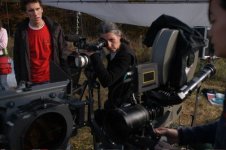
Silks are, or at least the ones I've used, are basically just a giant sheet that is usually hanging in some type of frame. You can see in the picture (bad example) behind everyone there is a white thing and it is propped up by two light stands. The ones I used had a plastic frame that you would just snap together. Then the sheet just wraps over the corners of the frame. Really nifty things, can be used for indoor shoots too for a really soft diffused light.
Attachments

Blaine
Mr. Hollywood
Here's an example of handheld versions:
http://www.filmtools.com/bolawh38disi.html
If you look at the clip on the bottom of this post: http://www.dvxuser.com/V6/showpost.php?p=853992&postcount=374 you'll notice that both Christa and Courtney are not in direct sunlight. I was actually holding up a handheld silk (similar to the largest one in the link above) to soften the light falling on the girls as Kevin shot the scene.
Of course you can get bigger ones that you would mount on a frame and position using combo stands.
http://search.store.yahoo.com/cgi-b....yahoo.com/cinemasupplies/&query=silk&x=0&y=0
http://www.filmtools.com/bolawh38disi.html
If you look at the clip on the bottom of this post: http://www.dvxuser.com/V6/showpost.php?p=853992&postcount=374 you'll notice that both Christa and Courtney are not in direct sunlight. I was actually holding up a handheld silk (similar to the largest one in the link above) to soften the light falling on the girls as Kevin shot the scene.
Of course you can get bigger ones that you would mount on a frame and position using combo stands.
http://search.store.yahoo.com/cgi-b....yahoo.com/cinemasupplies/&query=silk&x=0&y=0
Last edited:

Bus No. 8
Well-known member
It's harder to get away with these things nowadays. If you don't find a satisfactory fix, at least comfort yourself by watching John Sayles's Lianna for an example of an outdoor scene where the sun is all over the place. It's still a great movie.
But in an attempt to be a bit more helpful -
Can you not go back to the location and shoot a cover shot of people walking by, children playing, what have you - either in the type of sunlight that is plaguing you, or - even better, in a moment when the sun comes out from behind a cloud? (alot more time intensive, that last one, I realize). You could make that cut-away almost transparent if you set it up with nat sound that corresponds. Just a thought.
But in an attempt to be a bit more helpful -
Can you not go back to the location and shoot a cover shot of people walking by, children playing, what have you - either in the type of sunlight that is plaguing you, or - even better, in a moment when the sun comes out from behind a cloud? (alot more time intensive, that last one, I realize). You could make that cut-away almost transparent if you set it up with nat sound that corresponds. Just a thought.
jcskeeter
Well-known member
I agree with above. You might spend more time getting headaches trying to fix it. Going out and shooting a cover shot would be rather simple provided there are other types of cutaways in the sequence and it wouldn't look out of place. Nothing worse than noticing where something was fixed or covered up, as many of us know.
Richard Sutcliffe
Well-known member
you need to either mask the area you wish to colour correct and deal with that area in isolation or you need to limit your correction to the luma or colour range of the problem area and fix it that way.
The 3 way corrector has the tools necessary for this. The masking is easier in after effects.
The 3 way corrector has the tools necessary for this. The masking is easier in after effects.