davidpz888
New member
Hello everyone,
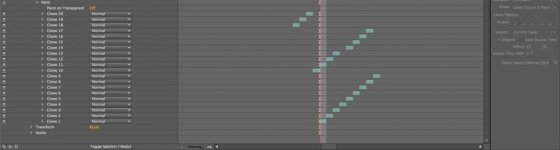
First of all, I am relatively new to After Effects and its integration to Premiere CS5, so please excuse me if I made some simple errors. But I am finding some problem trying to clone out multiple moving objects via After Effects and then having it render correctly when I export via Premiere. I have attached a screen shot to better illustrate what I have done:
When I preview / render in After Effects, all the objects (A, B, C) are successfully cloned out. However, when I export via Premiere, object A is NOT cloned out. It might have something to do with the fact clone strokes 10-17 overlap 1-9. But I have not found a way to have multiple strokes on a singe layer. And when I tried to turn on the “Paint on Transparent” option, it turned into a black screen. Any help would be much appreciated.
Thanks,
David
First of all, I am relatively new to After Effects and its integration to Premiere CS5, so please excuse me if I made some simple errors. But I am finding some problem trying to clone out multiple moving objects via After Effects and then having it render correctly when I export via Premiere. I have attached a screen shot to better illustrate what I have done:
- Clone strokes 1-9 = attempt to clone out moving object A
- Clone strokes 10-17 = attempt to clone out moving object B
- Clone strokes 18-20 = attempt to clone out moving object C
When I preview / render in After Effects, all the objects (A, B, C) are successfully cloned out. However, when I export via Premiere, object A is NOT cloned out. It might have something to do with the fact clone strokes 10-17 overlap 1-9. But I have not found a way to have multiple strokes on a singe layer. And when I tried to turn on the “Paint on Transparent” option, it turned into a black screen. Any help would be much appreciated.
Thanks,
David