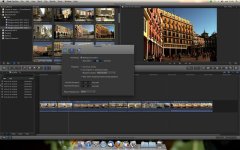
Clip and viewer colors mismatch

charales

Member
Hi everyone!

I have this problem with Final Cut X capturing video from a DVX-100b. I import the video perfectly but, when I see the clips, the have different colors than in the original video.
In the sample below, you can see the three arrow that point out the difference of colors between the clip's thumbnails at the left and below, and the play window at the right:
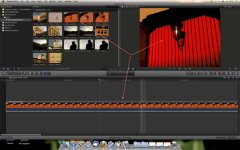
FinalCutX.jpg


Funny thing is that when I export the video to disk (in this case in H.264), the colors are correct . . .


Does anybody know what this might be coming from?


Thanks a lot,


Carlos
 
Have you added any color corrections or filters? The thumbnails in the Event Browser and timeline always reflect the original source media as ingested- they do not change at all relative to what you do to the clip with filters/effects/color corrections/automatic color adjustments, etc.

-Noah
 
Hi Noah,

I have not applied any filters at all, I simply captured the clips directly from the DVX100b and it started doing this.
By the way, I'm using Final Cut X (for 2 days now) and I can't find the menu you coment: "filters/effects/color corrections/automatic color adjustments"
Where is it?
 
that's not a folder- just saying anything you do to a clip will change its look...

Noah
 
Funny thing is that, in the Events library, the colors are correct until I place the mouse pointer over a clip, at this moment the clip darkens like in the picture above. Carlos
 
Are you using Optimized, proxy or original media? And what happens when you toggle? It's in Preferences>Playback

-Noah
 
Skimming is a low rez representation. When you actually playback with the playhead, that's the true image.

As for comparing them with the "original video", where did you see the original video to compare it to? In camera? That could have been a poorly set LCD, which those things are not so accurate often.

Did you have the import analyze for color balance? If so, go to the color section in the Inspector, see if it's turned on or off.
 
The original video is the .mov file stored in the "Original Media" folder inside the event folder. The colors and light in that file are the same as the ones in the tape (viewed through the DVX100's screen) and the files that other capture software make.
I tried capturing with the analyze for color balance on and off; same thing.
If I select a clip in the events window it will darken (like it did in FCP 7, though the viewer in this version displayed the real colors), what I don't understand is why it will also darken by simple passing the pointer over it, and why won't it darken in the Projects window.

Carlos
 
Last edited:
The original video is the .mov file stored in the "Original Media" folder inside the event folder.
As files or links, as original format, or as Optimized?

The colors and light in that file are the same as the ones in the tape (viewed through the DVX100's screen) and the files that other capture software make.
DVX100's screen can be adjusted, and is not that chorma/luma acurate.

I tried capturing with the analyze for color balance on and off; same thing.
Then you're seeing what you shot, and you need to readjust the DVX100's LCD display.

If I select a clip in the events window it will darken (like it did in FCP 7, though the viewer in this version displayed the real colors), what I don't understand is why it will also darken by simple passing the pointer over it, and why won't it darken in the Projects window.

Again, the "pointer", or more accurate "Skimmer", only shows a low rez version.
 
As files or links, as original format, or as Optimized?
As original format

DVX100's screen can be adjusted, and is not that chorma/luma acurate.
I have not touched the screen's settings at all

Then you're seeing what you shot, and you need to readjust the DVX100's LCD display.
Then why does FCP 7's viewer show the same colors as FCPX's timeline?
 
I solved the problem. I switched monitor profile from Colormunki's profile to the original Eizo monitor profile in system prefs and the problem is gone.


We'll have to wait till Apple fixes this problem . . .
 
Back
Top