Cineform codec- how to get started?

rayortiz313

Active member
Wanted to start using an intermediary codec so I can color grade HDV footage and have it look its best (using a Canon HV20...long story). When I try to track down the codec for my PC , all I get is links to GoPros new software- they seem to have dropped support for their earlier software that can be used to freely transcode.

EDIT/UPDATE:

I actually downloaded Avid DNxHD, MPEGStreamclip can transcode, not sure what my workflow is. Ill let you guys know how it goes.

If anyone has thoughts on the subject as a whole...
 
Last edited:
Wanted to start using an intermediary codec so I can color grade HDV footage and have it look its best (using a Canon HV20...long story).
What is the reason you want to use an intermediate codec for grading? Does you computer have trouble processing the original codec?

Note that the HV20 uses 24p wrapped in a 60i configuration, if you want to use 24p you need to be careful this is properly handled by an intermediate codec.
 
Last edited:
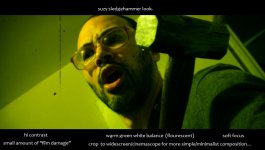
I'm using Sony Vegas Pro and thought grading in the software is not great, no? My artistic goal is to learn to do phony/cheesy/slightly gaudy saturated monochrome grading for my grindhouse projects (I also I tend to try to steepen the gamma lot for contrast)- this pulls apart the image if done in the NLE on the HDV which is interframe compressed causing the NLE to recompresses alot (???) Attached an example. Right now sharpness isn't a huge concern for me (as a matter of fact I even intentionally soften right now for a retro-degraded vibe), but I want to start to learn to get crisper images from the Canon HV20 if I can, for future projects.

I developed a habit of grading uncompressed avi in Virtualdub. Don't laugh, but I grew to like it and got used to alot of the filters and all.

My tentative hope for a workflow was to use Vegas Pro to transcode the M2T (doing the IVTC 30p conversion in the process) to a 720p or even 1080p avi small enough (cineform?) to be practical (storage), to then bring into virtualdub for grading/mastering.

I'm sure alot of this is misguided and ill-informed.

So to clarify:

-Canon HV20/Sony Vegas Pro/Virtualdub ?

Thanks in advance for the help

Suzy Grade.jpg
 
I'm using Sony Vegas Pro and thought grading in the software is not great, no? My artistic goal is to learn to do phony/cheesy/slightly gaudy saturated monochrome grading for my grindhouse projects (I also I tend to try to steepen the gamma lot for contrast)- this pulls apart the image if done in the NLE on the HDV which is interframe compressed causing the NLE to recompresses alot (???)
Transcoding may be necessary to improve editing performance or add timecode or comform various formats but it will never make a video any better or more robust.
 
Is storage and file size another reason? I've been rendering to uncompressed avi to grade in virtualdub and a few seconds becomes 1 GB
 
I've been rendering to uncompressed avi to grade in virtualdub and a few seconds becomes 1 GB
Why would you want to do that?

The first question to ask is do you need to transcode? Virtual dub can handle a lot of formats, the native format should be fine especially if you do not edit but merely grade, sequential processing is very efficient with long GOP formats.
 
Last edited:
Alright so now I hit the limits of my knowledge here---

What are you recommending-

I render the HDV to ...an avi with another video codec (MPEG-1 ?? ) in the container?

I'm a newb with codes and formats
 
I loaded this file into Virtualdub without a problem and can apply for instance IVTC or apply other filters.
Thee is no need for any transcoding.

Perhaps your question is how to render the VirtualDub result to an intermediate or deliverable format?

If so then I would recommend H.264, you can encode H.264 with VirtualDub by installing the Video For Windows version of H.264 (x264vfw) and if you wanted to you could render it in all-intra format as well.

If you want a lossless format you could use Huffyuv or UtVideo, uncompressed will only waste storage space.
However not all NLE's may be able to handle Huffyuv and even less will be able to handle UtVideo.
 
Last edited:
This is all very helpful thanks.

I guess my next step is figuring out how to get virtualdub to read the m2t files and also render h264 because it wont do either for me currently. I'm going to download HuffYUV and see if my Vegas Pro will read it and consider it as an intermediate.

Also..

I think I'm going to try to get the look as much as possible in camera so any color grading is just minor tweaks. I white balanced against a purple card (to get green) and increased contrast and saturation one click up in the HV20 and for the test shot the waveform monitor in Vegas read a nice 10-80 ish IRE range, nothing crushed or clipped so it gives me the confidence to try that.
 
This is all very helpful thanks.

I guess my next step is figuring out how to get virtualdub to read the m2t files and also render h264 because it wont do either for me currently.
Search on the web for the Virtualdub FFMpeg Input Plugin, if that does not work I think there is a Direct Show Input plugin available as well.

For exporting to H.264 install the x264 video for windows program.
https://sourceforge.net/projects/x264vfw/
 
Got Virtualdub to open m2t, but when I tried to install a seperate plugin pack to let Vegas read Huffyuv the plugin pack wiped out Virtualdubs ability to encode Huffyuv.

Arg...computers....

Amirite folks?

Anyways I'm gonna try Lagarith next.

(Thanks a bunch for all of this, I feel like I owe you a beer or something)
 
Last edited:
Back
Top