Chinese 2K RAW S35 Cinema Camera, 8000 dollars

Any word on the fan noise?

As you may know the KineRAW-S8p (tm) does not have a fan, and without a HDD in it it is silent, other than the autoslate beep.

The KineRAW-S35 (tm) I have here just has one speed fan and does not get very hot with that running, I've had it on for hours at at time and it gets warm on the outside but not too hot to put my hand on. I can hear the fan but its a low frequency sound as I think the fan is running at reduced RPM or something. If you had the mic on the camera it might pick up some sound indoors even with an isolation mount as I can hear the murrrrr sound if I'm within maybe 3 feet of the vents. Outdoors with the mic more than 4 feet away I don't think it would be able to be picked out of the background sound. I have a db meter I might be able to get a measurement?

My RadioShack Sound Level Meter reads -10 on its scale set to "A" weighting Slow response, 60db scale at about 2 to 3 inches (about 50 to 75mm) from the air vents, I cannot read a signal on the top of control side at that same distance because -10db is near the analog meter's left post.

They told me that Epic (tm) makes more noise, anyone have one they can measure the air vents and other angles at 2 to 3 inches?

I guess its less than 50db absolute close to the case, you can work out the inverse square law to get the sound level at some distance. My computer fan reads much higher, at the same distance my computer reads 66db fan noise.

These are not official values of the production cameras, but if you come over with a similar meter you might read a similar level.

The noise level in the house tonight is probably over 40db absolute so even if I had a more sensitive meter I could not read the sound at 4 feet from the camera, probably. It does not sound like a hair dryer. Alvin did mention it when we were shooting the other day, maybe someone asked him about it.

If you can still get that same meter at RadioShack (tm) and you have access to Epic (tm), RED ONE (tm), and Alexa (tm) you can put it 75mm away and see if the needle gets above -10 on the 60 scale with A weighting and Slow response. Then report back and we can tell something, or if you want to stop by with your camera I can measure it maybe?

The point to take away is that at about 6 inches I don't think my meter can measure the sound(?) its underrange.

==

I got a photo from the trade show, a company called Movcam (tm) in China has made some accessories to fit the camera,

Quote: [Movcam made three special parts for KineRAW-S35: handgrip, riser and bridge plate. They seems very good.]

I have attached an edited copy of the photo they sent to me,

Here is the Movcam web site, they seem to be in the booth next to Kinefinity (tm) (booth 2B222) and Movcam in booth 2A222?

http://www.movcam.com/
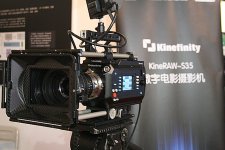

KineRAW-S35_with_Movcam_handgrip_riser_bridge_plate_640aj.JPG
 
KineRAW-S35 (tm) post BIRTV 2012 news

KineRAW-S35 (tm) post BIRTV 2012 news

I Got a email from Kinefinity.com (sm) about the news from the trade show,

1) Quote: [Besides, i got hundreds of emails from different countries. But i have no time to reply to them in time. I will communicate with them soon.]

So please give them some time to reply as they are very busy right now.

2) Quote: [People love the image quality, [edit]. If our first 20 units work well as expected, we may get many orders in China.]

They got pre-orders at the trade show and are I guess going to ship about 10 to 20 units for advanced field testing, and when any issues that come up are workout on those cameras gear up for mass production.

3) Quote: [We did a great exhibition in Beijing. Our booth were crowded everyday nearly, and we missed lunch some days.]

4) They say they still have plans for the S8 and S16 models but are looking into the details in light of the other cameras that are under development in the market.

So a lot of progress in the past year!

My Brother was shooting some lighting tests last night for a science fiction short he wants to see how the S35 looks under that short of lighting so we were shooting with the 2800K Tungsten "look" in the KineColor look group at EI ISO 800, that gives a slight blue cast to some of the lighting and better balance for the bulbs on a VariAC to control the lighting ratios. We were using a LOMO 100mm f/2.0 at T/2.8 and 144 degrees on the shutter. He seemed pleased with the results so far. The grading range is quite wide and there are no block artifacts of the kind that show up in H.264 recording cameras so it looks much like a 35mm film scan would, maybe with less grain and no processing marks like film would show.
 
KineRAW-S35 (tm) SI-FI lighting test sample

KineRAW-S35 (tm) SI-FI lighting test sample

My Brother wanted to shoot some lighting tests with the KineRAW-S35 (tm), below is a quick half size JPG of one of the test frames so you can see how the light ratio worked out, I need to maybe use a stop more light next time, I was going to shoot wide open at f/2.0 on the 100mm LOMO OCT-19 lens, but he wanted T/2.8 so the waveforms were a bit low needing extra grading up so there is some mid-tone grain showing. The light level was very low on this shot, the camera was monitoring at ISO 800 but the image is very dark that way so this is graded up to maybe 3200 or more. The blue back-light on the left is a small LED flashlight from about 6 feet away. This was shot 1920x1080 and then cropped 1920x803 and letter-boxed. My Brother says that the 1920x1080 Cineform (tm) 'raw' files open in his editing program called "Power Director" from the camera's MOV files. So he can edit that way, for proxy or finish. This image was taken from a DNG frame as I was recording BOTH mode to get both CinemaDNG uncompressed and Cineform (tm) wavelet compressed MOV without H.264 like blocky artifacts.
 

Attachments

  • S1976_I09_A372_half_size_grade1a_KineRAW-S35.jpg
    S1976_I09_A372_half_size_grade1a_KineRAW-S35.jpg
    232 KB · Views: 0
Hi Folks,

My name is Alvin. I have been the actor in various of the KineRAW S35 test shots.

I've made a reel out of some of the test shots. Everything on the reel was shot with the KineRAW S35...

Plus, I've uploaded the actual RAW footage to Dropbox.

Here is the Vimeo link to the collage I have uploaded and the link to Dropbox, which have the RAW footage (clips) of the videos plus more that was shot on the KineRAW S35.

Look into the Vimeo video description box to find the link to dropbox, which have the RAW footage plus more.

https://vimeo.com/48669282

Thanks for your time...
 
Hi Folks,

My name is Alvin. I have been the actor in various of the KineRAW S35 test shots.

I've made a reel out of some of the test shots. Everything on the reel was shot with the KineRAW S35...

Plus, I've uploaded the actual RAW footage to Dropbox.

Here is the Vimeo link to the collage I have uploaded and the link to Dropbox, which have the RAW footage (clips) of the videos plus more that was shot on the KineRAW S35.

Look into the Vimeo video description box to find the link to dropbox, which have the RAW footage plus more.

https://vimeo.com/48669282

Thanks for your time...

Thanks Alvin. Any chance the video could be uploaded in HD?
 
The current Vimeo video format is H.264 -1280x720

[FONT=times new roman, new york, times, serif]For some reason vimeo was not accepting the 1920--1080 format[/FONT]

[FONT=times new roman, new york, times, serif]I have tried numerous time before uploading it as a H.264 file.

I'll try again and if I do get it up on Vimeo i'll post the link here.
[/FONT]
 
The current Vimeo video format is H.264 -1280x720

For some reason vimeo was not accepting the 1920--1080 format

I have tried numerous time before uploading it as a H.264 file.

I'll try again and if I do get it up on Vimeo i'll post the link here.

Cool look forward to it. Right now it only plays in SD, without the little "HD" option on the bottom right.

Also, did you grade it or is that a log out of the camera?
 
Hi Alvin

Why don't you email it to Dan to grade and upload on his vimeo account?

i think most of us are more interested into the raw files direct from camera, instead another pre-graded sample...

i guess you'll have to wait a week till you can upload another movie in HD, normal account says 1 HD movie per week...
 
Grading KineRAW-S35 (tm) footage.

Grading KineRAW-S35 (tm) footage.

Hi Alvin

Why don't you email it to Dan to grade and upload on his vimeo account?

Alvin was in a hurry to post something of the footage we shot last month, so I got permission to give him the better raw shots in Cineform (tm) MOV, which he seems to have posted to "dropbox".

People have reported problems downloading the MOV from Kinefinity.com (sm) so its good that Alvin is able to help out to that extent.

Kinefinity.com (sm) is getting ready to ship the first cameras and I need to work out some issues so the DNG tags and raw data are calibrated right, that has priority over processing the shots, many of which you can see stills pulled from in the pages above, and higher quality maybe over on Cinema5D.com since they do not seem to re-compress the JPG as much.

I was planning on finishing the footage in my software when I have time. One issue that came up when Alvin was over my place the other night is that his Apple laptop LCD monitor shows the images to be very light and with the highlights clipped compared to my 2K PC CRT monitor that was a high quality monitor intended for grading and photo editing originally.

Hence, Alvin's grade of the bunker footage being very dark brownish green on my monitor, but probably looks more neutral and lighter on his LCD notebook monitor.

I thought he had shown it as SD, although he thought it was 1280x720p when I asked. Its nuts to show the results of a 2K uncompressed camera as SD H.264 for evaluation of image quality other than maybe the ability to shoot into deep shadows some of which is lost in the grading of the LOG90 curve that the Cineform (tm) raw is encoded in. When you play the Cineform (tm) without a 3D-LUT loaded, the footage looks like a Cineon (tm) film scan because its encoded LOG90, that improves the image quality and makes the so called raw footage easier to work with in simple grading programs like FCP.

The DNG frames are currently encoded linear 12bit so are more like normal raw sensor data and require good quality grading software to color correct because you need to convert the linear 12bit data into curve corrected data for monitor viewing or to be used like a 10bit DPX film scan based on the Kodak Cineon (tm) LOG curve with 90 points per T/ stop.

I'm going to be busy finishing some details of the support for the KineRAW-S35 (tm) in my programs and helping resolve some issues with the camera's monitoring using some "look" files I made for their initial shipments, they asked me to just make three look groups to start with, Kine709, KineCOLOR, and KineLOG, those range from about EI ISO 80 to 2560, the analog gain can be applied to get a range of 80 to about 81920 (the last firmware actually goes to 160000 but its a bit high noise although you can shoot with almost no light, I don't know what the upper limit will be in the shipped firmware as they are reviewing the quality issues and so the may set the gain cutoff lower.)

I have a mountain of footage to go through some shot with Alvin's help, and some shot without. I sent the better shots to Kinefinity.com (tm) with the suggestion that the post ALL of those MOV for download so people can get an idea of the camera's range, but it seems they just picked a few from the many I sent.

My Brother shot some test footage for his Si-Fi test, and processed the DNG in XNVIEW then converted that to AVI in VirtualDUB and loaded that into Power Director to edit and sync the sound. He also loaded the Cineform (tm) directly into Power Director to edit and sync the sound. The results doing that probably show more noise than if the shots had been processed in my programs, and that brings up the issue of looking even at the MOV Cineform in your own work-flow, you will not be seeing the "best" results possible from the camera for the most part as that depends on how the data is processed. In the case of Alvin I think he converted the Cineform into some other format, I suggested Prores 444 but he may have used some lesser intermediate format to get FCP to open the files because you have to load one of the trial Cineform/go-pro programs as I understand it before FCP will open the Cineform directly, that is not a problem with the PC version of the Cineform codec.

So I would hope that when you look at the Cineform MOV or other tests you keep in mind that your monitor's quality and the software you are using will impact the quality you SEE. I went over another friends house and showed him the Vimeo videos I did, but the laptop he has shows my midtone test pattern as VERY bluish and lighter than it should look, my test patter is EXACT made in MS paint brush setting the color numbers manually and to equal values, so my pattern is right, but what the LCD monitors show is way off balance, so you need to keep that in mind. I put the test pattern there so people can adjust their monitor to show the limits and mid-tone correctly, but it may not be possible for some monitors made for HD content that is ITU 601 limited to display full range images without cutting off the highlight and shadow details, and even your video board and player adjustments may not be enough to compensate for the clipping and color balance as well as gamma errors in your LCD monitors.

As for the shots with giggle, I suggested using the image stabilization in FCP to see if it helps with that, the high winds that day were being caught by the matte box and I could not hold the camera hard enough to keep it from being blown around, so it would be interesting to see if any stabilization plug-in can fix that issue to some extent.

We were out there because Kinefinity.com (sm) wanted a shot of the Golden Gate Bridge to show at BIRTV 2012 along with the other test footage, but as anyone from around here knows you cannot see the Bridge most of the time in the Summer because of the fog, hence the shots in the bunker to get out of the fog and wind, and some of those worked out, although if I get a nice graded conversion of those, it may not look nice on your monitor because of the above mentioned issues.

I graded the golden gate park footage with Alvin for my monitor and it looks ghastly on Alvin's note-book LCD so I am not sure what the answer is for showing footage other than making a 35mm release print that you KNOW cannot be tonally miss-adjusted in projection (other than day to day lab processing errors and out of focus mutiplex projectors, but in a few years film will not be a projection option because "all" the projectors will be out of the theaters and then print stock will maybe be discontinued altogether, so there goes that 'stable" viewing option).

I over darkened the highlights in that footage because Kinefinity.com (sm) accused me of over-exposing Alvin's white T shirt, which for the most part I did not, and I sent them Linear TIF showing that the bright parts of the shirt are under sensor clip, but they used a DLP projector that seems to have not had the right 3D-LUT loaded and THEY clipped off the highlights, likewise for using XNVIEW which has automatic gain control and clips the highlights as part of its normal processing so any time they open the DNG in XNVIEW they see clipped highlights which are in fact not clipped as long as you watch the zebras while shooting.

My software does not use automatic gain control so you can hold the sensor data that is captured in the DNG, but if I make a TIF or BMP from that, the LCD monitor or DLP projector is probably going to clip the highlights and shadows, so that is one reason professional labs charge so much, the need to have the same equipment used in theaters and so can reverse compensate for the system errors, but sending footage into the "wild" you have no idea what people are going to see...
 
Last edited:
Hello again folks,

I have upgraded my Vimeo account to Vimeo PLUS, by having the plus features I was able to upload the video in HD. The video properties was as stated ahead:Format 1080p HD Resolution: 1920x1080 Rate:24 size:436MB

https://vimeo.com/48781216

Thanks for your patience. Now help me get this video out to the mass!

Cheers

-Alvin
 
Hi all,

I have downloaded some of the footage from kinefinty.com and also the shots from Alvin's dropbox.(Thanks Alvin, for that)

I have messed around with the footage. This is the first time I tried out shots from the KineRaw. I am very impreesed. I have been a VFX guy for a bit now, and slowly getting into film conform and grading. I have handled a lot of film scans. I have noticed a few points. Just want to know what others think about it.

1. Noise pattern.
Very peculiar. Very much similar to film grain. But the chroma noise felt a little high. Maybe it will change but maybe it wont.

2. Sharpness
It felt a little soft. Certainly not digital pin sharp, but even for film, I would say a little soft. Maybe its the lens. Which lenses were used ? Alvins shots and also shots from China. Is there an OLPF ? Would it affect resolving power ?

3. Color
Not as bad as the Red cameras, but I felt the colors were a little bit muted. Only a bit. Probably thats the character of this sensor. Maybe I need to see more vibrant footage.

But anyway I still think this a fantastic camera. At the price range it does offer an amazing possibility.
 
Quote: [Oh, when I read that there were pre-orders I assumed, you know, thet they were accepting pre-orders. I guess I can't trust the internet anymore. Darn.]

You need to talk to them directly, they say the web site is back up and they are getting emails asking about people outside China getting one.

As I understand things they are taking pre-orders, but they said something about orders first being shipped inside China, so if you need a camera before various issues are worked out you might be able to contract for a camera to be made special, that was all I was saying.

I do not get involved in sales, you can talk to them about custom orders or retail sales, it depends on what your intentions are as to how you can thread the needle.

Hi guys,

seems there is a lot of confusion on pricing, availability, ordering etc. so I'll try to clear that up from what I know directly from Kinefinity.
I also don't understand why they don't post US$ prices on the English language version of the site, they do post Chinese $ prices though if you switch to the Chinese version.

We considered a Kineraw S35 for our production house and were inquiring about pricing.

Consider all of this if you want to buy one.

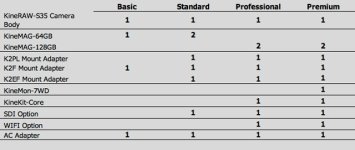
The three bundles they show on their website were quoted as follows:

Basic - US$ 7,000
Standard - US$ 8,000
Professional - US$ 9,500

They require a 20% down payment.

Availability, quote: "After one month or so, we get the camera and accessories ready."

Then there will be shipping cost to wherever you are, obviously.

HOLD IT.. not so fast. Add on top of that:

-15% tax duty
-17% VAT

quote "...at least...". So that could be more, or less. Even if you go there yourself to pick up a camera, you still have to make it back out of the country through customs. With a camera that big it's likely to get busted.

I am based in Hong Kong and this is the quote I got from Kinefinity. Export/VAT may be different exporting to different countries.
Anyone who's been on a film production in China knows shooting there can come with a lot of hassles like this.
Adding up those extra charges will already result in a surcharge of US$ 2,240 on the Basic package, making it US$ 9,240 and then you didn't pay for shipping yet.

Then there is one last thing to think about. Servicing/warranty. What if something goes wrong with the camera? You'll have to ship it back to China and most likely go through import/export troubles again with extra cost, not only shipping.

So far it looks like a nice camera but not feasible for our production company, and we're very very close being in Hong Kong, so all of you guys overseas, think about it three times, better wait it out until they've established a partnership with other companies overseas.
 
Thanks for the info Marc. I'm not entirely sure US customers are responsible for VAT, but I'll admit I don't know much about these things. Haven't had any issues purchasing other cine related items directly from china in the past.
 
New KineRAW-S35 (tm) graded video on Vimeo

New KineRAW-S35 (tm) graded video on Vimeo

I got time to convert the 2048x1080 version of the video Alvin Somwaru helped shoot in Golden Gate Park into Letter-boxed MPEG4 1920x1080 for posting on Vimeo,


http://vimeo.com/49064745

I used TEncoder (tm) set to 12000 kbps and two pass compression for the conversion from the graded uncompressed AVI but there are still some compression artifacts that show up here and there, anyone have suggestions for a better free, or maybe not free, encoder for making H.264 video files that Vimeo will accept?

I was using just the MPEG4v2 option in VirtualDUB (tm) but that is one pass and shows much worse compression artifacts. If you see the video as looking too light and washed out on your MAC notebook let me know about that, I may try to post another copy graded darker. It seems there is a bug in Quicktime (tm) where it shows videos too light and washed out looking, under Media Player (tm) on my Brother's PC with the CRT monitor set to 1920 resolution it looks OK as far as brightness. Viewing on a LCD or HD monitor it may look like the highlights are burned out and the shadows too dark since I encoded it full range for PC viewing.
 
Thanks for the info Marc. I'm not entirely sure US customers are responsible for VAT, but I'll admit I don't know much about these things. Haven't had any issues purchasing other cine related items directly from china in the past.

In the US some states ask you to pay "use tax". If there is duty charged on delivery or not depends on how its shipped, if you purchase it there and mail it to yourself you are the one filling out the customs for the shipment.
 
Back
Top