Capture/Sequence Settings for PAL in US

TobyLawless

New member
Hey Everyone:

I'm new to the site and am trying to capture and log footage from a recent trip I took to Europe...I used my buddies PAL camera / tapes from Spain and am using it now in the States w/ FCP and am having issues capturing...at first i was getting the "dropped frames" warning and adjusted my capture/sequence settings to:

Sequence Preset: DV PAL 48 Khz

Capture Preset: DV50 PAL 48 Khz

Device Control: Firewire PAL

Only problem is now I'm getting the "Capture encountered a problem reading the data from your source tape" and i can't seem to fix it...all i wanna do is capture this so i can edit!! Pls help!!

Thanks!

t
 
Only problem is now I'm getting the "Capture encountered a problem reading the data from your source tape" and i can't seem to fix it...all i wanna do is capture this so i can edit!! Pls help!!

Thanks!

t
Just to clarify, you are using your buddy's PAL camera to capture the PAL data on the tape that was used in that camera to record.

Or are you using some other camera to capture with FCP?

The only time I've really gotten uncorrectable errors on my DVX100 was when the heads/and/or transport had gotten some debris from shooting in the desert, and changing tapes out in the open. Fortunately the cleaning required was minimal, but I did have a tape that was unsalvageable.

If you were reading something, albeit with dropped frames, perhaps some form of cleaning is in order.

On the other hand, I don't know what the behavior would be if you had PAL DV tapes and were playing them back on a NTSC camera. I would think the data format would be 'the same', just optional header info selecting one or the other video format... but one never knows what optimizations where made for the camera's firmware/hardware...
 
you shouldn't be trying to capture DV50... you have standard DV (which is DV25).

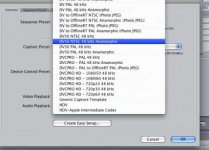
the capture options i see in audio/video settings are:

DV50 PAL 48 kHz
DV50 PAL 48 kHz Anamorphic
DVCPRO - PAL 48 kHz
DVCPRO - PAL 48 kHz Anamorphic
DVCPRO - PAL to OfflineRT PAL (Photo JPEG)

no options for standard DV or DV25 in PAL.

thanks!
 

Attachments

  • Picture 3.jpg
    Picture 3.jpg
    19.3 KB · Views: 0
Yes and yes. I'm using the same borrowed camera to capture that i used to shoot...the camera is a PAL and i had him ship it to me because various NTSC camera's wouldn't read my tapes...i guess it's possible that I got the tapes dirty but they were only uncovered at the time that I changed them and the conditions outside were average outside conditions - that is to say, not overly dirty or dusty, but definitely not in the lab...any advice on an easy way to clean the tapes if that is the case?

thanks for your help.

t
 
i guess it's possible that I got the tapes dirty but they were only uncovered at the time that I changed them and the conditions outside were average outside conditions - that is to say, not overly dirty or dusty, but definitely not in the lab...any advice on an easy way to clean the tapes if that is the case?

thanks for your help.

t


When I had major problems, I sent my camera in to a shop for cleaning. Since then, I've run a head cleaner tape through a couple of times. I'd not recommend using the head cleaner frequently, but that would be the 'cheapest/quickest' thing to do.

I hate tape... for me tape stretches, flakes, sensitive to transport 'cleanliness'... etc. and the magnetic domains decay over time (like everthing... but it seems to me quicker...). Dry weather may induce small electrostatic discharges... wet weather may induce 'gumming' up the works...
 
Any miracle men out there?

Any miracle men out there?

Still looking for some magical capture elf to detail how i might capture from this PAL cam...i highly doubt it is dirty tape as playback is fine and there was very little exposure...please help!! thank you. t
 
Solved!!

Solved!!

Problem solved...all on my own on that, but solved none the less, minus cleaning or anything crazy...just did an easy set-up for a PAL camera and everything captured fine! Thanks for your help tho!

t
 
Back
Top