Cant seem to get good looking DVDs

Mr.Durden

Member
Ive been transfering some shorts i shot whith the DVX to DVD lately, and the results i have gotten with DVD studio Pro have been less that satisfactory. I keep on getting very heavy "Blockyness" (block artifacts) in the dark areas, and even in some colored areas that arent that dark. Ive tried upping the bitrate, doing 2 pass variable, encoding with compressor with "best" settings and just cant seem to get a good image. I notice that I get way better results with other codecs like h264 or even Mp4 at lower bitrates. But when getting them on to DVD (mpeg2 encoding) they just look really bad.
The procedures i have tried are exporting from final cut (full quality DV) and sending to DVD studio Pro, or sending to compressor from FCP, and then to DVD studio. The image does get better with the highest bitrate settings, but still very blocky.

Am I doing something wrong? can some one tell me step by step, what you are doing to get good results with FCP and DVD Studio Pro?

Just for reference, the footage is 24pN edited on a 29.97 timeline, and the dvds I have made are 29.97 aswell (im not trying to make 24p dvds).
Thanx in advance
 
Do you have scrren grabs of the difference in quality so we can at least look at the results.
Try by exporting a 10 second portion in the following formats :-
-Standard quicktime movie out of FCP
-Your settings in Compressor of Mp2(please give us your exact settings)
-an H.264 export if you can

If your standard quicktime export is much better than compressor - then you have to go through compressor settings carefully and look at all the settings again.
Compressor should be superior - but I suspect you have some setting wrong.

Let us know
 
you should not be editng in a 29.97 timelime with 24p or 24pa. You should be in a 24 fps timeline....this may be some of your problem. Also, open inspector in compressor and see what your mpeg setting are, chance are your bit rates are very low. You should be making a 24fps DVD, cause thats what your footage is. The DVD will add back 3:2:1 pulldown.
 
so if i set 29pfps on compressor that would create some conflicts since someone told me to do so with my 24fps footage. Because my footage has come out blocky as well.
 
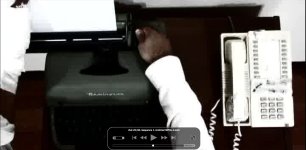
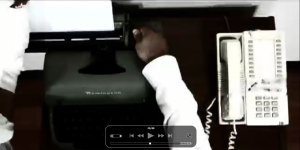
Here are the screen grabs.
Mpeg2.jpg
MP4.jpg
The Mpeg2 file has a bitrate of 8.6 mbps (very high) and the Mp4 has a bitrate of about 1.2 mbps.
Notice the Blockyness on the typewriter and the hand of the Mpeg2 Picture, the H246 isnt that good either, but not nearly as blocky as the Mpeg2. The footage isnt allways this blocky, just at cirtain points, but as you can see, it gets pretty bad. Ive made some dvd's that dont look this bad (this is a very extreme example), but in cirtain points of the dvd especially in dark areas, it usaully gets ugly.

Things to concider:

Both the mpeg2 and MP4 were compressed from MiniDV imported with FCP.

The footage is 24pN edited on 29.97 timeline, therefore its 29.97 footage. and yes the compressor settings were set at 29.97 aswell.

The Short film was edited on FCP, then exported to MiniDV, and reimported to FCP and then compressed. I know i shouldnt have done that, but there was no other choice, I edited it on a computer with a non-functional DVD writer.
Could the crappy quality of the Mpeg2 be because of the export/reimport?
Does 24P just look crappy on 29.97 Mpeg2?
Do i need to reverse telecine and maka a 24p dvd to get good quality on 24P?
I dont know im just spewing ideas.
Thanx for the help
 

Attachments

  • Mpeg2.jpg
    Mpeg2.jpg
    65.3 KB · Views: 0
  • MP4.jpg
    MP4.jpg
    62.5 KB · Views: 0
If you've identified the scenes/spots where there are problems, but most of the rest of the compression is okay, then have you tried adding compression markers in the FCP timeline? Why not tell compressor to work harder on those sections if it doesn't seem to be doing it on its own. Not sure if that will solve the issue, but just throwing it out there as something to perhaps consider trying.

As for the shooting at 24pN and then editing/finishing at 29.97, I don't think that would really give you the artifacting during compression persay. The visual impact there is that you shot in a film-like rate and are presenting it now in a video like rate (so basically just the 'motion' in the piece might feel a bit off to your eyes).

As for going back out to miniDV, you said you shot with the DVX, so I can't see that making a huge impact. If you put in graphics or titling or composited shots then yes those might get hurt by going back out to miniDV. But since you intially shot on miniDV in the first place, the base footage should be okay. Yes there is the recompression debate/issue, but within a couple of generations, from that data I've seen, it doesn't seem like you would get any truly significant loss (there is a technical loss for sure, but how well can you see it?).

cheers.
 
Thanx for the help, i will definetly try the FCP compression markers. The hole short was CC'd and lots of effects where used, actually the images that get the most artifacting are the ones that come right after the effected images, so maybe that has something to do with it.
The screen grabs where taken from this Short (not this compression though):
http://youtube.com/watch?v=0k0LrEvB1E8

The artifacting showed up mostly in the images that come after the quick TV static and film lead out sequences.
 
Key frame

Key frame

Basically you will need to force a keyframe at the beginning of the new scene to avoid the bockiness.
As for the 24p timeline - if the footage was shot on NTSC it will be at 29.97 frames and FCP will automatically pull this down for you. (correct me if I'm wrong)
If you have a PAL camera you would have a 25P setting on your camera.....
 
Thanx for all the help guys, i tried the Compressor Marking and they seems to work great, but this made me realize how much i dont know about the hole compression setup, and unfortunatly, made me more curious about other things.

First off, is there a way to mark a hole segment without having to go frame by frame, because there were hole segments of footage that were unbareably blocky.Extreme Blocks.jpg

Second, How can Mpeg2 encoding get so blocky in the first place? it has a pritty high bitrate, its the standard for Comercial DVD's, and i dont recall seeng a movie with the kind of artifacting that i get when i compress my footage (check out the atteched image, its not zoomed or anything, its horrible)
My footage is pritty contrasty (blacks are crushed), so why all the artifacts, is it allways necesary to place a tun of compressor markers in hole segments of footage?

Thanx for all the help, you guys are great.
 

Attachments

  • Extreme Blocks.jpg
    Extreme Blocks.jpg
    53.5 KB · Views: 0
First off, there is a new book coming out for Compressor actually. I'm not sure its out just yet (December 5th is the listed date). When that does come out you may want to give serious consideration into getting it.

http://www.peachpit.com/bookstore/product.asp?isbn=0321474082&rl=1

In regard to compression markers, no, for the most part, you should not be needing to flood your timeline with them inorder to get desirable results. Using one at the head of a scene that is having difficulty ought to do the job for you. Company I work for sends our important stuff out to a professional authoring/media company so haven't really had to push Compressor for a while myself, and so not sure why you'd be finding a need to use a high volume of compression markers.

As for how MPEG-2 can get so blocky, well its compression and that is precisely what happens in compression. You're trying to replicate raster images with less detail (and thus less filesize), and the easiest way to do that is to use one simple pixel to represent the formerly many pixels and voila, 'blocky' image. There's a lot more math involved, but that's the barebones of it anyway. And even with a high bitrate, remember that bit rate has max, min, and average values/settings. Then your software is scanning everything and using its built in algorithms to try and decide when best to apply different values. Sometimes there are factors in the footage that make it think it can use a lower bitrate when infact it needs a high one, and well then things break down in the final MPEG-2. Its just part of the nature of the beast I suppose.

Now why don't commercial DVD's encounter this problem? Because commercial DVD's aren't produced in small offices or people's houses using FCS. More often then not they likely output to a high quality source (film itself, digibeta perhaps, D5, whatever) and then give that to a DVD production facility. The production facility will then use a hardware encoder to scan and compress the project. It costs WAY more, but also gives way better results (probably not inline w/ a 'bang for your buck' mentality though). The best software encoder that I know of is the Cinema Craft Encoder. I believe its multi-pass (over 2x) encoder is 2k though. And oh that is one reason that encoder and some hardware encoders can get better results, they won't stop at 2 passes, some can be pumped up to like 8 passes or more. In most regards I'd consider that overkill, but if you absolutely must have a clean DVD for selling high volumes of, well....

Anyway, there's plenty I could rant on about DVD authoring, and I'm sure others will chime in on this too, so I'll stop here. At the end of the day, for a cost effective DVD authoring solution, you're just going to look at some struggles and trial and errors. Good luck.

cheers.
 
Back
Top