Can't see scene in "levels" adjustment, with different play speed.

kidwoo

Well-known member
Loving CS4 more by the minute. I've been doing timelapse scenes for years with various versions of Premiere Pro. I've NEVER had this problem. Case in point: I've got a clip sped up 4x (400%), and now I can't see the applied change in the levels adjust menu????????

Anybody want to take a swing at this one?


http://kidwoo.com/images/Levels blank.PNG


Levels%20blank.PNG
 
Hmmm...10:56 AM post time (EST) = 7:56 AM (PT). Okay, I'll take a swing at it. You hadn't had your coffee yet and didn't realize you were looking at the RGB levels settings? :)

Gorgeous shot, btw.
 
Last edited:
Coffee in hand at the time of posting. :D

But in all seriousness, that levels window, typically shows the scene as you make adjustments. And it DOES show the scene when the clip is unaltered. But when I speed up the clip, and then go back and try to make corrections, the display window is black, as shown above. So I can make adjustments before altering the speed of the clip and see the effects just fine. But not after.

Worked all the time in CS3.
 
Sorry, couldn't resist.

I'm fairly new to Premiere -- how do you get that Levels Settings window to display? Anyway, I think it might be a bug. Because if you change the display mode in the viewer (for a clip in the timeline) to look at scopes, waveform, etc., when you come back to Composite mode the screen is blank. You have to reload the clip from the timeline to restore viewing the clip. They may be related.
 
how do you get that Levels Settings window to display?

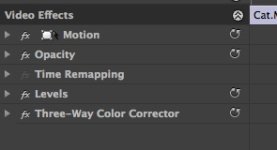
Hit the little button to the left of the undo or reset. It's to the right of the word "levels"; it's highlighted slightly in the screenshot above

@kidwoo - I don't seem have this issue on a "sped up" clip. It might be related to your graphics card issues from your other thread?

I even tried on that P2 clip you uploaded - no issues

EDIT: you just have to be at the beginning of the clip, if you are in the middle or somewhere I get black screen on the preview too. Use [PGUP]
 
Last edited:
Hit the little button to the left of the undo or reset. It's to the right of the word "levels"; it's highlighted slightly in the screenshot above

Am running Premiere CS4 version 4.2 on a Mac and I don't have those little buttons. Check it out:
 

Attachments

  • premiere.jpg
    premiere.jpg
    15.8 KB · Views: 0
That's weird. Do you have any other options or buttons when you twirl down the menu ?(besides the regular controls)
 
Nope. Nothing but the regular settings adjustments.

I vaguely remember seeing a tutorial that pointed those buttons out. But I use both Premiere and FCP and was going more and more toward FCP so never bothered to really check it out.

Using FCP almost exclusively now, but am interested in how well the latest Premiere update works with FCP projects so I've been trying to keep up with Premiere. Would definitely like to find out why I'm not seeing those buttons.
 
EDIT: you just have to be at the beginning of the clip, if you are in the middle or somewhere I get black screen on the preview too.

That's really pretty lame, isn't it? I have to say it's things like this that made me go back to FCP after trying out Premiere again. There are just too many rough edges that interfere with a smooth workflow. And I have nothing against Premiere. In fact, I have a real soft spot for it since I first started using it all the way back in version 1.0. Plus there are many features I genuinely like.

The biggest complaint I had with Premiere was when it would intermittently freeze when playing back the timeline. It could be playing back fine, even multiple times in the same segment, and then for no reason on the next play the picture would freeze while the audio kept playing. Sometimes it would recover after 15-30 seconds or so, but other times it required a force quit or it just crashed the system. And don't get me started on all the quirks involved with dynamic linking and AE.

Sorry, I didn't post here to slam Premiere. All I'll say is it's a real pleasure to use FCP again and enjoy an uninterrupted creative workflow. Every piece of software has its problems, but I think the fact that I was willing to give up native editing of AVCHD in Premiere and endure the transcode to ProRes in FCP says something about how fed up I was.

I really hope Adobe gets their act together and delivers on the promise of Premiere and the whole theoretical seamless workflow between their applications because it's my experience that it's currently more marketing hype than reality.
 
Back
Top