Can you get wide screen movies?

nyvideo

Active member
I'm not sure if this is the right place for this question, but here goes.

I watched the film Inception the other night on HBO. It began with the studio logo in what appeared to be "wide screen" with the black bars on the top and bottom. I checked with imdb which says the film was shot in 2.35:1.

But as soon as those opening logo shots were over (showing the WB/TimeWarner logo, the Legendary Pictures logo and the Syncopy logo), the rest of the movie, beginning with the opening scene at the beach, filled my 42" 16:9 set with no black bars.

The purist in me would like to have the option to see films at home the way they were shot. Are there any sources for this? I checked with Netflix and they told me that the DVD and even the BR DVD are both 16:9, not 2.35:1.

It's possible that they were incorrect, but that's what the Netflix guy, who seemed knowledgeable, told me. (At least he understood what I was asking about. When I called Comcast the guy told me the "problem" was that I didn't have my TV set up correctly.)

Any thoughts?

Thanks.
 
That's how HBO does it. Other networks don't and will show 2.40:1 films at the proper aspect (with black bars).

I find it annoying.
 
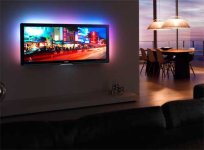
The "purist" in you needs this:

philips-cinema-21x9-lifestyle.jpg

Yep, a few companies have 2:35:1 TVs. I think this is the Vizio. That would be pretty cool.
 
The problem is, if HBO has already cropped the image, won't matter what you view it on. That information is gone.
 
The Harry Potter Blu-Ray I have says "16x9 2.4:1"... They're probably embedding the 2.4:1 image into a 16x9 image, to feed out to 16:9 televisions. So if online it says 16:9, it may actually be cinema-scope 2.4; especially with Warner Brothers.


Edit:

Just found this:

"Main Feature
1080p High Definition (DVD standard definition for the third disc) 16x9 2.4:1 DTS-HD Master Audio: English 5.1 Dolby Digital: Castilian Spanish 5.1, English 5.1 Audio Descriptive Service."

http://www.play.com/DVD/Blu-ray/4-/...Play-Limited-Edition-Case/ProductReviews.html
 
Just as in the days of SDTV, we are still seeing pan and scan for HDTV. Different ratio, same problem. This of course, matters somewhat less with 16x9, but it's still a concern. The Girl With The Dragon Tattoo was actually shot with enough padding to simply reframe for 16x9, rather than crop.

To go off topic for a bit...

The differentiation of the aspect ratio and picture format (which, obviously, is an aspect ratio itself) stems from the DVD era, when 16x9 typically denoted anamorphically compressed films. As far as DVD (and Blu-ray) spec are concerned, there are only two "valid" ratios - 4x3 and 16x9. MPEG-2 actually has a 2.21:1 ratio as well, and though many players will play this back (I've encoded such a disc for experimental purposes), it's technically not in the DVD spec. Blu-ray has a few unfortunate exclusions from its spec as well:

- No 1080p/30 standard (though it's doable by faking the interlace flag)
- No 4x3 1080p support (HD 4x3 content must be pillarboxed, which then creates windowboxing if the content is ever played back on an SDTV).

These two wouldn't even be more computationally expensive (that argument is best used for 1080p/60), yet they weren't included for some reason.
 
The Harry Potter Blu-Ray I have says "16x9 2.4:1"... They're probably embedding the 2.4:1 image into a 16x9 image, to feed out to 16:9 televisions. So if online it says 16:9, it may actually be cinema-scope 2.4; especially with Warner Brothers.

All Blu-rays are 16:9, as HD is, and anything wider is letterboxed, just as it is for widescreen DVDs.
 
All Blu-rays are 16:9, as HD is, and anything wider is letterboxed, just as it is for widescreen DVDs.

Right, I was just saying that some companies (like Warner Brothers) are calling 2.40:1, 16:9; giving the impression that the 2.40 is cropped. When in fact it's 2.40 embedded into a 16:9 image.
 
Thanks for the interesting responses. It's nice to know that there are others in the same boat.

That Vizio wide-screen is awfully sexy. Probably out of my price range...
 
Back
Top