Can this footage be saved in FCPX?

thedigitalcurrent

Active member
I shot a wedding and unfortunately the lighting went out mid ceremony, so most of my footage is extremely underexposed. Shot it on my GH4 and I tried color correcting it in FCPX, but I'm no expert, was wondering what you guys thought....

Attached is the full quality master clip.
 

Attachments

I would never click on a zip file in an internet forum.... . smells a bit fishy to me...
ah, sorry - never mind, I see now someone else has already taken a stab at the footage. Untrusting me.:Drogar-BlackEye(DBG
 
Last edited:
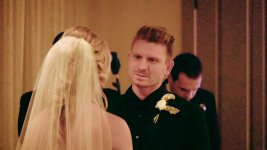
I know that you want a FCXP solution, but I took a quick stab at it in MAGIX Vegas Pro 14...

WeddingFix.jpg

In Vegas I used the following tools :

- LEVELS : to bring up detail in the shadows and to brighten the image

- HSL ADJUST : to increase the saturation

- COLOR BALANCE : to kill the strong yellow cast and magenta cast

- REDUCE NOISE ver 4 : This is the NeatVideo Pro noise-reduction plug-in that "fuzzed" all the horrible noise that the LEVELS adjustment revealed

- SHARPEN : to sharpen the very soft image that NeatVideo Pro produced

I could not get rid of the nasty mottling on the background walls which was revealed by the LEVELS adjustment.

Hopefully your sound is good, as this is never going to be a great image.

NeatVideo.com is available for FCPX.

Good-luck!
 
I shot a wedding and unfortunately the lighting went out mid ceremony, so most of my footage is extremely underexposed. Shot it on my GH4 and I tried color correcting it in FCPX, but I'm no expert, was wondering what you guys thought....

Attached is the full quality master clip.

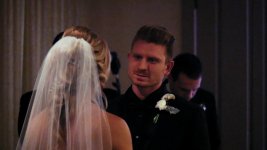
This is pretty bad and difficult to fix. Below is a quick attempt using only the built-in FCPX color board plus Neat Video:

Steps:

(1) Use waveform scope to adjust exposure
(2) Use RGB parade scope to roughly balance color
(3) Use Neat Video to reduce noise, modifying both luma and chroma sliders
(4) Use shape mask on face to locally improve saturation
 

Attachments

  • WeddingColorFix.jpg
    WeddingColorFix.jpg
    39.8 KB · Views: 0
The problem is there is almost nothing left in the blue channel.

no blue_1.1.4.jpg

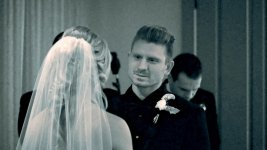
What you could do is turn it into a stylish tinted grainy black and white.

bandw_1.1.1.jpg

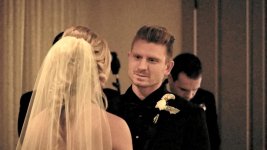
Or some 'old' look

old_1.1.2.jpg
 
Last edited:
I like Cary's idea of deliberately giving these shots a different look - they'll never match the look of the 'properly' lit shots anyway, so use that limitation to your advantage. However this needs to be discussed with the clients, who may well loathe (or love) a particular look.
 
Back
Top