Hello, I'm looking to purchase the GeForce GTX 285 for my HP Pavilion p6313w. Here are my questions:
1. Would the card even work/fit? It says that my computer has a PCI- Express slot, but the card's box says PCI-Express 2.0???
2. Is there a better cuda/Premiere CS5 supported card that I should purchase? My budget is around 200 dollars.
3. ALSO, there is already an integrated gfx card in my computer (NVidia GeForce 9100). Is there a major difference between the integrated card and the card I want to buy? Will I be removing this integrated card and putting in my new card or do I just leave it in there???
Here are some details on my system and the card I've been looking to buy:
My computer:
Model number p6313w
Product Name HP Pavilion p6313w Desktop PC
Processor AMD Athlonll X2 215 2.7 GHz
Socket Type Socket AM3
Chipset nVIDIA GeForce 9100
Power supply 250 Watts
Memory Installed 5 GB
RAM Speed supported PC3-10600 MBps
RAM Type 240 pin, DDR3
Hard drive 640 GB SATA 3G
Hard drive speed 7200 RPM
DVD Interface SATA
DVD Data buffer memory 2 MB
DVD LightScribe Yes
Modem PCIe internal modem
Sound/Audio High Definition 8-channel audio - ALC 888S chipset
Audio codec ADI AD1984A
Network (LAN) Integrated 10/100 Base-T networking interface
Memory card reader Supports: Compact Flash I, Compact Flash II, IBM Microdrive, Secure Digital (SD), mini-SD, MultiMediaCard (MMC), Reduced size MultiMediaCard (RS-MMC), MultiMediaCard Plus (MMC plus), MultiMediaCard Mobile (MMC mobile), Memory Stick, Memory Stick Pro, Memory Stick Duo, Memory Stick Pro Duo, SmartMedia, xD Picture Card (xD = extreme digital
Input/Output ports Front panel: 1 x 15-in-1 (4 slot), 2 x USB, 1 x Headphone, 1 x Microphone; Back panel: 1 x S/PDIF out (coaxial), 1 x VGA, 1 x DVI, 4 x USB, 1 x 1394a, 1 x LAN, 1 x Audio (side speaker out, rear speaker out, center/subwoofer-out, line-in, line-out, microphone
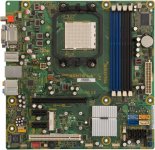
Expansion slots 1 x PCI, 1 x PCI Express x16, 2 x PCI Express x1, 1 x PCI Express x1 minicard socket
Keyboard HP USB keyboard
Mouse HP USB optical mouse
Operating System Provided Microsoft Windows 7 Home Premium (64-bit
Dimensions 7.0 x 15.5 x 16.6 inches
My possible card purchase:
# GeForce GTX 285 with 648 MHz clock
# PCI Express 2.0
# 1024 MB 512-bit .7ns DDR3 memory
# 2484 MHz memory clock and 1476 MHz shader clock
# Open GL 3.0, Windows XP and Windows Vista suppor
1. Would the card even work/fit? It says that my computer has a PCI- Express slot, but the card's box says PCI-Express 2.0???
2. Is there a better cuda/Premiere CS5 supported card that I should purchase? My budget is around 200 dollars.
3. ALSO, there is already an integrated gfx card in my computer (NVidia GeForce 9100). Is there a major difference between the integrated card and the card I want to buy? Will I be removing this integrated card and putting in my new card or do I just leave it in there???
Here are some details on my system and the card I've been looking to buy:
My computer:
Model number p6313w
Product Name HP Pavilion p6313w Desktop PC
Processor AMD Athlonll X2 215 2.7 GHz
Socket Type Socket AM3
Chipset nVIDIA GeForce 9100
Power supply 250 Watts
Memory Installed 5 GB
RAM Speed supported PC3-10600 MBps
RAM Type 240 pin, DDR3
Hard drive 640 GB SATA 3G
Hard drive speed 7200 RPM
DVD Interface SATA
DVD Data buffer memory 2 MB
DVD LightScribe Yes
Modem PCIe internal modem
Sound/Audio High Definition 8-channel audio - ALC 888S chipset
Audio codec ADI AD1984A
Network (LAN) Integrated 10/100 Base-T networking interface
Memory card reader Supports: Compact Flash I, Compact Flash II, IBM Microdrive, Secure Digital (SD), mini-SD, MultiMediaCard (MMC), Reduced size MultiMediaCard (RS-MMC), MultiMediaCard Plus (MMC plus), MultiMediaCard Mobile (MMC mobile), Memory Stick, Memory Stick Pro, Memory Stick Duo, Memory Stick Pro Duo, SmartMedia, xD Picture Card (xD = extreme digital
Input/Output ports Front panel: 1 x 15-in-1 (4 slot), 2 x USB, 1 x Headphone, 1 x Microphone; Back panel: 1 x S/PDIF out (coaxial), 1 x VGA, 1 x DVI, 4 x USB, 1 x 1394a, 1 x LAN, 1 x Audio (side speaker out, rear speaker out, center/subwoofer-out, line-in, line-out, microphone
Expansion slots 1 x PCI, 1 x PCI Express x16, 2 x PCI Express x1, 1 x PCI Express x1 minicard socket
Keyboard HP USB keyboard
Mouse HP USB optical mouse
Operating System Provided Microsoft Windows 7 Home Premium (64-bit
Dimensions 7.0 x 15.5 x 16.6 inches
My possible card purchase:
# GeForce GTX 285 with 648 MHz clock
# PCI Express 2.0
# 1024 MB 512-bit .7ns DDR3 memory
# 2484 MHz memory clock and 1476 MHz shader clock
# Open GL 3.0, Windows XP and Windows Vista suppor