
Navigation
Install the app
How to install the app on iOS
Follow along with the video below to see how to install our site as a web app on your home screen.
Note: This feature may not be available in some browsers.
More options
You are using an out of date browser. It may not display this or other websites correctly.
You should upgrade or use an alternative browser.
You should upgrade or use an alternative browser.
Best way to subtitle on Premiere?
- Thread starter rawfa
- Start date
Depends on how you are delivering it. If on YouTube, it's easiest to do the captions as a srt text files. There are a number of programs that allow you to create text files. I use one called Subtitles (I think). These can be translated into Adobe Encore subtitle files if you want them on DVD. There's another program that burns them into videos too. Most of the programs for captioning are either unnecessarily expensive or crappy. But I don't caption often.
I wish there was an easy way to do captions in premiere.
I wish there was an easy way to do captions in premiere.

rawfa
Veteran
I´ve checked some tutorials on youtube and it seems to me that basically you have to generate a subtitle file, import it to premiere and enable it. What I couldn´t find on these videos is how to move each piece of subtitle back and forth so it will match each dialog piece. Or do I have to export the video, create the subtitles in a specific subtitle program, match each piece of subtitle to each piece of dialog, export a final file, import it on premiere and then export it embedded on the final video?
I don't think you can edit closed captioning within Premiere Pro. You need to as you say export the video, use a subtitles program to create the subtitles and adjust timing (eg. Subtitles - The Editor). From here, you can either
a) Upload the subtitles file (.srt) file next to your YouTube video. Thus clicking the "CC" button will allow you to bring up different closed caption texts. What sucks is that Vimeo still does not have a closed captioning system.
b) Translate the .srt file to .mcc file and attach it to Premiere Pro so that it can export a video stream with CC embedded (for broadcast).
c) Use a program like Submerge to burn the .srt file into the video. You can choose font, placement, etc.
Or you can scrap all that and just create titles directly in Premiere Pro.
if someone can tell me an easier way, I am all ears.
Chris
a) Upload the subtitles file (.srt) file next to your YouTube video. Thus clicking the "CC" button will allow you to bring up different closed caption texts. What sucks is that Vimeo still does not have a closed captioning system.
b) Translate the .srt file to .mcc file and attach it to Premiere Pro so that it can export a video stream with CC embedded (for broadcast).
c) Use a program like Submerge to burn the .srt file into the video. You can choose font, placement, etc.
Or you can scrap all that and just create titles directly in Premiere Pro.
if someone can tell me an easier way, I am all ears.
Chris
j1clark@ucsd.edu
Veteran
Hi guys,
I´ve started shooting a 10 episode fiction series that I want to subtitle to english. Which is the best and fastest way to do this? Each episode is about 5 to 8 minutes and it´s just pure dialog. BTW, I´m using CS5.5
cheers
Rafa
"... just pure dialog..."... that's unfortunate...
In any case, there are pro tools to do this, and they are very expensive.
What I'm working on at the moment is a XMP -> SRT utility program that takes Premiere "Marks", which you can affix text in the 'label' portion, and can be exported as 'side card file' that uses XML formatted to indicate among other things the time code for the 'mark'.
Time code for NTSC is a bit tricky, but for PAL and Real(tm) 24 fps (not 23.97...) converting from time code to the following is pretty straight forward, which is the SRT format for captions.
----- http://en.wikipedia.org/wiki/SubRip
1
00:00:10,500 --> 00:00:13,000
Elephant's Dream
2
00:00:15,000 --> 00:00:18,000
At the left we can see...
-------
I've also worked on a widget that uses HTML5 video playing capabilities to be able to get current time on a clip, create caption text, in that case WebVTT format, to then use with HMTL5 playing + caption capabilities.
If I had 'spare' time I'd probably turn these things into some sort of commercial offerings for about $25 bux or so... rather than the pro 'full feature' packages that cost into the 1000's if not 10's of 1000's... Those packages support Broadcast captioning, and the standard for that is far more complex than those who want to caption their Youtube or Vimeo media require. (I'll not go in to those details here...).
There may be other less expensive and more limited, and a web search will probably yield some... the other problem I have is that I'm Mac based and often these tools are Windows based...
While my main goal was to create a utility to 'mark caption points', it could also be used for collaborative spotting of clips, by groups which are working across the Internet. A 'low res' reference clip (or set of clips, call them 'dailies' or 'rushes', could be put up on Vimeo then played and spotted by members of the group. I did see one small startup doing this at NAB... They did not use Vimeo as I recall, and when I asked Vimeo about their 'developer's API', I was told the API did not include such features as would be useful to allow for forward, fast forward, reverse, fast reverse, and as I recall 'get current media time', which are essential for accurate 'marking' of caption in/out points.
But at the moment for those who are on the nolo budget, it's some amount of grunt work is required...
rawfa
Veteran
Nah, nobody helped me, now screw everybody....hehehe...just kidding. It´s http://www.nikse.dk/subtitleedit . I was actually waiting to see if this workflow works before posting. The program is very easy to use but the work it´s incredibly tedious. My main doubt remains...can I import an SRT file to premiere and export it embedded to the final video?

novoluc
Active member
Thanks Rafael. Searching on the net after reading your post, I just came upon:
http://www.aegisub.org/
They have Windows and Mac versions. Seems pretty simple and straightforward. It's free, soft and user manual can be downloaded from the site. Maybe worth a try...
Like I said, just found it, so I didn't try and can't comment.
L.
http://www.aegisub.org/
They have Windows and Mac versions. Seems pretty simple and straightforward. It's free, soft and user manual can be downloaded from the site. Maybe worth a try...
Like I said, just found it, so I didn't try and can't comment.
L.
rawfa
Veteran
I´m still going to try out the one I´ve posted. I refuse to believe that something that seems as trivial as to import an SRT file cannot be done (specially because so far nobody actually said it cannot be done).
Worst to to worst I think that vimeo and youtube allow you to upload an SRT file along with the video.
Worst to to worst I think that vimeo and youtube allow you to upload an SRT file along with the video.
rawfa
Veteran
I´ve got a free subtitling program and I´m creating the subtitles. It saves the file into an .SRT. I suppose I can import this to Premiere´s timeline and export it merged with the final video, right?
If this is not possible, are any of the options bellow valid?
1 - is there a program like "Handbreak" that allows me to export directly from premiere that would allow me to embed the subtitles? I would like avoiding having to re-encode the video.
2 - Is there a way for me to upload an SRT file to youtube along with the video so it will always be visible?
3 - Is there a way for me to upload an SRT file to vimeo along with the video so it will always be visible?
If this is not possible, are any of the options bellow valid?
1 - is there a program like "Handbreak" that allows me to export directly from premiere that would allow me to embed the subtitles? I would like avoiding having to re-encode the video.
2 - Is there a way for me to upload an SRT file to youtube along with the video so it will always be visible?
3 - Is there a way for me to upload an SRT file to vimeo along with the video so it will always be visible?
Last edited:
I remember using a program to translate .srt files into Broadcast acceptable .mcc files which can be accepted by Premiere. Don't know about a Handbrake like program. For YouTube, in the embed code you can specify it to turn on CC by default. Can't remember if you can do it directly. Vimeo does not accept .srt files last I checked.
rawfa
Veteran
Is .MCC the only type of file that Premiere accepts for CC? I´m trying to find something on google but nothing comes up. I did find some info on converting SRT to SCC: http://www.ehow.com/how_8716406_convert-srt-file-scc.html
I think it accepts SCC too, but remember that Premiere Pro doesn't allow you to export the closed captions burned in. See this discussion thread:
http://forums.adobe.com/message/4878736
It's easiest (I found at least) to burn them in afterwards. Yes, it requires re-encoding, but that's why the .srt system with YouTube is so nice. You just need a text file and you can upload as many different languages and subtitles as you want.
Sucks I know.
Chris
http://forums.adobe.com/message/4878736
It's easiest (I found at least) to burn them in afterwards. Yes, it requires re-encoding, but that's why the .srt system with YouTube is so nice. You just need a text file and you can upload as many different languages and subtitles as you want.
Sucks I know.
Chris
Is .MCC the only type of file that Premiere accepts for CC? I´m trying to find something on google but nothing comes up. I did find some info on converting SRT to SCC: http://www.ehow.com/how_8716406_convert-srt-file-scc.html
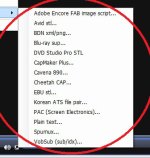
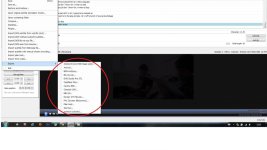

rawfa
Veteran
Nobody? Come on, I cannot be the only person in this situation...
So far I´m exporting the video from premiere, then I import it to subtitling program that generates an SRT file when I´m done, and then I have to import the premiere file and the SRT to another program and reencode everything together. Not practical at all.
So far I´m exporting the video from premiere, then I import it to subtitling program that generates an SRT file when I´m done, and then I have to import the premiere file and the SRT to another program and reencode everything together. Not practical at all.