Best way to encode for a video DVD.

Amadou

Carbonite Member
I am trying to encode a DVD DL to get the same quality I get from commercial DVD's. I seem to have problems getting there. What is the best way to do it? (1) Going straight from Premiere to Encore (2) Going to Encore and importing the video and the audio seperately? (3) Importing the project into Encore and then importing the audio separately? Do I get a better picture quality if I render in a specific format prior to encoding? Sound Wise, am I better off importing the wav file into Encore separately? What should be the wav sampling rate? 48hz -16bits? Please let me know what is recommended to get the best possible picture quality on DVD. Thank you. Also, do I get a better quality with other programs such a NERO? What do the "pros" use?
 
The best will be to export out a lossless intermediate file and use a third party encoder like the free HC Encoder, in CQ mode with a Q value of 4 and a DC Precision of 9.

Second best is to export out of PP using the appropriate MPEG2-DVD preset, changing the Min, Target and Max to 5, 7 and 9 respectively.
 
Export lossless file and use tmpge mastering works 5 for encoding then authoring program of your choice. I use dvdlab pro.
 
Download the trial and encode a small section then compare it to what you have. Include text to observe its ability to downscale.
 
I am trying to encode a DVD DL to get the same quality I get from commercial DVD's. I seem to have problems getting there. What is the best way to do it?

Commercial DVDs & BluRay discs are professionally encoded scene by scene with very high end gear. You are not going to achieve that quality level.
 
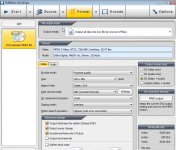
I compared the cheaper encoders: mainconcept, cinemacraft, and TMPGEnc 4.0 XPress. The last came out on top for replicated DVD projects when ecoded for video at 8250 kb/s with AC3 audio added on top of that.

ScreenHunter_83 Jul. 08 14.34.jpg
 
Last edited:
What about sound? I noticed no two encoders give me the same sound. I tend to stick with Dolby 16bit 48hz. Also, I noticed that I see to get better sound when I use the AVI video sound rather than importing a saparate wav file. What are your expereinces on audio?
 
DVD players have no problem with AC3 Dolby Digital 48000 Hz stereo 320 kb/s. This conserves space so you can up your video bitrate. I have had thousands of DVDs manufactured to the specs. I noted with only one return which was a scratch on the disc surface most likely made during packaging.

You might find this interesting reading http://www.discmakers.com/authoring/faq/#1
 
Last edited:
Mark, also, I dont know where you got that menu. I can't find it in TMPGe Authoring Works 5 Trial Version.
 
DVDLab pro is "the tool" you need for authoring DVDs. It has a bit of a learning curve and is a little old school but if I can use it anyone can. Just remember it will not author blu-ray. There is a good community help forum at http://www.mmbforums.com/viewforum.php?f=10&sid=e29fb9c6eaab98a9650ae6624ea7222c plus a lot of folks here use it and can help.

Just to put things into prespective. Shooting and editing is simple compared to all the research you can do learning to encode for DVD, author, DIY design work for DVD jacket and disc, getting all you licensing material together and then sending it all to the manufacturer in the accepted format for replication. A reliable manufacturer will check everything to make sure you get an acceptable product. With "duplicated" DVD productions the final product may be less reliable if specs. are not closely followed.
 
Last edited:
Okay, let's cut to the chase. What encoding software/hardware do big studios use when encoding big budget movie DVDs?
 
Okay, let's cut to the chase. What encoding software/hardware do big studios use when encoding big budget movie DVDs?

Depends on the studio, but back in the day Sony and Toshiba had some really expensive proprietary systems us little people couldn't even touch. Then it was Scenarist from Sonic taking over the studio scene but that cost tens of thousands to get set up. Sonic had a "little brother" to Scenarist called Fusion that a lot of the smaller studios were using. Then Apple bought out another company and repackaged their program as DVD Studio Pro, though the Pro was questionable since it wasn't spec level and buggy. DVDSP and most modern DVD authoring software hides the actual command structure of the DVD which makes it easier to learn and make basic DVDs, but much harder to do advanced features and keep it streamlined. DVDSP is still used by a lot of people, but not the major studios who still use Scenarist. I'm still putting out a lot of retail DVD releases with an old Sonic system that I bought for less than 10% of it's original price. It works great and I know that its output is going to be hassle free at the factory.
The encoders back then were often hardware cards like Sonic's SD2000 for the independents and another proprietary one for the bigger studios, but these days they've all been replaced with software solutions like the ones from Cinemacraft which are much better performers, though not the most intuitive to learn and get the correct results.
 
Back
Top