Best Render Settings VMS10 => DVD Architect Blu-Ray ???

c3hammer

Well-known member
I'm having great difficulty getting consistant image quality between computer file formats and Blu-Ray disk in DVD Architect.

Every computer based file format I render to looks exceptional on the computer, even on a 27" monitor. Converted to AVCHD and played on a dvd in a blu-ray player also shows exceptional quality.

My first attempts to create a blu-ray disk from any file so far has been horrible. Massively oversaturated, massively oversharpened and significant artifacting. None of which is in the original footage from a T3i or in any of the other computer based outputs.

I believe I want to use Sony AVC at 23.976p 1920x1080 at 20mbps for the video stream and AC3 audio, but DVD Architect appears to be re-rendering to something way worse and is taking over an hour to create the iso file for a 17 minute test clip. I've stayed with 23.976p the whole way through the process as well.

Any suggestions on what render setting to use for both audio and video in VMS10 such that it doesn't have to rerender/compress again in DVDA ???

Cheers,
Pete
 
Thanks for the hint David, but still no go. If I go to File => Optimize in DVDA it says that "24p is not supported in this product" as the reason for the recompress. Is it possible that it's re-encoding to 29.97i and the reason I'm getting such horrible results?

Any idea what DVDA 5.0 that comes with the Platinum Pack is doing here?

dvda 24p.jpg

Cheers,
pete
 
It's probably more likely because it was re-encoding your AVCHD to MPEG-2 and thus was converting a very highly-compressed video file into another highly-compressed video format.

If VMS's version of DVD Architect won't encode 24p (though that seems silly; if it's compliant it shouldn't have to encode anything and thus shouldn't care what it's laying to disc), then I'd say you should render out of Vegas as 60i. But yeah, you won't get the benefit of true 1080p 24p.

The other option, of course, is to upgrade to Vegas Pro, which won't have this limitation.
 
I burned the iso I made with the Sony AVC video render to a DVD so I could open it on the computer in a DVD player.

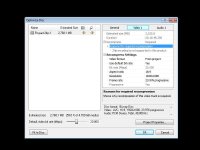
Here's a screen capture from Splash Lite of the 00001.m2ts file in the Stream folder. Says it's a 23.976p h.264 stream. It's definitely creating 24p but I have no idea why it is giving that comment or recompressing in DVDA. This version seems to be very good quality when viewed on the computer again.

splashlitescreencapture.jpg

I'll burn it to a proper BD disk and see how it comes out. I quit trying things and burning BD disks. It got a bit expensive in time and money :)

I deleted the m2v video streams and their corresponding iso's so I didn't go back to see how they look. I'll have to make another one and burn it to a DVD to see if it looks the same.

In any case I've learned one possible way to verify your iso file before you burn to BD.

Cheers,
Pete
 
Actually, I missed that this was in the Optimize Disk box.

This recompress will only affect things which have to be rendered, like menus, or anything that has to be recompressed because it's not compliant with the format. If it's compliant, it won't be recompressed.

So, if you have 23.976 Blu-ray-compliant MPEG-2, it won't recompress it. I suggest gving it a shot.
 
I just tried a couple of test BD's on a quite a few HDTV's at my local Costco! All I can say is that when you get it right it is incredible!!!

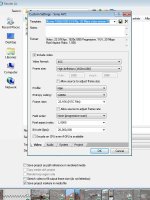
Currently the best example is with the Sony AVC render at 20mbs 1920x1080 23.976p and the 100% quality setting. The image quality varies radically between players and displays. Many of the displays are what is doing all the sharpening, saturating and artifacting. I tried it on a 60" and a 65" tv's and the image was unbelievable! Surprisingly the 3D displays tended to be much less blown out. They seem to be higher quality and don't require so much processing to compete.

Sony AVC blu-ray settings 24p.jpg

In any case those were my settings that performed exceptionally well in case anyone else comes along with this same quesiton.

Cheers,
pete
 
Back
Top