Best conversion program to batch multiple 7D files into Apple PRoRes 422 LT

RobbySonic

Active member
Hey Guys,

After finding the solution to to my FCP project problem.

I need to find the best way to batch covert around 60-80 7D clips into Apple ProRes LT for use with FCP 7.

My macdealer/tech seems to be giving different information than those on the forums.

Which would be an ideal program?
 
Use the free Canon EOS plugin for FCP 7. It works very well and also includes the option of meta data (the additional columns). It's also pretty fast, automatically adds your footage to your FCP project (since it's part of FPC L+T) a and you can choose your flavour of Prores right in the interface.
 
Use the free Canon EOS plugin for FCP 7. It works very well and also includes the option of meta data (the additional columns). It's also pretty fast, automatically adds your footage to your FCP project (since it's part of FPC L+T) a and you can choose your flavour of Prores right in the interface.

Ok I'll have to try again.....Maybe I have an old Canon EOS plugin for FCP 7 because i did install it.
Did they update the original plug-in maybe?

I didn't see the option for ProRes LT.
Do i go to prefereces in the Log & Transfer window to choose ProRes LT?

if you have a screenshot that might help....my deadline is creeping lol
 
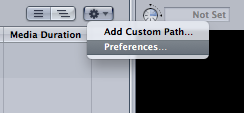
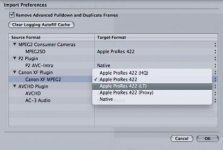
Once you are in log & transfer, click the gear button to the top right of the source clips window (just to the left of the middle bar), choose preferences then select the source codec type then ProRes LT as the destination....

It turns out I don't have the Canon EOS plugin on this computer, only the MXF plugin - but it's the same concept. the other computer is busy so I can't get a sreeen shot from there....

Screen Shot 2012-11-22 at 19.52.03.pngScreen Shot 2012-11-22 at 19.52.12.jpg
 
Once you are in log & transfer, click the gear button to the top right of the source clips window (just to the left of the middle bar), choose preferences then select the source codec type then ProRes LT as the destination....

It turns out I don't have the Canon EOS plugin on this computer, only the MXF plugin - but it's the same concept. the other computer is busy so I can't get a sreeen shot from there....

View attachment 62913View attachment 62914


Well Thanks for the screenshot.

Now that is the issue.....If you remember from my previous post My Plug-in does not list 422 LT.

I only saw proRes 4444 as the option. I have the EOS E1 plug-in.... But i will double check in 2 hours when i get to my homestudio computer.

There must be another updated Canon EOS plug-in that shows those options. I wouldn't even be posting if i saw the 422 LT.
Should i get the MXF PLug-in for FCP 7 then?
 
No need to get the MXF plugin unless you have a camera that shoots MXF (not DSLRs), but check you have the latest EOS plugin because I just checked the other computer and the options are the same for EOS. Having said that - the EOS plugin I have is a couple of years old... so I doubt it's a 'latest version' issue.
 
No need to get the MXF plugin unless you have a camera that shoots MXF (not DSLRs), but check you have the latest EOS plugin because I just checked the other computer and the options are the same for EOS. Having said that - the EOS plugin I have is a couple of years old... so I doubt it's a 'latest version' issue.

Thanks again Exact! I have figured it out. My stress is now over lol The setting is there i just never clicked the drop down.
So now I'm going to transcode in ProRes LT finally

If I'm ever in the UK I'll join for a pint. I do have some relatives there.


take care
 
Back
Top