Avid, FCPX, PPro

Danny1280

Well-known member
Okay, I know this topic has been beaten to DEATH, especially when FCPX was first released, and the mass-exodus from FCP.

But now in 2013, FCPX has had a series of updates, things are different, from what I'm reading on this forum, and it seems that there's a lot of well-written comparisons between PPRO and FCPX.
But not much comparing to Avid.

I'm still on FCP7, and poised to make a switch. I'm thinking AVID because it seems to have that Built-from-the-ground-up-by-and-for-editors approach, and the customizing and fine-tunning seem sophisticated.

But I'm worried that I'm hopping onto a dinosaur, and don't want to invest money/time/energy into a system that is on its way out.

I realize this is a FCPX forum, and may be slightly biased, but does anyone here have a sense—in the professional world of every-day production—whether AVID will remain an important/robust alternative? I'm going to ask this in the AVID forum as well.
 
It's 2013: Time to re-consider FCPX/AVID/PPRO?

It's 2013: Time to re-consider FCPX/AVID/PPRO?

Okay, I know this topic has been beaten to DEATH, especially when FCPX was first released, and the mass-exodus from FCP.
But now in 2013, FCPX has had a series of updates, things seem to be different, and there seem to be claims by apparent professionals that FCPX is a pro tool.

I'm a FCP7 user, poised to make a switch. Originally, I wanted nothing to do with FCPX, and was leaning towards AVID, rather than PPRO, because of its built-from-the-ground-up-by-and-for-editors approach, and the customizing and fine-tunning seem sophisticated. I just liked the way AVID felt, from my limited experience with it.

But I'm worried that I'm hopping onto a dinosaur, and don't want to invest money/time/energy into a system that is on its way out.
I haven't seen/heard as much buzz out there about AVID as I have about PPRO, but that could be because AVID editors are busy working rather than wasting time on these forums!

I realize this is a AVID forum, and may be slightly biased, but does anyone here have a sense—in the professional world of every-day production of film and broadcast—whether AVID will remain an important/robust alternative? I'm going to ask this in the FCPX forum as well.
 
I would say in the every day world of broadcast, television, and news - yes. Avid will remain a very important part of the process. It's when you start getting outside of the traditional distribution channels and the type of programming changes that other tools offer a viable, if not better solution. But for workflows that requires collaboration, multiple editors, shared storage, solid list and metadata management, when meeting deadlines, Avid is hard to beat. But for all in one productions, web delivery, graphics heavy and such - you hit some of the current limits of the system.

I work in features, so nothing at this time really beats Media Composer for pure storytelling style approach to the edit and metadata/media management. But for finishing - the project either moves to Autodesk Smoke 2013 or DaVinci Resolve due to depth of either VFX or color correction toolset in addition to resolution independence.

I would wait till April after NAB to see what all the players are offering, and you get a sense of what they will be offering for the year (except for Apple which is too hard to predict). Smoke is adding more editorial type features to the product so it will be interesting to see how far they have come along. At this point, I wouldn't edit a feature from scratch on it, but it has was I call "conform editing" meaning I can easily edit changes after a conform is done. Also, smaller, more graphic oriented projects like trailers and spots would work well at this time. It is very deep in graphics and compositing, and having that all integrated into one application makes many of the workflows easier than jumping between applications. One to keep an eye on. Adobe is also very committed to the industry, CS6 brought lots of attention and improvements to PPro.

NAB 2013 will be interesting. Perhaps Apple will have announced their plans for a MacPro replacement by then - and we can all take a look at the landscape to find the tools and platforms that meet our needs.

Michael
 
I have 2 old Avids in the attic, and swore I would never edit on an Avid again. I just purchased a new 27" iMac and installed FCPX along with Adobe CS6 Production Premium. FCPX does some neat things, but is still lacking as a professional edit platform. Adobe Premiere Pro is much closer to the feel of FCP7 and a true professional edit platform. I have kept my old MacPro near loaded with FCP7 as a just in case, and for those things the other platforms lack like various plugins not yet available.
 
I personally own fcp x, fcp 7, and have spent a good bit of time editing with premiere. Final cut pro 7 was such a beautiful program inside and out... Keyword here WAS. Fcp7 is outdated. prpro is basically the perfect blend of professional toolsets and a clean simplistic layout. I'm a huge apple fanboy and know that apple made fcpx with a consumer in mind NOT a professional. If your a 13 year old kid just advancing from iMovie fcpx is PERFECT. Final cut pro 10 still has it's place but if you do regular freelance video premiere will be drastically faster. if you've spent any time at all with fcp7 premiere will totally be second nature to you. plus there are so many little thing that annoy the pee out of you when editing in fcpx it's gonna be a hard adjustment from fcp7 so... stop reading this and go buy premiere!
 
I sat on FCP7 for a long time, that is until I trialed (no such word but you know what I mean) FCPX and Premiere 6. Bottom line is both were incredibly fast as compared to FCP7. I then thought why on earth have I waited, time saved on either is a pretty big change. I have both now.

Brief lowdown.

P6 with Cuda enabled is damn fast. If you're happy with working the old way with FCP7, you'll be set. You can even alter the shortcuts to match fcp7 that you're used to. Its solid and stable. It obviously works very well with other adobe apps - my two of choice being AE and PS.

FCPX (today) - with open CL its fast. Id say P6 only has a slight advantage here. Both though will make you shake your head at FCP7. In a big heavy project, I do find at times FCPX when doing BG render can become a little unstable if your doing anything else that requires the graphics card to work hard.

FCPX has a couple of workarounds. I purchased two additional apps 7toX and Xto7. These apps take the XML from X and convert to 7 and vice versa. So why would I need these? Well 7toX means I can bring in my old 7 projects and work on them. And X to 7, well the reason I got this is so I can take my timeline to 7, do an audio two pop export and OMF export for sound - its the only reason and it works well. Currently no OMF export from X. If you dont need to do sound exports for a third party to mix, forget this step.

FCPX is a totally different way to work. If you like change and a bit of a challenge for a few days the rewards await when you "get it". Using functions like audition is pretty neat. The round tripping to Resolve works flawlessly.

FCPX pro? Who cares what anyone says. I use it on pro jobs every week, I know many others that do. I hear people on the fringes of this business saying its not pro. They're the ones generally doing all that talking. I enjoy using FCPX.

AVID - I havent touched it for a few years - ask others.

ANOTHER Option - Take a look at Autodesk smoke. Theyve integrated an editor, compositor and grading board in one large app.
 
I sat on FCP7 for a long time, that is until I trialed (no such word but you know what I mean) FCPX and Premiere 6. Bottom line is both were incredibly fast as compared to FCP7. I then thought why on earth have I waited, time saved on either is a pretty big change. I have both now.

Brief lowdown.

P6 with Cuda enabled is damn fast. If you're happy with working the old way with FCP7, you'll be set. You can even alter the shortcuts to match fcp7 that you're used to. Its solid and stable. It obviously works very well with other adobe apps - my two of choice being AE and PS.

FCPX (today) - with open CL its fast. Id say P6 only has a slight advantage here. Both though will make you shake your head at FCP7. In a big heavy project, I do find at times FCPX when doing BG render can become a little unstable if your doing anything else that requires the graphics card to work hard.

FCPX has a couple of workarounds. I purchased two additional apps 7toX and Xto7. These apps take the XML from X and convert to 7 and vice versa. So why would I need these? Well 7toX means I can bring in my old 7 projects and work on them. And X to 7, well the reason I got this is so I can take my timeline to 7, do an audio two pop export and OMF export for sound - its the only reason and it works well. Currently no OMF export from X. If you dont need to do sound exports for a third party to mix, forget this step.

FCPX is a totally different way to work. If you like change and a bit of a challenge for a few days the rewards await when you "get it". Using functions like audition is pretty neat. The round tripping to Resolve works flawlessly.

FCPX pro? Who cares what anyone says. I use it on pro jobs every week, I know many others that do. I hear people on the fringes of this business saying its not pro. They're the ones generally doing all that talking. I enjoy using FCPX.

AVID - I havent touched it for a few years - ask others.

ANOTHER Option - Take a look at Autodesk smoke. Theyve integrated an editor, compositor and grading board in one large app.
I agree but I'd have to say Fcpx is AWESOME for editing weddings but TERRIBLE for editing action scenes. I probably should have checked to see what type of projects you work on. But for action or really any short films premiere is my preference. Just my two cents.
 
I really appreciate the time people took, and the obvious expertise you all bring to the table.
My main usage will be for documentary. So the storytelling aspects—being able to catalogue, label, categorize, organize a multitude of clips and subclips—and then having the best tools for creating a story out of this overload of information and footage, is probably my main challenge with an NLE. The only one of the four (FCP7, FCPX, Avid, Premier) I haven't tried is FCPX. But when I saw the first demonstrations of the magnetic timeline, and being able to group clips together within a timeline, and move them around as groups, it looked quite exciting. But then all of its problems scared me away, and I'm not sure how good it is at splitting lots of footage into small bits, organizing them into bins within bins, and then piecing all together). My little experience with Avid is that it would be a great workhorse for the kinds of storytelling/documentary that I'm doing. And Premier...I've only tried it a few times and not enough to get sold. I'm currently trying to finish up one documentary (in FCP7), and just starting to shoot another. So the big decision for me is for the new doc I'm starting to shoot, and whether I should be transcoding to prores or DNxHD. I'm tempted to try AVID for some of the reasons discussed, but also hearing lots of good things about PrePro. But somehow, it seems like staying with FCP7 is one of the last choices, according to the wisdom on this thread.
 
Last edited:
They all have different strengths.

Personally, if editing an interview-heavy doc, I feel it makes a lot of sense to send it off to a transcription service. This is worth it for me in time saved and project quality, especially when collaborating. Maybe not everyone and every project, of course.

Anyway, once you have everything transcribed, Avid can automatically align the footage to the text.

Then with ScriptSync and script-based editing, you can edit using the transcription and quickly narrow down your interview stuff...

You have the transcription up and can actually edit using the script:
http://community.avid.com/blogs/med...8/10/mc-011-scriptsync-for-documentaries.aspx

Plus PhraseFind for searching for specific words etc is very useful too:
http://www.avid.com/US/products/PhraseFind/overview

Adobe has speech recognition and search tools but they have not worked as effectively for me as the Avid method.

They market it as this magical tool that just transcribes and searches for you.

But the problem is: computer speech recognition transcription isn't really accurate enough.

Avid's method - of getting a human to transcribe to a script, then the computer matches to the script, is way more robust. It sounds less cool but is more useful. Plus you still have phonetic phrase search.

So to me Adobe is good and cheap and well marketed and fine for small stuff / non-brutal deadlines. Avid crushes it for heavy projects but their marketing is poor.

FCP X contains some great ideas for docs. EG tagging a region, face recognition, etc.

But in terms of actual performance on the ground today... Avid + transcription service + integrated script syncing and speech recognition = powerful professional tool to churn through work with paying clients.

If you're doing something more lightweight, though, all 3 will work fine and then you might as well go for the cheaper and "cooler" options like Premiere or FCP X (which is slowly becoming a usable tool as they add features incrementally).

End 2c.

Bruce Allen
www.boacinema.com
 
to BruceAllen: WOW! I've heard a little about AVID's scriptSync, but never used it, and somehow never believed it would work well.
Here's what I've been doing in FCP7 (which might sound crazy).

I transcribe everything in FileMakerPro in separate subclips (time-consuming, I know, but then I feel I get to really "know" the content), and then name those subclips in FCP the same. That way I can search through keywords in FileMaker, then quickly find the clip I need in FCP, where my clips are organized in bins.

So, with that said, do you think I would save a chunk of time in AVID? I really like the control and cross-referencing I can do in FileMaker (adding fields for specific keywords and categories, etc).
But maybe i'm wasting a lot of time when there's a tool (AVID and ScriptSync) that is made for the job.
 
to BruceAllen: WOW! I've heard a little about AVID's scriptSync, but never used it, and somehow never believed it would work well.
Here's what I've been doing in FCP7 (which might sound crazy).

I transcribe everything in FileMakerPro in separate subclips (time-consuming, I know, but then I feel I get to really "know" the content), and then name those subclips in FCP the same. That way I can search through keywords in FileMaker, then quickly find the clip I need in FCP, where my clips are organized in bins.

So, with that said, do you think I would save a chunk of time in AVID? I really like the control and cross-referencing I can do in FileMaker (adding fields for specific keywords and categories, etc).
But maybe i'm wasting a lot of time when there's a tool (AVID and ScriptSync) that is made for the job.

Well, yes... sounds like if you're into all of this database stuff anyway, you'd totally benefit from Avid's tools. That's exactly what Avid's workflow is all about - they were the first to have a decent database and have always focused on that, since the professionals (or their assistants) need that stuff you're asking for.

Is the implementation perfect? No way. In places it's quite clunky. But it beats 3rd-party systems currently IMHO. I think you would be able to ditch Filemaker. Not sure what you need but you can make custom fields etc.

For right now, if your time is valuable and you like organization, Avid totally makes sense. That's why it's used so often in newsrooms, etc (btw check out Avid's cloud-based news editing setups now, crazy stuff). We recently upgraded our gigantic Avid Unity to an ISIS system at work and if we didn't feel it paid for itself, we wouldn't have spent the money and effort getting it running. And damn is that one expensive beast.

The only thing is if it is worth the time and expense to transition to them. In a few years, Premiere and FCP X may catch up and/or surpass it for a fraction of the cost. FCP X is actually a full database system and they or 3rd parties could in the future extend it. Not a guarantee they will though!

Also if Avid totally collapses, then presumably there will be a big market and 3rd parties will step in and quickly bring Premiere and FCP X up to speed if architecturally posible.

I don't know. The only way to test it out is with a trial but the problem is that to really get the benefits, you want to just work in an environment with a bunch of smart people using Avid properly. It's not exactly the perfect app to dive into for 30 days unaided because the benefits only make themselves known when you're deep in the project. And also, as mentioned, there are some clunky and nasty gotchas to work around. But hey... if it weren't worth the time and money, we wouldn't use it.

If you have any questions I'd be glad to put you in touch with some experienced Avid tech guys. They're pretty busy though!

It really just comes down to if you're doing the volume of work to justify it and how much you enjoy having an organized integrated database (sounds like you do!).

Bruce Allen
www.boacinema.com
 
I really appreciate the time people took, and the obvious expertise you all bring to the table.
My main usage will be for documentary. So the storytelling aspects—being able to catalogue, label, categorize, organize a multitude of clips and subclips—and then having the best tools for creating a story out of this overload of information and footage, is probably my main challenge with an NLE. The only one of the four (FCP7, FCPX, Avid, Premier) I haven't tried is FCPX. But when I saw the first demonstrations of the magnetic timeline, and being able to group clips together within a timeline, and move them around as groups, it looked quite exciting. But then all of its problems scared me away, and I'm not sure how good it is at splitting lots of footage into small bits, organizing them into bins within bins, and then piecing all together). My little experience with Avid is that it would be a great workhorse for the kinds of storytelling/documentary that I'm doing. And Premier...I've only tried it a few times and not enough to get sold. I'm currently trying to finish up one documentary (in FCP7), and just starting to shoot another. So the big decision for me is for the new doc I'm starting to shoot, and whether I should be transcoding to prores or DNxHD. I'm tempted to try AVID for some of the reasons discussed, but also hearing lots of good things about PrePro. But somehow, it seems like staying with FCP7 is one of the last choices, according to the wisdom on this thread.

For docs, where you're normally dealing with a lot of footage over a long period of time, and a lot of people talking, I'd go with Avid. I used Avid for years but recently have been using Premiere much, much more. But if I were doing a Doc I'd use Avid. No doubt in my mind about that.

What Bruce wrote sums up a lot of my reasons. No need for me to repeat.
 
Fantastic advice! Thanks so much.

You say "a fraction of the cost." I already own the student version of Avid which gives three years free upgrades. But are there other add on costs I'm not considering?
 
I mentioned it already and explained in some detail why I felt it was not as good. Your thoughts on that?

Sorry, didn't notice your inclusion of that. Just wanted to make sure Danny knew the functionality was there. Have you tried Avid and Premiere speech tools against the same files?
 
Sorry, didn't notice your inclusion of that. Just wanted to make sure Danny knew the functionality was there. Have you tried Avid and Premiere speech tools against the same files?

Nope, haven't had the time. I do find the Avid system better overall for ways I will attempt to explain:

Adobe has voice recognition which you can optionally guide with a text file. Once you've done that, you can use it to search for phrases. It also shows the transcription in a little window.

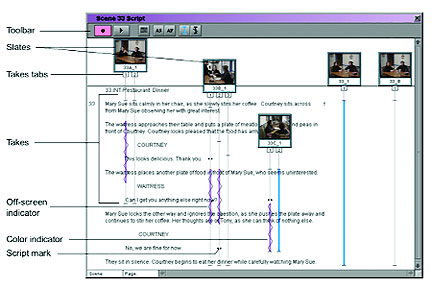
Avid has two separate modules: PhraseFind, which is for searching for dialog (kinda like Adobe), and ScriptSync, which actually gives you your script (if a narrative) or transcript (if a documentary) in a window, with little video clips that you can see are aligned to the script with lines indicating sync, with little dot things showing sync points that you can click on to move to points in the video. If you are shooting multicam, you can see mutiple clips. If you're doing a narrative it even gives you each take next to each other.

In general, Avid's one is more comprehensive. It also exactly mirrors how a professional script supervisor lines a script. Which is awesome.

The issue is that part of the ScriptSync module feels like the UI was written in 1996. That is because it was (they added the speech recognition to the syncing later).

Anyway, it's moderately awesome and of course once Apple or Adobe decides to implement it with a 2012-era interface, everyone will be like "OOH MAJOR INNOVATION". If Avid updates it, nobody will notice, except crusty old Avid editors who will complain that the buttons have moved :)

Here's an article from Editor's Guild magazine:
http://www.editorsguild.com/V2/magazine/archives/0707/techtips_article02.htm

And some pics from the article:
techtips-02b.jpeg
techtips-02.jpeg


Fantastic advice! Thanks so much.

You say "a fraction of the cost." I already own the student version of Avid which gives three years free upgrades. But are there other add on costs I'm not considering?

Not sure! The speech recognition thing is an add-on so it may or may not be covered. It was included at one point, but I think nobody even noticed that this feature was there (usual Avid marketing) so they split it out, since the 3rd party doing the speech recognition part was charging a lot for it, I guess? I'm sure you could use the 30-day trial on your project though :)

Anyway, it'll be really interesting to see what NAB brings. Maybe Avid will actually announce some good new features (after transitioning to 64-bit they have laid a solid foundation), or maybe Adobe will add stuff like the above script-based editing and/or proper project sharing / database stuff needed and really take on Avid? Dunno!

Bruce Allen
www.boacinema.com
 
Last edited:
Anyway, it's moderately awesome and of course once Apple or Adobe decides to implement it with a 2012-era interface, everyone will be like "OOH MAJOR INNOVATION". If Avid updates it, nobody will notice, except crusty old Avid editors who will complain that the buttons have moved :)

Truer words have rarely been said.
 
Back
Top