
Hi all,
I am missing audio from a Zoom H2 recording. Some of it is there, but in another part of the same clip the audio is dead, though it seems to show up as a ghosted waveform.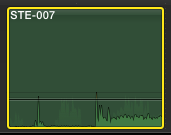
You can see the working audio at the end of the clip, but in the middle, all I have is a 'greyed out' waveform and no real audio (I can hear a hint of what should be there, but it is so quiet I can't use it. Thoughts?
I am missing audio from a Zoom H2 recording. Some of it is there, but in another part of the same clip the audio is dead, though it seems to show up as a ghosted waveform.
You can see the working audio at the end of the clip, but in the middle, all I have is a 'greyed out' waveform and no real audio (I can hear a hint of what should be there, but it is so quiet I can't use it. Thoughts?