Audio Confusion....Please Help

nklaeser

Well-known member
I just recorded an all day meeting taking a line out feed from an audio board. The client had five microphones plugged into the board, some handheld, some lavaliers. I plugged a 1/4" into the aux out and ran 150 feet of xlr cable to a Shure 267 mixer and I then took the output of the mixer into my camera. The signal I recieved seemed very low eventhough I raised the aux's all the way up and had the aux master 3/4 way up.
There also seemed to be alot of noise in the signal. Is there a way to boost the signal from the board besides by raising the levels? I don't have a lot of experience with board feeds...can someone offer some advice. I was told that maybe I could run the line level signal into a "box" that would raise the signal to a mic level making it a stronger signal?
 
I plugged a 1/4" into the aux out

An AUX of what? Was it a send with separate volume controls on each channel or true parallel of the main mix. Did the AUX have it's own volume output knob/fader?

ran 150 feet of xlr cable

Did you use an impedance matching transformer? Even though you ran XLR cable it was still Hi-Z if you didn't use a transformer.

to a Shure 267 mixer

A real oldy. Are you sure (Shure :laugh:?) it was working properly? Which input and which output did you use and how were they set.

then took the output of the mixer into my camera.

What camera, and were you monitoring the audio while you were shooting?


There also seemed to be alot of noise in the signal.

Three possibilities - Audio implementation of the camera, improper audio settings somewhere in the audio chain, long Hi-Z cable runs.
 
Are you CERTAIN it was a line-level output from the venue audio board? Sounds like it could have been mic-level.
Although this is the conventional way to do this, there are MANY places where it could go wrong.
For example exactly what did you use to adapt the 1/4" phone plug output from the board to the XLR cable?
Was it wired properly? Was it broken? And the same for the cable, etc.

The inputs on a Shure 267 mixer are switchable between line-level and mic-level.
You should need no other "box" to boost the level of the signal.

There are ways of trouble-shooting this kind of problem which include substituting pieces of the puzzle
and other techniques. And it is helpful to include things like this in your check-list:
1) Contact the operator of the venue system to pre-arrange feeds, connectors, levels, etc.
2) Have a kit which includes a variety of adapters, including spares in case of trouble.
3) Arrive early enough to connect everything and confirm operation and time for debugging, etc.
4) Know how your camcorder audio level indicator behaves relative to audio levels.
5) Use the built-in oscillator in your Shure 267 mixer to set the mixer output and camcorder input levels properly.
6) ALWAYS monitor the audio signal on your camcorder while recording with a good pair of headphones like Sony MDR-7506

It seems rather unlikely that the line level output from ANY board (you didn't identify the one you are referring to)
would be "high-impedance". I'm not sure I am buying unclebob6958's proposed solution of the matching transformer.
OTOH, if the output was single-ended, using a transformer to balance the source may have been of some benefit.
 
Last edited:
Yes, more info needed.

Was the AUX a stereo feed or a mono one? Was it true line level, or a mic level. What board was it?

I have taken many an AUX feed from a board, and never had an issue. The key is knowing what the level from that particular board was. Did you have enough gain sent to you from the board?

But since the event is over, any advice you will get is hindsight info. Did you monitor the recording throughout the event? Did you do a sound check through YOUR equipment to ensure the quality? If you didn't, well that's on you for not giving audio enough attention.

Just some things to think about on your next gig. Sound, unlike a lot of people's perception, is just like video: you have to monitor what you are recording. It is not "set and forget", just like a camera.

And, sadly, I think you just learned that painful lesson. Depending on how bad the audio is, you may be able to recover some of it with filters and EQ. But sound is GIGO: garbage in, garbage out. If the video is blown out, there is not much you can do to recover that info, as you know. Audio is that way too.

What I am saying is harsh, I know, it is tough love. But until you give audio the same attention video is given, you will continually repeat your mistake. Audio needs the exact same attention you give the imagery.

And clearly that did not happen here. Had you done so, you would have heard the issues even before pressing record on the camera. Next time be just as attentive to the audio, like you did with the framing of the shot.
 
Last edited:
I was adjusting the aux outputs of each channel and the master for all the aux outputs.  I was running the line level feed to a M267 mixer (line input) and then to a DSR250 (line input).  I not using any type of matching transformer just a straight cable run from the mixer.  Unfortunately,  there was no sound person on-hand just my self running back and forth between the mixer and my camera on the other side of the room.  I tried asking the banquet facility if I could get into the facility a day before and set-up my equipment but the answer was "no".  I was trying to beat the clock before the seminar started.
 
I was monitoring the audio throughout the event but once the event started there was not much I could do. The mixing board was a Mackie 14 channel board with the main XLR output feeding a house amplifier which I believe was a line level feeding the amplifier. I plugged the 1/4" to XLR cable into the aux send on the board thinking that this would give me the output of each channel. Fortunately, I used my own wireless lavalier on the main presenter because I knew that I was going to have many more issues if I didnt.
 
On my Mackie there is an Aux (actually 4 Auxes) on each input channel that controls the level on that input going to the bus plus an Aux Send level on each bus itself. For an input to appear on an Aux output BOTH level pots have to be opened. Perhaps you neglected one or the other.
 
The problem also may be that the house system is set up such that the speaker amps take a very low signal, and the mic gains on the board therefore are set very low. I've seen plenty of such situations where this was the case, and even the full gain of an aux send couldn't bring the signals up to a reasonable level for most recording equipment. That shouldn't be causing outrageous noise, though… In any case, always check the gain staging of the whole signal chain, and (if they let you) adjust it as early as possible in the chain.
 
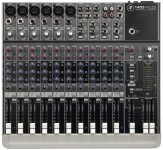
ZOOMED_1402VLZ3.jpghttp://www.mackie.com/products/1402vlz3/

This is the closest that I can come to the board that I was working on. I plugged into the 1/4" AUX SEND #1 and had each aux send pot (knob) turned up and also had the AUX 1 Master turned up. At one point during a break I tried plugging into the 1/4" MAIN OUT at the upper right side of the board with no difference. The strange thing about it was when people spoke through the microphones the level meters barely registered. Do you think the amp in the room is turned up too high? You could hear the presenters through the speakers in the ceiling but you could tell that there was alot of noise in the signal along with feedback from time to time. The master gain control was at unity (12 o'clock). The reason I am so concerned with this problem is that I have an identical shoot in this room in May and don't want to go through the same thing. In desperation, I grabbed my minidisc recorder just to see if there was a signal coming from the board and plugged into the tape out and also tried the headphone out and there was little or no signal.
 
Yes, it sounds like their setup may be pretty lousy… if you can, drop the gain on the speaker amps so you can raise the gain levels on the board. If not, see if you can drop the main mix of the speaker so as to raise the channel gains. If not, see if you can drop the channel fader levels so as to raise the channel gains, and use a pre-fader send. If they won't let you mess with their board… then you may be doing the best you can.
 
I can cover most of the presenters either with a wireless or a mic on the podium. It gets a little hairy because they walk around the too
with a wireless handheld grabbing questions from audience members. They also have a section where the leaders of the organization sit on the stage and pass a wireless handheld around answering questions. So, I am at the mercy of the audio board output. I need to talk to the client about getting an audio person there who knows whats going on.
 
Sounds like the gain staging through the board was way off. The channel faders should be roughly in the white markings at the top as should the master output fader. The meters should be bouncing around 0 to +4.
 
...
I was told that maybe I could run the line level signal into a "box" that would raise the signal to a mic level making it a stronger signal?

Since nobody addressed this... Line level is MUCH stronger than Mic level so whoever told you that was not giving good advice.

There are a few things that pop into my head RE: your situation.

First your going from 1/4" to XLR. How? You said a cable but that doesn't really say much.
If the AUX send on the Mackie is unbalanced and you are using a straight through TRS to XLR cable then one leg of the XLR is either floating like an antenna or grounded out. Either could be a problem for your mixer, it really depends on how it deals with the balanced in.

The grounding of one lead could drag the signal level down and the open lead could be a big collector of noise and static.

If it's an unbalanced AUX you should use a balancing transformer out of the AUX so the XLR is a balanced run.

IF the Mackie AUX is balanced then you may still have an issue because Mackie uses "impedance balanced" out puts not "true" balanced out puts. Technically this is not "wrong" but some equipment has an issue with it (especially older equipment). The result will be a very low signal level. To "fix" it you need to run the XLR through an isolation transformer so that the input the mixer sees is a true balanced one.

The other thing that may be going on is that the AUX may be set up so it can be an insert. Mackie does this on their "direct outs" and it would be really weird to do on a real AUX but I'm not 100% confident that you were actually plugging into an AUX. Was it actually labeled as an AUX send or is that just what you think you were plugging into? Not meaning to be insulting but you said you didn't know much about audio so if the same guy who told you to boost your line level up to mic level also told you it was an AUX send maybe it was an insert???
 
I suspect the house mixer & system was not gain-staged properly, as I have run into countless times. Usually the channel (preamp) gain is set so low there's no way to get an adequate level, out of a post OR pre-fader aux. send. Usually it's result of the house A/V idiot feeding line level to a mic level input (which is the configuration with many 'installed' hotel ball-room systems). This results in having the gain extremely low on the house mixing board.
Usually a Mackie VLZ type mixer in the room, feeding an XLR mic-level wall jack. FWIW, before the Mackie's made their appearance, it was very common the find a Shure M series mic mixer, which was more fool-proof. As many hotel A/V dept.s are staffed by idiots. Sorry if I offended anyone.
 
Yeah, I have seen INSERTS be used as AUX's before, I used to do it a lot when I ran out of AUX sends. It's all in how far you plug the TRS into the jack. First notch makes the jack act as an AUX, second notch it is a INSERT.

But I suspect Rick and those that mention improper gain staging are right. If the guy was not used to sending multiple feeds, or just didn't give a you-know-what, it is easy to have the system "sound" okay, but in reality, the system is woefully inefficient due to the way the board is set up.

The abbreviated way I used to set up a board for a live mix and the GS'ing,

1. Zero the board. Faders to infinity, trim all the way down
2. Start with first needed channel, live up the mic, bring fader up to unity gain.
3. do mic check, while bringing up the trim. I used to shoot for about +2 on slightly louder signal (depends on the material)
4. repeat for each channel being used
5. Then mic check with talent, so I could apply any needed EQ, and balance the mix up.

There is a lot more to it, but it give you the idea.
 
Or simply set the Aux buss to pre-fader and set your own level and your fed will not be effected by what the sound guy needs to do for the PA... now if the gain on the mics isnt enough then its pilot error on the sound guy's behalf. show him the manual where they explain settign gain staging.
 
At one side I can understand the OP (you, nkleaser, that guy yes :-p)

I think he has had one of those typical "we ALSO want a VIDEO of an event, like all the other guys". Where those people think that capturing/recording video is something
you do between "entree" and "main dish". And think that all those cool/impressive images/sounds/edits are because those crew-people are sleeping all day...

And of course they want a 86406846846484343468434 zillion dollar "value" film for the price of 0,000000000000000000000000001 dollar.

And of course they will be mad if things aren't good because you're on your own. So telling them "I can't do this alone" is not always an option because they'll go
to someone else... But I think one has to dare to say: "ok, fine.. go to someone else because he/she is cheaper...I'll be glad to welcome you back after you
discovered "cheap is not always better". But then of course everything will go well (with the cheaper one). So you're screwed anyway....

You wanted to take a look the day before but you couldn't... But I think being able to be there 2 hours before, together with the other technicians or so... O Wait,
you told that there was nobody...so probably it's all been setup and then they ask a monkey to switch on everything :-p

But I think you (plurial) got my point :-p

And to find problems there's a kind of "following steps"

- first check if everything has power and gain and faders are open, speakers are on ?
and if 48v is needed or not
mute button is off ? no solo's are on ?

- with wirelles mic, check frequencies, attenuation, sensitivity on mic and receiver, receiver is on, not muted,
cable at receiver site is plugged in and is ok ?

- start where the mic is, replace the mice with a mic you're sure is working (which you tested with a cable that's working)
it works know ? throw away the mic (the old one)....or replace batteries.

- not working ? replace the cable between the mic and the other end (mixer or patch)

- if not working yet, check the connections between the mic and the mixer, try other patches,
other inputs on the mixer,

- check between mixer try other cables, other patches...
 
The problem is with this facility is that there is no audio person. The audio system is set-up by the night crew and a "a/v" guy comes into the room in the morning a turns everything on, does a quick sound check and then leaves. No one rides the levels or knows w the ystm is calibrated. I have another shoot at ths facility in May and I want to be prepared when I walk into the room. I believe that I was plugged into the aux send output on the board. What type of cabling or device do I need to get a good/clean feed? I submitted a diagram in one of the earlier posts showing the type of board I wad connected to.
 
The problem is with this facility is that there is no audio person. The audio system is set-up by the night crew and a "a/v" guy comes into the room in the morning a turns everything on, does a quick sound check and then leaves. No one rides the levels or knows w the ystm is calibrated. I have another shoot at ths facility in May and I want to be prepared when I walk into the room. I believe that I was plugged into the aux send output on the board. What type of cabling or device do I need to get a good/clean feed? I submitted a diagram in one of the earlier posts showing the type of board I wad connected to.
Ouch. That's a bad position to be in.

Believe it or not, unless you separately mike each talent for your own purpose with your own mixer, the equipment you need is already in place, save for the guy to run it. I would highly suggest that you find a decently knowledgeable audio guy to help you out.

Seriously, that is the solution here. A mix engineer can really enhance the audio you capture (that is the position/crew member you are looking for). He will run the board for you, even handle the recorder (doing a secondary recording from the board is never a bad idea). That leaves you free to focus on the video aspect.
 
Last edited:
I agree with Doc Bernard. Simply adding a hardware gadget is unlikely to be the solution to this problem.
You've got one equation and 7 unknowns here. Your symptoms could have been caused by any number (or all) of these possibilities.
Either find an experienced audio person to help you or plan on spending several hours in advance with the venue people to work out the problems.
 
Back
Top