Apostrophes and foot marks

little bobby

Well-known member
So I discovered something strange today while I was creating some text in Premiere CS6 using the Titler. For almost all of the fonts that are installed on this computer the apostrophe comes out looking like a foot mark. The only reason this even came to my attention is because I have a supervisor that is really really really in love with typefaces and I had to then spend way to much time finding a font within titler that actually looked like an apostrophe. Apparently there are only 3 fonts on my system that, when in Titler, look like apostrophes. In any other program, Adobe or otherwise, the apostrophe looks like an apostrophe, not like a foot mark.

Does anyone else run into this problem? Anyone have a solution? Anyone even care?

SUmpcm0.gif


I think the image should be pretty straight-forward.
 
I checked this out in Premiere and yes ..thats how it is.

I then checked my fonts using Main Type and thats exactly how they are represented there too. (So its not an Adobe issue)

Maybe that's just what they are supposed to look like ? ' " , ;


The tricky thing about apostrophes is that they need to be "smart." Microsoft Word automatically flips them to face the right way based on relative proximity, but it involves programming that I guess the titler in Premiere doesn't want to deal with.

I think you can get intelligent apostrophes in Photoshop, if you want to design your titles there and import them.
 
Maybe that's just what they are supposed to look like ? ' " , ;

Unfortunately Shooter, that is not what they are supposed to look like. Those represent the foot and inches marks, respectively, something that I am guessing is much more common in the US as opposed to the rest of the metric-using world.

The typeface I am using has a specific look to the apostrophe and what Titler uses is not even in the same typeface family. That is what I find strange.

Anyways, I re-did the titles in Photoshop and it uses the correct symbol for apostrophe.

HmC7ENF.jpg


Maybe Titler does lack the ability to recognize and utilize the "Smart" apostrophes and quotation marks as you mentioned Finn. Photoshop always makes the quotation marks face the correct direction. I don't mind using Photoshop to do the text for my videos; it just seems as though Premiere should be able to do it properly.
 
Unfortunately Shooter, that is not what they are supposed to look like. Those represent the foot and inches marks, respectively, something that I am guessing is much more common in the US as opposed to the rest of the metric-using world.

They're also minute and second marks when measuring angles.
 
Unfortunately Shooter, that is not what they are supposed to look like.


Yes . I realise that.
But its interesting that a Font Manager shows them that way as does this site. , ' ; " ,

Even Windows 'FONTS' displays them wrong.
 
The problem isn't the fonts... it's choosing the right characters.

Back in the old days, when all text was ASCII, there were only the single and double quote characters, which stood in for feet, inches, seconds, minutes, quotes, apostrophes, accents, etc. Due to this confusion some fonts will represent them as asymmetric quotes, but most show them as "prime" marks. (Some fonts show them as accents.)

Fortunately now we have Unicode, which has special characters for quotes. The hard part is getting at them.

Some software will automatically do this -- e.g. in Word, if you type prime - hello - prime, you get open quote - hello - close quote. It seems that titler isn't that smart, though. (Which is actually good, if you want to completely control what's in your titles).

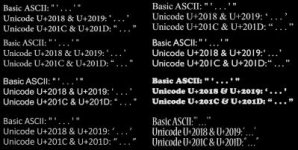
You can get the quote characters / apostrophes you want using Windows' "Character Map" accessory; I guess Mac will have something similar. But be careful, there are a lot of "turned comma" and "combining mark" things that look similar. The ones you want are U+2018 & U+2019 for single quotes, and U+201C & U+201D for double. U+2019 is also the officially recommended character for apostrophe.

Below is a test title I made up showing those characters in a bunch of randomly-chosen fonts. This page explains the quotes:

http://www.cl.cam.ac.uk/~mgk25/ucs/quotes.html

Wikipedia is useful too:

http://en.wikipedia.org/wiki/Apostrophe#Unicode

Cheers.


Quotes.jpg
 
Last edited:
Back
Top