Ed Kishel
Veteran
Haven't been here in a while so I don't know if Panasonic monitors these boards anymore. I know Mr. Green does and he's got their ear I think 
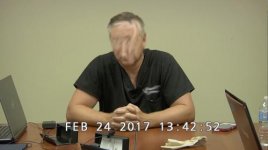
Here is a frame grab from a 4:3 SD center crop of some 1080 footage. I took this because SD is alive and well in the world of legal video. In particular, depositions shot in HD have to be scaled and cropped- as the trial prep software that attorneys use only accepts 4:3 SD. The issue I have is that the all-important time and date stamp is so too far to the left of the frame. It practically clips the first character off when cropped (and will whatever date/time format the display is set to). It looks worse if the monitor used to display it has a large safe area. And some older courtrooms still rock the CRT.
Now I could re-frame off to the left, which would put the stamp more in the middle when cropped. But most court reporting firms have batch transcoding setup for the center of the frame. They want the original unaltered footage so they can just drag and drop into Sorenson Squeeze / TMPG ENC etc. Having to manually adjust the framing for each file becomes a problem. And "problems" affect future deposition job offers.
Panasonic- I've only had this camera for a few days but I LOVE the UX90 so far. Pretty please with a cherry on top: in the next firmware can you center the time and date stamp? Or at lease some extra space before the first character? Even in the HC-X1000 (although not centered) the stamp looked a lot better.
thank you
Here is a frame grab from a 4:3 SD center crop of some 1080 footage. I took this because SD is alive and well in the world of legal video. In particular, depositions shot in HD have to be scaled and cropped- as the trial prep software that attorneys use only accepts 4:3 SD. The issue I have is that the all-important time and date stamp is so too far to the left of the frame. It practically clips the first character off when cropped (and will whatever date/time format the display is set to). It looks worse if the monitor used to display it has a large safe area. And some older courtrooms still rock the CRT.
Now I could re-frame off to the left, which would put the stamp more in the middle when cropped. But most court reporting firms have batch transcoding setup for the center of the frame. They want the original unaltered footage so they can just drag and drop into Sorenson Squeeze / TMPG ENC etc. Having to manually adjust the framing for each file becomes a problem. And "problems" affect future deposition job offers.
Panasonic- I've only had this camera for a few days but I LOVE the UX90 so far. Pretty please with a cherry on top: in the next firmware can you center the time and date stamp? Or at lease some extra space before the first character? Even in the HC-X1000 (although not centered) the stamp looked a lot better.
thank you
Last edited: