Advice for lighting a toy on a white cyclorama and getting good whites

stanw

Active member
I am using an Aputure 300d Mark II with an Aputure Light Dome II for some simple product/toy videos. I have the light close to the toy on the white table top cyclorama, and the Aputure was dialed up to around 85%. The Light Dome is large in relation to the toy and it is fairly close so I figured it would be blasting it with soft even lighting. The light is on a small stand and is maybe a foot off the ground or so. I tried shooting on an A7IV at 24fps and at 60fps and I adjusted the f-stop and ISO to get the exposure right, and the shutter based on the FPS.

My goal is to just create soft even lighting onto the toy,

https://imgur.com/X4fdTwv

https://imgur.com/Q4z5wTW

1. The whites in the cyclorama do not look white to me, they seem muddied. How can I get it to look more white?
2. Any general advice for a better way to light this?

Thanks in advance for any help
 
In the wide overhead you can see chewbacca is getting in the way of his own limbo effect (chewie preventing himself entering limbo is pretty deep).

One approach is to evenly light the cyc first, then bring in the talent and see what's needed. A better position for the cyc light might be completely overhead and the softbox may even work best half on the cyc, half hanging over the back (to keep a bit of light off talent).

For chewie, the lighting is certainly soft but possibly too soft. If this were a human, your softbox would be the equivalent to a 40 foot diffusion frame (just estimating), which means it's more difficult to get any shape on him.

There will already be light bouncing everywhere from the cyc so you could experiment with different size white cards like one that's the size of a post card or even credit card. That would still be like a 4x4 or 8x8 frame on a person. If more separation is needed, the smaller key light could also help let an edge light read more because there'll be more of a shadow on one side.

Talent position might work best on the bottom left corner, as close to the edge as possible that still shows enough white on the ground. Or try adding additional white paper and increase the distance even further from the wall.
 
Last edited:
my thoughts from having done qute a lot of 'white'

dont expect the bg to be white.. expect to make it white in post

why is he not further up the stage (more space between him and physical background

often negative fill (black card) is used to make shape on the subject.

often this is so close to the subject as need removing in post

you may even the light more by putting him in tent .. which could be made in this scale with 2x2 bit of diffusion roll propped in an inverted U

if the tent is over the subject you may create a situation where the b/g is 4 stops over the subject and then will get a good white while 'shading' the subject

you might (in a full life scale would) put secondary fixture firing on the background

the real art is to get a nice transition between a correct exposed subject and over exposed bg.. thats where opening seperatin (distance) between the two helps

in post is should be easy to key the bg using colour picker and a roug and feathered lassoo
 
Is this for still or video? I am guessing nothing will be moving within the scene? I agree that this might be more skewed towards post with background enhancement or replacement. If it is a still frame this could be done in Photoshop. Some still photographers use clear plexiglass to place the subject on and have the white underneath/behind which allows for complete separate lighting. Complicated no doubt but seemingly always "faked" without the perfect studio equipment setup.
 
Last edited:
In the wide overhead you can see chewbacca is getting in the way of his own limbo effect (chewie preventing himself entering limbo is pretty deep).

One approach is to evenly light the cyc first, then bring in the talent and see what's needed. A better position for the cyc light might be completely overhead and the softbox may even work best half on the cyc, half hanging over the back (to keep a bit of light off talent).

For chewie, the lighting is certainly soft but possibly too soft. If this were a human, your softbox would be the equivalent to a 40 foot diffusion frame (just estimating), which means it's more difficult to get any shape on him.

There will already be light bouncing everywhere from the cyc so you could experiment with different size white cards like one that's the size of a post card or even credit card. That would still be like a 4x4 or 8x8 frame on a person. If more separation is needed, the smaller key light could also help let an edge light read more because there'll be more of a shadow on one side.

Talent position might work best on the bottom left corner, as close to the edge as possible that still shows enough white on the ground. Or try adding additional white paper and increase the distance even further from the wall.


Hi Rob,

1.) I’m sure the answer to this is going to be obvious, though when using such a large/soft light source like this, how does the lighting differ if lighting from overhead vs. from the front? Do you mean just in regards to being able to move it partially off of the subject overhead like you suggested?

2.) You mentioned the light is "too" soft, should I just move the light further back to eliminate how soft the lighting is?

3.) The only reason I placed Chewie where he is (Chewie is actually just a stand-in for the actual subject I’m going to shoot video of) is because if you take a look at my setup in this photo https://imgur.com/lFqcit4 I have very little space to position myself between the light and the subject/Chewie. I am moving in on the subject, tilting up, panning across….

Perhaps I am doing this all wrong, and my setup needs to be completely different. I am open to ALL suggestions.

Thanks!!!!!
 
my thoughts from having done qute a lot of 'white'

dont expect the bg to be white.. expect to make it white in post

why is he not further up the stage (more space between him and physical background

often negative fill (black card) is used to make shape on the subject.

often this is so close to the subject as need removing in post

you may even the light more by putting him in tent .. which could be made in this scale with 2x2 bit of diffusion roll propped in an inverted U

if the tent is over the subject you may create a situation where the b/g is 4 stops over the subject and then will get a good white while 'shading' the subject

you might (in a full life scale would) put secondary fixture firing on the background

the real art is to get a nice transition between a correct exposed subject and over exposed bg.. thats where opening seperatin (distance) between the two helps

in post is should be easy to key the bg using colour picker and a roug and feathered lassoo

Hi Morgan,

Regarding achieving true whites, I was just concerned that I was doing something wrong. Regarding moving him further from the background, it was just because I have limited spaced in between myself and the light and the subject while shooting https://imgur.com/lFqcit4

Regarding using a tent, should I just be doing this inside of a light box? The reason I got the cyclorama was so I would have enough space to pan across the subject, though unless I am missing something, the background is not high enough to be able to easily tilt up and down on my subjects…unless I am doing something wrong…which is likely.

Thanks!!!!
 
One comment.. a diffuse tube with an open back is imo better than a light tent because you can light the bg very bright compared to the subject - when ive used a light tent i opened the back ro make that effect
 
As other suggested I think your subject is too close to the background. I would suggest buying a "half roll" size of white seamless paper, (about 4.5' wide) and costs about $20.00. Roll the paper out about 5 -6 feet and up to a C-stand, this will extend your background to give a white limbo effect you'll need to light the background but you'll be able to get a clean white background, you'll need a dining room table size surface hence the term "tabletop". If in a studio use a 4x8 plywood on horses with the half roll of seamless.
 
Hi Rob,

1.) I’m sure the answer to this is going to be obvious, though when using such a large/soft light source like this, how does the lighting differ if lighting from overhead vs. from the front? Do you mean just in regards to being able to move it partially off of the subject overhead like you suggested?

2.) You mentioned the light is "too" soft, should I just move the light further back to eliminate how soft the lighting is?

3.) The only reason I placed Chewie where he is (Chewie is actually just a stand-in for the actual subject I’m going to shoot video of) is because if you take a look at my setup in this photo https://imgur.com/lFqcit4 I have very little space to position myself between the light and the subject/Chewie. I am moving in on the subject, tilting up, panning across….

Perhaps I am doing this all wrong, and my setup needs to be completely different. I am open to ALL suggestions.

Thanks!!!!!

I'm assuming you want the white background to be as even as possible and appear completely white?

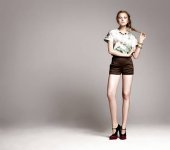
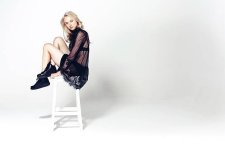
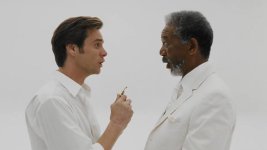
Look at these white cyc examples, along with potential reasons they were used:

fashion.jpg - Click image for larger version  Name:	fashion.jpg Views:	0 Size:	25.5 KB ID:	5690749istockphoto-473063792-612x612.jpg - Click image for larger version  Name:	istockphoto-473063792-612x612.jpg Views:	0 Size:	18.9 KB ID:	5690750
Fashion shoot - obvious shadows, no abstract effect, they want you to know the studio is the location.

bruce.jpg - Click image for larger version  Name:	bruce.jpg Views:	0 Size:	26.2 KB ID:	5690751

Scene from Bruce Almighty (shot by Dean Semler) - Bruce meets God. This isn't a studio, it's heaven! No shadows are critical to sell the effect that the white continues forever.

Your shot doesn't necessarily need meaning behind it either if you simply like the look.

1) I only suggested overhead rather than front on as a way to avoid the talent's shadow hitting the wall. Another position could be from one side on the ground, with the light aimed at the wall but behind chewie. A pair of small lights on both sides could also work e.g. aputure credit card sized lights.

2) Yes, one way is to light chewie first, then light the wall to eliminate any shadows. But if you only have access to one light then you might be splitting the difference with something that works for both at the same time. This is where small bounce cards or negative fill would come in. Except before those modifiers, you could just quickly use your phone to dial in brightness with different sized sources. For example, a phone background at full brightness with a white rectangle might be enough of an "LED panel", or an orange background for a warmer edge light.

3) That sounds like a decent sized camera move. What do you have to tilt and pan to? Your overall plan has to take the camera position into consideration as well.

I think more space is going to help you here, which hopefully isn't too much of an issue because of the smaller size..
 
Last edited:
As others have suggested. Lighting the cyclorama separate from your subject and having the subject further away will help control exposure on BG and subject separately. I shoot a lot of toys and incorporate a ton of small lights and dedo type projector accessories to get the toys to look great but not too flat from large soft sources I use to set light level. I'm not sure the exact scale of the product but on any little toys a probe or periprobe lens (or other wide/macro in a pinch) can help give the figure a more 'full size' perspective.
 
Silly question, but in the two photos, the very edges, and behind the white cyc appear to be lit? As in there are more light sources than just the two lights you mention? There don't seem to be any 'off-set' shadows, so what is filling those in? Top right is a straight shadow from the top of the cyc, but we can see detail in the shadowed area? What colour temp is that light? The same as the other two? This could be giving you the little colour shift? Not the two video lights you mention?
 
Back
Top