5dtoRGB doesn't "see" footage on SD card

woodcarver

Well-known member
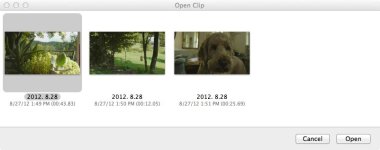
Just got 5DtoRGB lite on my mac (running mountain lion). I shot a little on my GH2 and inserted my SD card in the computer but 5DtoRGB can't seem to find anything on it to convert. It does convert files from the "orignal media" folders created by FCP X, but it would be nice not to use FCP X to copy the files to my hard drive first before converting them with 5DtoRGB. Anyone else have this issue--or know the solution? Thank you.
 
Thanks for the quick response. I did open up the card, looked for the files. There was nothing there that 5DtoRGB would recognize. In fact, the structure looks quite different than it did in Snow Leopard.
 
5DtoRGB will work with .MTS files. You have to find those clips within the AVCHD directory structure and add them directly to the file window in 5DtoRGB.
 
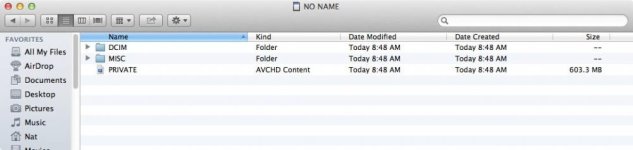
Yeah, I believe I understood your first posting. Trouble is, there are no .mts that show up when I open the SD card and hunt around inside it. Really weird, but I attached two screengrabs which show what I mean. I know the .mts files are there somewhere, because FCP X is working fine with all the footage I shoot. The organization--or at least the way the operating system is displaying the organization appears to be new.directory structure in OS X.8.jpgdouble click "private".jpg
 
Ok, I found this an answer on Macworld (here's a link http://hints.macworld.com/article.php?story=20120801145830468)
"In Mountain Lion, movies are now locked into Quicktime so the folder structure containing your .mts movie files on SD cards and devices is now all hidden under a file called PRIVATE. To get to the files, hold down the Control key and click on the PRIVATE file. In the popup menu, select Show Contents and repeat through the files until you reach your original .mts files, which can then be dragged to the desktop".
Unfortunately, 5DtoRGB lite won't let me control click on the PRIVATE file (it's grayed) out, so I had to control click through finder and yank the .mts files out and copy them to my desktop. Maybe this will be fixed in an update of 5DtoRGB.
 
I saw this earlier and then stumbled on a different solution, then forgot where I saw this thread.

If you have lightroom 4, import your MTS files using LR. The nice thing is you can set up a nice easy system for cataloging your MTS files with however you choose to catalog. Then, in lightroom right click the folder you just downloaded to and select "show in finder". There they are, ready to batch in 5d2rgb. If you need to convert just 1 at a time, right click the MTS preview and select show in finder, then drag that to the 5d2rgb icon. Pretty simple and your backing up your footage were you can use lightroom for reference.

If you like 5d2rgb, spend the bucks and download it from the App store so you can batch process.
 
Back
Top