3D camera not working?

Hehe, I did that tutorial a long time ago and since used the effects to get alot of other things done as well. Yeah check that the layers are set to 3d. Make sure you are rotating the camera around and not anything else as well as making sure your view is set right. Try different cameras like left right top and all that to see if you are actually moving it. Select the camera from those views and drag it around, it should move.
 
make sure your 3D layers for your camera are activated, and that you are in active camera view. Basically what everyone else already said.
 
Well..i went to the preview settings..and i click instead of Active Camera...i put Camera 1.

I went to like Left and right views..the camera is there..and i can move it around..but when i click Camera 1 view...it doesnt change...its retarded...


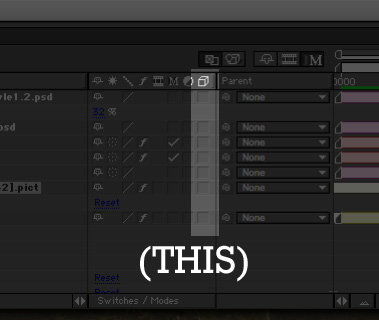
..but iduno how to put all layers to 3D..where's the button?
 
ae_3dbuttons.jpg
 
I believe it's the button right above your red circle and slightly to the right. It's in a grouping of two with one currently depressed.
 
not sure on windows, but you need to switch that section that says "switches/modes" to switches.
 
Back
Top