16:9 black bars cutting off part of video

FilmBoy77

Veteran
Quick question. I have a video shot in 4k of a black ops character controlling a 3D hologram beacon. First off, let me know what your opinion is of it in general since this is moreof a first pass at it: https://www.youtube.com/watch?v=2__IVjH7eDI

Secondly, when I add the black bars on the top and bottom his hand is cut off and the beacon just seems to appear instead of you being able to see that it came from his wrist. Is there any way to show the entire thing with the black bars? See attachment for reference.
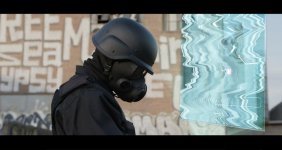
 

Attachments

  • black ops.jpg
    black ops.jpg
    50.7 KB · Views: 0
Not too bad on the holographic. You are victim if you will of shooting/framing for maybe 16x9 format but now you want to convert to a more cinema format. Why are you using black bars rather than make your sequence setting what you are wanting to export? About the only thing I can think to do is re-position the video so it appears the camera drops down to show the wrist, of course you will then cut off part of his head by doing that.
 
Not too bad on the holographic. You are victim if you will of shooting/framing for maybe 16x9 format but now you want to convert to a more cinema format. Why are you using black bars rather than make your sequence setting what you are wanting to export? About the only thing I can think to do is re-position the video so it appears the camera drops down to show the wrist, of course you will then cut off part of his head by doing that.

If the clip is long enough, you could shift the crop down to show the wrist, then animate the effect so that over the course of the clip it moves upward to show the head -- sort of faking a camera tilt.

But I agree, if you're going to apply this cropping in post, then you have to bear that in mind when shooting and frame your shots accordingly.
 
Back
Top