_joe
Member
and for clarification idiot = me
so I went out with the intention of shooting in 24Pa, but somewhere along the running and gunning, the scene selector wheel clicked over to a setting I had for 24P.
Captured into avid via firewire into an Avid MC 23.97 timeline and everything looked just fine and dandy mixing between the P and Pa. Even encoded in a small .mov encoded with H.264 with no problems.
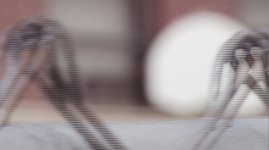
HOWEVER, when I now want to export to DV/DVPRO - NTSC with the current frame rate, progressive, the P footage now shows significant banding/field problems/whatever you want to call it. I've included a pic for kicks.
I'm a bit miffled as to what I can do to solve this problem since I'm a bit of a newbie when it comes to creating video for things other than the web. I thought re-exporting and deinterlacing from QT would work out the problems, but that only reduces the image quality overall.
Any help would be greatly appreciated/deserving of a cookie and metal. Thanks :-D
so I went out with the intention of shooting in 24Pa, but somewhere along the running and gunning, the scene selector wheel clicked over to a setting I had for 24P.
Captured into avid via firewire into an Avid MC 23.97 timeline and everything looked just fine and dandy mixing between the P and Pa. Even encoded in a small .mov encoded with H.264 with no problems.
HOWEVER, when I now want to export to DV/DVPRO - NTSC with the current frame rate, progressive, the P footage now shows significant banding/field problems/whatever you want to call it. I've included a pic for kicks.
I'm a bit miffled as to what I can do to solve this problem since I'm a bit of a newbie when it comes to creating video for things other than the web. I thought re-exporting and deinterlacing from QT would work out the problems, but that only reduces the image quality overall.
Any help would be greatly appreciated/deserving of a cookie and metal. Thanks :-D