What is the best monitor system for an HVX. By best I clearly mean cheapest and most efficient. Feel free to include anything from lcds to arms to power supplies and what not. If there is already a thread about this I am sorry. I searched but I couldn't find a thread on it. Thanks in advance

Navigation
Install the app
How to install the app on iOS
Follow along with the video below to see how to install our site as a web app on your home screen.
Note: This feature may not be available in some browsers.
More options
You are using an out of date browser. It may not display this or other websites correctly.
You should upgrade or use an alternative browser.
You should upgrade or use an alternative browser.
HVX 200 monitor question??
- Thread starter theknife
- Start date


dregenthal
Veteran
What is the best monitor system for an HVX. By best I clearly mean cheapest and most efficient. Feel free to include anything from lcds to arms to power supplies and what not. If there is already a thread about this I am sorry. I searched but I couldn't find a thread on it. Thanks in advance
Cheap & most efficient are not going to fit into the same category as best, but you already know that. If 100 people respond to your thread that's probably how many answers you're going to get . . .
Be that as it may, I wouldn't trade my Panasonic BT-LH1700W for anything at the price point - but it's not cheap. There's another thread on the Manhattan 8.9" LCD just a couple lines below yours . . . They're $495. I just got mine the other day and am very much impressed with it (and very glad I sold off my Marshall a couple months back). It comes with a small AC power brick so you're good to go right out of the box. A great option for portable power is the Tekkeon MP3450 rechargeable, usually somewhere around $135 (shop around you may do better).
I gave up on getting ripped off on Noga (and similar) arms a long time ago . . . I use a Manfrotto 484 ball head attached to a Manfrotto by Bogen Imaging Quick Action Super Clamp, and attach it direct to the top carrying handle of my HPX170 or HVX200, or anywhere else that suits me (like the arm on the fluid head of my tripod).
Hope this helps (and doesn't start a war, i.e., "my monitor's better than your monitor).
Best.

dregenthal
Veteran
Color is important.... how much assembly is required for the manhattan lcds?
None . . . You take it out of the box, plug it in and press the power switch.
(I'll try to post a pic of mine in the next day or two).

jjb
Well-known member
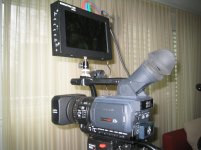
Attached you'll find a picture of my Manhattan lcd.None . . . You take it out of the box, plug it in and press the power switch.
(I'll try to post a pic of mine in the next day or two).