Hard Drive Failure + Corrupt P2 Footage = Help!

AlexMWhite

New member
I am 2nd AC/P2 Workflow on a project being shot this weekend. The producer purchased an Iomega UltraMax Pro 1.5TB hard drive last week. I formatted it as a Mirror RAID, and on Friday night - after the first day on set - I imported all 36 clips into FCP 5.1.4 as well as copy two P2 Cards completely raw (the original Contents + lastclip.txt stucture). Everything was going great.

Saturday morning comes around, and the next time I plug in the Iomega drive (the second time its been plugged in total), one of the drives fails. It could not be detected using Disk Utility nor DiskWarrior. The only application that could find anything was DataRescue II. Unfortunately it would have to take 21 hours to completely scan the Iomega RAID.

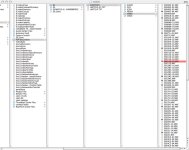
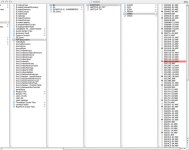
Today, Sunday, DataRescue "recovered" all of the data. Unfortunately, it appears to all be completely corrupted.The VIDEO folder under the CONTENTS folder has 'broken' mxf files (see attached photos below)http://picasaweb.google.com/alexmwhite87/P2Problems#5259025035436744482. None of the .mov footage brought into FCP will open, either.

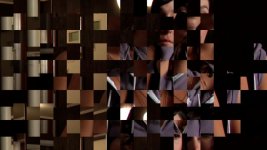
I have tried Raylight, P2 Genie, and the "Repair P2 Clip/Volume" on both P2 Log Pro and HD Log. Raylight and P2 Genie did not do anything and the closest HD Log got me were corrupted files with a few random frames of not as corrupted footage ((see attached photos belowhttp://picasaweb.google.com/alexmwhite87/P2Problems#5259025034036474610).

Is their any hope of recover those QT or MXF files?
Thank you so much for your time!
Sincerely,
Alex M. White
 

Attachments

  • CorruptP2-Finder01.jpg
    CorruptP2-Finder01.jpg
    100.4 KB · Views: 0
  • CorruptP2-Finder02.jpg
    CorruptP2-Finder02.jpg
    100.4 KB · Views: 0
  • CorruptP2Clip01.jpg
    CorruptP2Clip01.jpg
    64 KB · Views: 0
Looks like everything got lumped into the "video" folder under contents. Trying separating the stuff in there into appropriate folders.

0004RZ, 0005GR, etc. are most likely video, everything else should be in the other folders. You might need to trying opening the other files and determine what they are and possibly rename the extensions accordingly.

It looks like it's all there, just all unorganized and a big tangled mess, perhaps someone else will have more and better advice.

Good luck.

Also...see if you can find someone with the latest Final Cut 6. It seems to handle importing stuff much easier. You don't even need the lastclip.txt files and it still works. Maybe it will "see it" better than FCP 5.
 
Hi,

Not sure what help program you used but it sure didn't do the job very well. The ******-01.mxf types are audio files. Pull those and put them into the Audio Folder. Als I don't understand how you ended up with two lastclip.txt files. This too is adding to your corruption. Once you have them separated, buy a copy of P2 Log from Imagine Products and have it run a repair on the folder. More Data Repair programs look for something entirely different when trying to repair. This program is looking for the MXF integritiy. It is a specialty application that next time you go to shoot, you should use it to off load your cards, and you won't have this problem.

Good Luck,

JAn
 
HVX-FS-100 Corruption Issue

HVX-FS-100 Corruption Issue

I recently was shooting on the HVX to a Firestore FS-100 in 720/30P and during an important interview, the red roll indicator in the view finder went off.
I was careful not to jiggle or move the sensitive 4 pin connection and even had gaffer tape holding it squarely in the receptacle as a strain relief. This happened 2 or 3 times over the next few hours. When I attempted to off-load
at the end of the day, the contents folder claimed to have an error (probably due to a corrupt file) and wouldn't let me transfer. I had to open the folder and drag the files 10 at a time starting at the last clip and working back to the first files. Sure enough, the first few clips were corrupt from probably being interrupted during recording. I rebuilt the contents folder in the back-up HDD to restore the structure and then backed it up 2 more times. Now the FCP editor that is cutting the doc cannot log and capture many clips because of errors. I imported all the clips I could into PPro CS3 with AHD installed and after deleting the corrupted clips (which were luckily brief test records and bars) I had success with most of the footage and only lost about 8-12 minutes over a whole day of shooting. The FCP editor had told me because of spanned clips, FCP wouldn't log and capture 2 critical files. I now have to export to tape (DVCPRO-HD) the 2 clips that FCP couldn't open as a work-around. Some advice I have is, until panny or a 3rd party supplier come up with a 4 pin to 6 pin adapter that mounts on the HVX, you are risking this same problem. I have alot of confidence in the P2 card system now and have never had a corruption issue with them. I recently purchased Shot Put P2 and the in-expensive Acer laptop that was mentioned in Barry Green's thread. It can copy the P2 card contents to up to 3 drives at once. Sorry for the long thread. Jim
www.southafricamovie.com
 
"I formatted it as a Mirror RAID"

Why was there a problem? The point of mirroring is that when one of the drives fails the other drive has the exact same information you simply swap out the faulty drive for a new one.

I just looked up the drive you are speaking about, and it seems to me to be a Raid 0 (STRIPPED) Raid drive. This means the drive is going to be faster (good for editing) but it is not Mirroring your data which is entirely the point on set.

You need to give this drive to an editor and get an actual mirrored raid drive right away. Something like a G-Tech G-Safe (NOT a G-Raid) or a Lacie 2Big which have RAID 1 controllers. This whole ordeal would have been avoided if that had been the case, simply remove the drive that failed and pop in a new one.

This drive is no different than any other removable drive and if you are going to continue using it then your production team needs to purchase a second external hard drive to back up the files manually into. As of right now you have a single point of failure on your data.


**edit** further googling of this drive shows a RAID 1 Version of this hard drive (I found this on Newegg) However, the reviews are less than glowing. Alex can you please confirm that you where using the newer version of the Iomega drive (one with Raid 1 and eSATA) and that it failed AND corrupted your data even when mirroring? There is an older model that does not seem support Raid 1.
 
Last edited:
Back
Top