Multi-clip HD editing between Panasonic and Canon

Artvoice

New member
I use an HVX-200 and have been doing multi-cam shoots with a guy using Canon AH-X1. The formats are different. I am the one doing the editing in FCP 6 and I want to be able to use multi-clip edit. How do I convert the Canon clips to be compatible so that FCP will allow me to multi-clip?

jamie
 
There are a couple different ways to go about doing this. Your goal is to get everything into the DVCPRO HD format.

Option 1: Create a timeline for his HDV video that matches his camera settings. Log and capture his video. Place all of his footage on that time line than export using QUICKTIME conversion to match your HVX settings. That's based on guessing that you both shot either 60i or both shot 24p. If you shot different frame rates than it's a bit more involved that that. Than import those new files into you DVCPROHD project.

Option 2: Create a timeline for his HDV video that matches his camera settings than log and capture his video. In the browser, right click on his clips and select media management and select convert to DVCPROHD. Select a destination for these new files. Than open you timeline for the HVX video and import those new files into the project.

I hope this helps.

Jim
 
If you shot different frame rates than it's a bit more involved that that. Than import those new files into you DVCPROHD project.

Jim

I have the same task that would involve two diff frame rates.
DVCPRO HD 720 24pn
SD DV 720x480. 29.98fps

Final edits will be SD on a DVD. Any idea how i should convert my HVX footage to match my other frame rate? (un-edited) Once i have matching frame rates then i will edit my project.

i open to any suggestions/tips.

thanks in advance.
 
I have done the same thing with good results, MCVIDEO. I found the best results with converting the SD 60i DV to DVCPROHD 720 24p.

when converting the SD, use an inexpensive plugin like Nattress to conform the frame rate, add some interpolation to covert the 4:1:1 to 4:2:2 and then lay it in a 720 DVCPRO HD time line. Render, export and import file back into project for multi-clip editing...etc.

Takes up more HDD space and time to render, but I have found it makes a better looking final product. Also, 24p on a DVD takes up less space and plays great on set top boxes with CRT monitors and computers with LCDs.


Jason
 
I have done the same thing with good results, MCVIDEO. I found the best results with converting the SD 60i DV to DVCPROHD 720 24p.

when converting the SD, use an inexpensive plugin like Nattress to conform the frame rate, add some interpolation to covert the 4:1:1 to 4:2:2 and then lay it in a 720 DVCPRO HD time line. Render, export and import file back into project for multi-clip editing...etc.

Takes up more HDD space and time to render, but I have found it makes a better looking final product. Also, 24p on a DVD takes up less space and plays great on set top boxes with CRT monitors and computers with LCDs.


Jason

Jason Thanks for the post. Sounds like a try but wanted to make sure im understanding your post, and just to be clear i need to down convert unedited DVCPROHD 720 24ps footage to SD. Reading your post your suggesting i convert SD? Wouldn't it be better to dont convert HD to SD since my final edits will be SD?

Just want to make sure i explained myself well to begin with. So does this change the process? I was thinking to drop all of my 24pn footage in my time line with settings at DVCPRO HD using the 23.98fps to match my recording, then render out as QT MOV uncompressed? Take that into compressor and render it out to SD. Bring that into FCP 6.0 adn start editing both footage..

Also im not familiar with the process of how to render my HD footage "uncompressed" (QT mov file) in fcp before i move to compressor.. i know how to render out to QT mov file but not "uncompressed"..
 
MC,
I am saying what you initially thought, that is: Up convert the SD, edit, add titles, color correct, then down convert to SD for DVD.

Your process sounded good until compressor got involved before editing. I have found that editing in DVCPROHD will make cleaner titles and cleaner footage (depending on the number of effects you use), even if some of the footage started as SD. This is even more true when going to the web. Don't just believe me, do an experiment for yourself and look at the differences in a compressed H.264 web movie file based on one that started as DVCPRO HD and one that started as DVCPRO (color will be better, graphics will be less aliesed, even detail will be noticeably different).

I personally don't render an uncompressed QT.

Here is my process if my footage is SD but being edited with HD content:

I drop it into a DVCPRO HD or ProRes sequence,
add some interpolation filters,
render and export as a "use current settings' Movie.

Then i import that DVCPRO HD QT movie back into FCP
and edit with other HD content.

Finally, I export as a QT reference movie
and use Compressor to encode for SD dvd and/or Web.

Hope that helps explain. If you come up with a workflow that rocks, by all means, use it and tell me about it! There are probably even better ways to do this. Even though it sounds drawn out and rather convoluted, I have found this workflow to make a strong improvement in my mixed content final products.


Jason
 
do i need to account for the different formats? SD being at dv25 shot at 29.98fps and HD footage at 23.98 fps? (24pn)?

I will do a quick test run this week and report back. i'll follow your last comment and do a quick burn to dvd and play on my tv.
 
ok, i know im doing something wrong and its one of those small details im overlooking when setting up my timeline in fcp 6.0

I click easy set up> select setting to match my footage which is 720 24pn. So i click on DVCPRO HD 720p24.. I click finish and i im ready to proceed. While i think i have my settings right, i dont. i drop a 6 second clip on the time line and get a message that says the clip does not match your timeline settings. do you want fcp to set it for you? so i click yes.. my question is what am i missing that fcp does not recognize my footage settings when i drop a clip on the time line?

Any ideas?
 
FCP 6 allows multiple frame rates in the same timeline without rendering. Although I'm not that familiar with FCP6, when you clicked okay it may be changing the frame rate and resolution to match your clip.

Command + 0 to check your timeline's settings.

I drop the SD 29.97 footage in a 23.98 timeline (matching resolution to what ever the HD footage will be intercut with), add a nattress 4:1:1 to 4:2:2 filter and some selective sharpening, render and export. Than import the 23.98 HD QT, and edit it with the 24pn footage in a 23.98 timeline.


J
 
MC,

Here is my process if my footage is SD but being edited with HD content:

I drop it into a DVCPRO HD or ProRes sequence,
add some interpolation filters,
render and export as a "use current settings' Movie.

Then i import that DVCPRO HD QT movie back into FCP
and edit with other HD content.
Jason

Ok, i have followed this process. i get it. but now i see black bars on both sides of my SD footage.. will this correct when i compress using compressor 2 and choose the SD output at 720x480? im running a test..
 
im trying to DL the FCP FRC for fcp 6.0.. If anyone knows of how to convert frame rates please share your ideas. thanks in advance.

just to re-cap. i am editing SD footage shot with sony vx2100 at 29fps and im editing it with hvx200 DVCPROHD footage shot at 20x24pn which is 23.98fps. I followed AWAKENFILMS suggestion noted in prev postings. I still need to convert my frame rates to match my HD timeline in FCP. Final output will be SD 720x480..

This is my first with mixing frame rates.
 
Last edited:
I think it all depends on your final output.

Artvoice, I do the same with my Canon XH-A1 and HVX 200a I use to shoot weddings. I personally took the DVCPRO HD footage and converted it to HDV and then so you can multiclip with it. I was not doing any color correction or filters of any kind so the HDV did not matter. If you were then taking the HDV footage to DVCPRO HD is a better move. I think you have the instruction on how to do that already.

MC Video, what is your final output? SD or HD? If you have SD 4:3 and want HD final product then your going to have to uprez to 1080 or 720 and crop it to 16:9 so you dont get pillar boxing (black bars on left and right). If your final output is SD i would just transfer the HD footage to SD and multiclip from there. Are you doing any color correction or a lot of filters and effects?
 
my final output is sd. I know how to convert hd to sd final out put. My problem here is mixing two two diff frame rates together. 23fps hd hvx footage and 29fps sd footage shot on vx2100 Sony camera.
 
following steps to get below results.. sequence set at DVCPROHD 720P24.
drop HD 720x24pn (23fps) into my timeline. file>export>using qt conversion.
Format set to QT Movie/ Clicked options and made the following changes:
SETTINGS> Compression Type changed to DV/DVCPRO NTSC under MOTION i changed frame rate to 29.97 (with intent to match my SD footage i will be doing my final edits with) SCAN MODE left at Interlaced and Aspect Ration set at 4:3..

Under SIZE option i Dimension at Compressor native and click ok...

i got the following results below.

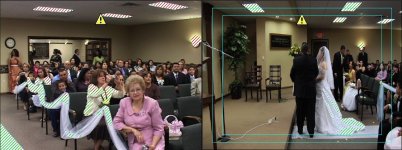
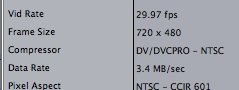
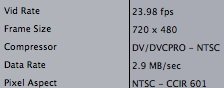
Everything looked good that i can tell expect this did NOT chnage the frame rate from 23 fps to 29fps as i had selected in my settings outlined above. Left pict (Viewer- SD footage -29fps) compared to right side (Canvas - converted HD to SD footage with settings above looks a little- a little squished in)

I compared the two settings and you can see the frame rate do not match. Any ideas how i can get 23fps to match my 29fps?
 

Attachments

  • Picture 5.jpg
    Picture 5.jpg
    196.5 KB · Views: 0
  • Picture 6.jpg
    Picture 6.jpg
    12.3 KB · Views: 0
  • Picture 7.jpg
    Picture 7.jpg
    11.9 KB · Views: 0
Last edited:
Back
Top