
Navigation
Install the app
How to install the app on iOS
Follow along with the video below to see how to install our site as a web app on your home screen.
Note: This feature may not be available in some browsers.
More options
You are using an out of date browser. It may not display this or other websites correctly.
You should upgrade or use an alternative browser.
You should upgrade or use an alternative browser.
The end of 35mm adapers and hv20s....
- Thread starter Hunter Hampton
- Start date
John Caballero
Veteran
Oh no! Joe I found that 2 pixels in the left hand corner 22 seconds into the footage was compressed wrong. Oooohhh bummer and I thought it would be perfect....I am becoming an expert on compression algorythyms, must have been something I read in a forum somewhere. LOL, you did pretty good. Go and sleep.
BTW: I guess step number one with this camera is put it on a tripod. The good thing is that you don't even need a heavy one for it, just a smooth head.
BTW: I guess step number one with this camera is put it on a tripod. The good thing is that you don't even need a heavy one for it, just a smooth head.
Last edited:
awesome Joe!
ok this gets me excited.
these images from the d90 show that the d90 is definately not the latest advancements in video codecs and compression or the absolute best image that anything in the world has to offer
but this is usable, this is very usable
$1000 for camera that accepts 35mm lenses and records 720p? thats a really awesoe deal
did i say I am excited?
this is going to get really interesting and be really fun and i definately think this could be used for HD and not limited to web. i dont think i would want this camera as my number one to shoot an entire season of a sitcom for a major network obviously, but i think on the indie side of things, we are going to see some really great stuff come from setups that use this cam. i think im more excited about this than i am about shooting on an hvx with 35mm adaptor even though mjpeg is at the other end of top quality codecs. i think the price and lens options outweigh that fact and joes image, when used steady to avoid jello vision that thats a pretty damn good picture for $1000!!!!
ill shoot a feature with this! all those people who look down on this setup and think it would be rediculous to shoot a feature can think what they want.
personally i want to break the rules and create something amazing with a setup that many will say is not even worth it. i guess i just like the challenge of doing something that many are going to doubt.
but i see potential and i hope others too and its time to prove all those doubters and moodkillers wrong!
next up: lets get this manual settings figured out and its full speed ahead! its going to be fun to prove to all those squares out there!
but first i must sleep..... hats off to kohli and joe!
ok this gets me excited.
these images from the d90 show that the d90 is definately not the latest advancements in video codecs and compression or the absolute best image that anything in the world has to offer
but this is usable, this is very usable
$1000 for camera that accepts 35mm lenses and records 720p? thats a really awesoe deal
did i say I am excited?
this is going to get really interesting and be really fun and i definately think this could be used for HD and not limited to web. i dont think i would want this camera as my number one to shoot an entire season of a sitcom for a major network obviously, but i think on the indie side of things, we are going to see some really great stuff come from setups that use this cam. i think im more excited about this than i am about shooting on an hvx with 35mm adaptor even though mjpeg is at the other end of top quality codecs. i think the price and lens options outweigh that fact and joes image, when used steady to avoid jello vision that thats a pretty damn good picture for $1000!!!!
ill shoot a feature with this! all those people who look down on this setup and think it would be rediculous to shoot a feature can think what they want.
personally i want to break the rules and create something amazing with a setup that many will say is not even worth it. i guess i just like the challenge of doing something that many are going to doubt.
but i see potential and i hope others too and its time to prove all those doubters and moodkillers wrong!
next up: lets get this manual settings figured out and its full speed ahead! its going to be fun to prove to all those squares out there!
but first i must sleep..... hats off to kohli and joe!
There's always a way to figure out how long the exposure time is. If you can't get a number from the camera it will be harder but not at all impossible.If there is indeed no way to know what shutter speed you are at while recording, then this is definitely not The end of 35mm adapers and hv20s...
sure you can
shoot some repeating strobes and check the frames.
you still didn't say anything about autoiso setting or didn't check its behaviour when recording.
it won't allow the camera to go below activation speed (default 1/60 i think). that's why it's called minimum shutter speed
if it's on while recording only by max iso and activation you'll control it
or your metering may be off for such high iso and the shutter never drops that low
test like i've said above. matrix metering isn't compatible with handheld meters, remember?
thought this was an informed community....
shoot some repeating strobes and check the frames.
you still didn't say anything about autoiso setting or didn't check its behaviour when recording.
it won't allow the camera to go below activation speed (default 1/60 i think). that's why it's called minimum shutter speed
if it's on while recording only by max iso and activation you'll control it
or your metering may be off for such high iso and the shutter never drops that low
test like i've said above. matrix metering isn't compatible with handheld meters, remember?
thought this was an informed community....
Last edited:
Let me chime in and give you guys a little Nikon history. I was involved with Nikon Dslr's back when the D1x was introduced. A fine camera and still is (for shooting my nephews Little League games).
Back then everyone including myself said "Great you can use any Nikon F mount lens!"
In most cases you want to use the Newest Lens, and best yet to use the "Digital" lens.
What we soon found out (from Nikon) there was an inherent problem with a situation called "Light Scatter" The reflection of light from the sensor to the rear element back and forth. The result is soft low contrast images. Nikon recommended there newest lens and wait for there "Digital" lens.
What makes a Nikon Digital Lens?
- Optimized for the smaller sensor (smaller than Full frame 35mm) The reason for the smaller sensor is edge sharpness. The light ray is hitting the outer sensor area at severe angle to the sensor receptor.
- Resolution ... The digital image wasn't as forgiving as film for sharpness.
- Better multi coating on mainly the rear element to prevent as much "Light Scatter"
Note: This is NOT a Diss or Dig to Joe64 or Kholl or anybody for that matter. Just sharing some experience and Nikon history.
The sample I just saw from Joe94 (Thank you Joe94) has three things going against it right from the get go.
- An older 50mm Nikkor manual lens that is known to be soft at f2 since the 1960's. That lens is greatly sharper at f5.6-f11 The lens may be even before "Multi Coating" Also over time and exposure to light any lens coating degrades. Even the newer "AI" manual 50mm lens is not great at f2.
- The sample was also "High Key" in lighting which is very hard on the lens. There is no dought some lens flare going on regardless of what lens was used. Again.... Older lens with older optic coating is more prone to lens flare.
- The sample looked over exposed. Over exposed digital is softer. You get "Sensor Pixel Bleeding," A digital trick we use sometimes if were going for the sharpest image, like for a product photo. We will under expose it a little, Than brighten it back up when we convert the RAW file to a TIFF or working file.
Again... Thanks to all the research most everybody is putting forth.... Hope this info helps in rating this camera.
frisco
Back then everyone including myself said "Great you can use any Nikon F mount lens!"
In most cases you want to use the Newest Lens, and best yet to use the "Digital" lens.
What we soon found out (from Nikon) there was an inherent problem with a situation called "Light Scatter" The reflection of light from the sensor to the rear element back and forth. The result is soft low contrast images. Nikon recommended there newest lens and wait for there "Digital" lens.
What makes a Nikon Digital Lens?
- Optimized for the smaller sensor (smaller than Full frame 35mm) The reason for the smaller sensor is edge sharpness. The light ray is hitting the outer sensor area at severe angle to the sensor receptor.
- Resolution ... The digital image wasn't as forgiving as film for sharpness.
- Better multi coating on mainly the rear element to prevent as much "Light Scatter"
Note: This is NOT a Diss or Dig to Joe64 or Kholl or anybody for that matter. Just sharing some experience and Nikon history.
The sample I just saw from Joe94 (Thank you Joe94) has three things going against it right from the get go.
- An older 50mm Nikkor manual lens that is known to be soft at f2 since the 1960's. That lens is greatly sharper at f5.6-f11 The lens may be even before "Multi Coating" Also over time and exposure to light any lens coating degrades. Even the newer "AI" manual 50mm lens is not great at f2.
- The sample was also "High Key" in lighting which is very hard on the lens. There is no dought some lens flare going on regardless of what lens was used. Again.... Older lens with older optic coating is more prone to lens flare.
- The sample looked over exposed. Over exposed digital is softer. You get "Sensor Pixel Bleeding," A digital trick we use sometimes if were going for the sharpest image, like for a product photo. We will under expose it a little, Than brighten it back up when we convert the RAW file to a TIFF or working file.
Again... Thanks to all the research most everybody is putting forth.... Hope this info helps in rating this camera.
frisco
Last edited:
If someone happens to own an analog oscilloscope you can check what shutter speed the camera is using. Just record the screen with an appropriate sweep time.
Just did a test with my D40. I put the scope in auto trigger mode with a sweep time of 5 ms per square. With an exposure time of 1/100 of a second the image shows the ray in two squares. With 1/50 - four squares.
Just did a test with my D40. I put the scope in auto trigger mode with a sweep time of 5 ms per square. With an exposure time of 1/100 of a second the image shows the ray in two squares. With 1/50 - four squares.
Attachments
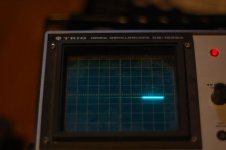
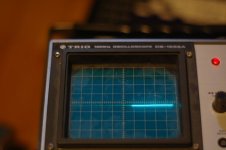
- The sample looked over exposed.
exactly
he used a handheld to meter but that has nothing to do with matrix at iso 1280.
instead of looking thru de viewfinder or at liveview with autoiso active to see what iso does the camera meter before shooting, for each part of the room in the pan view. incident external metering in the middle of the room is wrong
iso 1250 (above 800) may have some noise reduction in-camera affecting fine detail.
people here said at higher iso is very very noisy. where is the noise then? or 1250 isn't high enough.
actually how did you set iso 1250 manually?

Norbert
Well-known member
Maybe not impossible, but I'd rather take my HV20 with me than lug around an oscilloscope for example.If you can't get a number from the camera it will be harder but not at all impossible.


If there is no possibility to manually control the shutter time then I think I will make my own "exposure unit". It will be attachable to the front of the lens like a lens cap. My idea is that it will contain a PCB with like 10 LED:s and a microcontroller. The LED:s intensities will be dimable by the microcontroller. There will also be a mode which moves the light from one LED to the next in a high speed similar to how the ray sweeps in the oscilloscope. That way I can dim the light to an appropriate level, then lock the exposure, then check the exposure.Maybe not impossible, but I'd rather take my HV20 with me than lug around an oscilloscope for example.
Since Kholi says that the shutter speed isn't manually controllable and since I can't see any motion blur in Joes video I'm skeptical to whether the indicated shutter speed of 1/60 is really correct.he used a handheld to meter but that has nothing to do with matrix
I took some photos in my kitchen. Even at ISO200 it was overexposed at f/2.0 1/60. Actually the exposure level looked very similar to the exposure levels in Joes kitchen, with some blown out areas on white parts. (I know the conditions can differ by huge amount, very unscientific by me.) Anyway, I would have had to use a shutter of about 1/400 to get the same exposure at ISO 1250. Since Joes video is strobing it may well be something like that.
Last edited:
3 Requests: Shoot something on a Steady Cam, Dolly, and Jib. Dolly forward through a hallway, turn the steadicam in a whip pan type motion, jib from the ground to to something... like a tree or something.
I want to see some movement on sticks that isn't just a slow pan. The rolling shutter in handheld mode is horrible.
I don't know what you guys are talking about... this doesn't look very usable. I don't think this is what we were hoping for... lets pray the Canon 5d Mark II doesn't have these issues.
Thanks to anyone who shoots that footage.
I want to see some movement on sticks that isn't just a slow pan. The rolling shutter in handheld mode is horrible.
I don't know what you guys are talking about... this doesn't look very usable. I don't think this is what we were hoping for... lets pray the Canon 5d Mark II doesn't have these issues.
Thanks to anyone who shoots that footage.
Hmm I'm pretty dissapointed by the rolling shutter. www.kholi.net/d90vrlens.mov kholi's clip of shows tremendous swaying even for little movements.. I think I'll wait for the next DSLR with hopefully improved video functionality..
actually how did you set iso 1250 manually?
You put the camera in manual mode, hold down the ISO button and then use the thumb wheel to set your ISO.
I set the shutter on the camera to 1/60. The information on the LCD indicated that the shutter was 1/60 and the ISO was 1250, and it never changed though the duration of the clip.
When I was playing with the camera last night I pointed it at my computers LCD. I don't know the proper nomenclature but could see the scan lines crawling down the screen. I reset the AE-L button at a couple different brightnesses and pointed it back at the LCD. The scan lines were crawling at the same rate. This would indicate to me that the shutter was in fact not changing just that the gain was somehow different.
When I was playing with the camera last night I pointed it at my computers LCD. I don't know the proper nomenclature but could see the scan lines crawling down the screen. I reset the AE-L button at a couple different brightnesses and pointed it back at the LCD. The scan lines were crawling at the same rate. This would indicate to me that the shutter was in fact not changing just that the gain was somehow different.
Smart thinking, but a CRT would be a better bet. LCDs don't work the same way. Point it at a TV which, in the US, we know will be scanning at 60Hz. That's a good way to check to see what the shutter's doing.