Adobe Premiere Pro and DVX100B on a PC - Can anyone make it work??

Hi guys,

I've seen a few threads with people not being able to capture in Adobe Premiere Pro starting on version 1.5 (when they adopted 24p support) on PC. I have Adobe Premiere Elements 4 and it won't recognize my camera. I know I'm using a PC and I'm a loser, but I also do audio recordings with Cubase 4 and I have no issues with my PC other than this.

I've look around in so many threads and I find NO solution to this problem. I have no issues whatsoever capturing with Windows Movie Maker or Sony Vegas Pro 8.

I'm tempted to start using Vegas 8 but I have been using Premiere for some time, I have Adobe After Effect and all the plug ins. It is really frustrating that now that I finally have my DVX100 camera I have to switch software and re-learn the whole program!!

I'm also thinking about capturing with a different source. I'm doing all my films with 24p now, could you suggest a solution to this so I can still use Adobe Premiere?
 
The problem with Elements is that it in no way supports 24p. That's probably not why it's not recognizing the camera -- it'll do just fine capturing all of the footage as 60i -- but it's not an environment you want to be in for long if you want to work with 24p.

Current versions of Premiere Pro (since 2.0) are just dandy working with the DVX. And it's also less of a hassle than FCP (you don't have to worry about 24p capture settings or which pulldown you used, be it 24p standard or 24pA), so you're hardly a loser. And Vegas integrates with the DVX better than anything.

As for recognizing the camera, I dunno; Windows obviously sees it, so try reinstalling Elements.
 
David thanks for the reply. I'm not really interested in using Elements, I just want to get back with Premier Pro. Worst comes to worst I'll be capturing with a different program, although I hate to have to switch. What program would be the best to capture for 24p?
 
I don't understand why you keep mentioning Premiere Pro if you're using Elements. I use Premiere Pro CS3, and it works perfectly fine for me, I've never had a problem with it. Do you have Premiere Pro, if so, have you tried that instead of Elements?
 
i think you should update to Adobe CS3. I also own a dvx 100b and i never encounter issues like that.
 
I have VEGAS 8, ADOBE ELEMENTS 4 AND PREMIERE CS3. I'm not interested in anything BUT CS3 which is what I've been using for several months. I never had issues with it until I plugged this camera in. Forget about Elements, not interested in that, I was just giving examples that my camera is working with Windows Movie Maker and Vegas but not with Adobe.

I need to work with Premiere CS3 with extreme urgency. I cannot stand the other interfaces and I have to edit a movie BY next week!

Do you guys have PC or MAC?

I have a swappable hard drive, in the other one (that I've never used before) I have Windows Professional 64 bit. I ALSO have Windows Vista Business. I'm going to try Windows Pro 64 bit, see what happens. I'm not sure about Vista...
 
Last edited:
OK, your posts made it seem like you were using Elements.

You shouldn't be having a problem. If you're going to go through the trouble of installing a whole new operating system, I'd suggest just uninstalling and reinstalling Premiere Pro first.
 
I have never used Vegas, but would there be a loss in quality if he captured in Vegas and imported to CS3?
 
I have used Premiere Elements 1.0, and now 3.0, myself. Occasionally, I have had trouble getting the program to recognize ANY camera, until I changed my procedure. I learned that if I plug the camera in FIRST and wait for the computer to recognize it, THEN open Premiere Elements, the program recognizes it every time. Try it and see.
 
Last edited:
OH MAN!!!! CS3 its working at least ten times faster now !!!

See, I already have two swappable hard drives (you guys are visual learners so picture attached :beer:) one having regular Windows XP but the other Windows Professional x64 Edition which was sitting on my closet for a year.
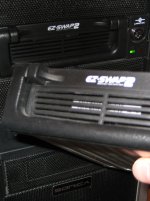
I never decided to use my Windows Professional x64 because I've heard some software (as of last year) was not compatible. HOWEVER most graphic/audio intense applications can run at 64 bits with no problems.

After installing Adobe Premier CS3 on my new hard drive, the software started over ten times faster the normal speed and my camera started capturing right away while my computer was downloading and installing updates.

I don't understand why are we all not running at 64 bits. I guess this should be another thread... I'll let you guys know how this keeps working out, I haven't done many tests yet.
 

Attachments

  • IMG_0068.JPG
    IMG_0068.JPG
    176.3 KB · Views: 0
Cs3

Cs3

I am using Premiere CS3 and it use to be able to capture from my DVX100a. But now it jsut says could not connect.. please restart camera.. has anyone else ever had this problem

Terry
 
I have an earlier version (Premier Pro - no number) and it works fine with my DVX. Just no 24P capture.
 
I have the same problem...my Premier pro 2.0 doesnt seem to recognize the camera and ask to reset the camera...and it does that to any cameras not just my dvx100.....help anyone? :(
 
I have Premier Pro, the version before they used numbers, and have no problem importing 24P footage. It just handles in a 29.97 timeline. When I de-interlace and burn to DVD it looks good to me. Am I missing something good by not having a newer version of Premier?
 
YES! YOU ARE MISSING A LOT!! :-)
I have P.Pro CS3 and the 24frame timelines are a must!
Your solution was good - but this is better. You WON'T go back.
Also the newer Media Encoder export pages have like a Kajillion PRESET outputs for things like Export for iPod, Export for YouTube, a ton more, and encoding presets for hundreds of phones and hand-helds and mobile devices.
I had that original P.Pro too - I thought it was amazing...but the CS3 and CS4 are reeeeally advanced now. Lots of new goodies, and helper tools.
~DPS
 
That would be great. I've been using this cheapy conversion software to do Flash and QT, etc. but it doesn't do a very good job.
 
I have the same issue using Sony Vegas Studio Platinum. I have to take my tape from the DVX and insert it into my Sony Handicam to load onto the computer.
 
I don't understand why are we all not running at 64 bits. I guess this should be another thread... I'll let you guys know how this keeps working out, I haven't done many tests yet.

I agree with you 100%. Let us know when you test it enough times. Thanks.
 
Back
Top