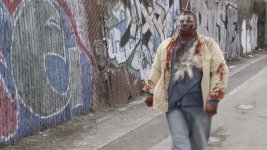
Dust hits to blood?

Hello -
On set, we shot dust rounds (I guess they are called?) at the actors... But I can't figure out how to tint them red. Any ideas?
Thanks!
~S.e.
 
Huh! I didn't know that they could be used for this purpose. Generally, I thought they were for bullets striking the ground, buildings, and other non-bleeding objects.

As for your question -- well, this could be tricky to pull off. Ultimately, what you're probably going to have to do is mask each cloud of dust and color-change it or adjust the curves and levels until it looks blood-red. Now this might be very difficult or impossible depending on what color shirts your actor's are wearing and how complex the blood spray is.

You might consider not changing the color and overlaying some pre-matted blood spray effect on TOP of the area where the dust round hit the actors. This might help solve your problem.

A screenshot or two might help...

Good luck!
 
I don't think they are supposed to be used for this!
The VFX guy we had for our movie got another job, so can't do all the FX, so they asked me to do it. And I've been trying to talk to the VFX guy to figure out how the hell to do this, but I get the impression that he's avoiding me...
I really hope I don't have to mask each one :(
heres a still.
And thanks guys!
 

Attachments

  • 17j - 4 (2) 2.jpg
    17j - 4 (2) 2.jpg
    145.3 KB · Views: 0
interesting, I have not seen this technique before, even after 70 plus film and TV projects.

If you want that to be blood it may be an intensive project.

I would say that you need a compositor that can roto (garbage matte) the dust splashes and turn them from white to red. I would try to use a software like combustion that can "sample" the white and change it to red.

I used this technique in the police car crash scene in "Cradle to the Grave", the dust in the street neede to be gray, like street dust, not yellow dirt dust. Here: http://www.briansmallwood.com/gallery.html choose the police cars shot on the right.

Otherwide, you can do a tight roto scope of all hits and color corrrect them that way.

Good luck,
Brian
 
Last edited:
I don't think there's any particularly easy way of doing this. You could try drawing a mask over the entire zombie and replacing that color range with something else. Not sure how those results would turn out.

The alternative, of course, is just masking off the dust and coloring it. While it's probably only 4 or 5 frames per shot, I'm guessing that the dust lingers a bit. That will be almost impossible to handle, I think. Luckily, the zombie does look a little dusty :)

Good luck, and lemme know if you find a solution -- I'm no expert.
 
you could leave it gray and be original. But I guess the blood he is covered in might be a problem. unless its all the blood from the dead. I got nothing.
 
Draw a mask, make a layer that's red and feather, feather, feather.

The only way to have it be automated in post is if you used flourescent green or orange dirt or something that is very different than a flesh tone and you could auto target that color. But then you could have just made the dirt red in the first place.
 
mask it off then pull a luma matte? the dust explosion is lighter than the shirt. it would be dirty but given how fast the impact is, maybe no one would notice?
 
i have got to say that your FX guy needs to be "not hired" again if your supposed to make blood out of this mess. for a quick shot it will work with alot of extra work to get it looking just right, but dust for blood? i mean if you cut right after the impact and initial spray you might be ok, but what about when it starts to drift in the wind? it would have been much easier to just comp in a dust hit that you can change the colors of independently on a seperate layer. ..aaaanyway.

at this point i wouod agree with sean and JDS .. mask it out in general just around the area you want to show, and then I would use a change color effect to grab just the dust color and change it to red or similar type function such as a luma matte where you could select a range of a given parameter in which the dust will stand out a bit from its surrounding footage and grab the dust ect, and then change that selction range to red.
 
Back
Top