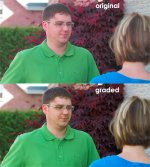
'film' grading, A1 + Letus Extreme

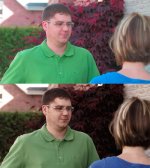
Via the original post, my stab at it.

frank01b2mv6.jpg
 
i did a few other adjustments, here they are:

colorgradingib9.jpg


I will post some video shortly to demonstrate the noise level difference. IT is quite substantial, but maybe i'm just being picky. Plus, film does have grain after all. Would like to soften the noise level a bit however.
 
video for download of before/after. Again, much more noise now. Which can only mean to raise exposure on face, and adjust less in post.

link (right click save as)

http://www.tassweb.com/papa/mother.mp4 4 megs

compression doesn't help but notice the noise level in the trees.

if the link doesn't work for you just go here

http://www.tassweb.com/papa

find the file mother.mp4 and download.
 
Last edited:
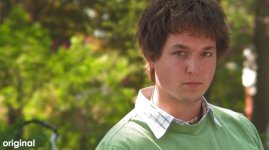
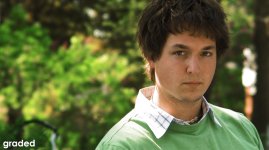
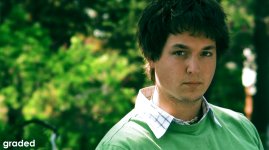
Here's my try:)
 

Attachments

  • original.jpg
    original.jpg
    260.7 KB · Views: 0
  • grade1.jpg
    grade1.jpg
    275.5 KB · Views: 0
  • graded cyan.jpg
    graded cyan.jpg
    292.1 KB · Views: 0
  • anothergrade.jpg
    anothergrade.jpg
    161.8 KB · Views: 0
Last edited:
was thinking that as well. Which is why i am going to find an even mix between the coloring in knockedup, and forgetting sarah marshall.
 
was thinking that as well. Which is why i am going to find an even mix between the coloring in knockedup, and forgetting sarah marshall.


yeah.. well I wouldn't mix in more reds.. cause the reds are just ugly.. but some yellowish, brownish thing would be great :)
 
here is a grab comparing the correction to forgetting sarah marshall. I left the original image slightly more exposed thati was recommended for noise reduction reasons in post grading. It worked on in my interest.

The light is very different in the grab as opposed to my lady, but the skin tones on the brighter sides of the face are almost idential as is the coloring of the trees and black levels + overall saturation


sarahmarshallcomparisonem9.jpg


factor in as well that sarah marshall has a tan.
 
Last edited:
I downloaded your grab and gave it a shot and I could get a very close result to yours using just Curve. Was that all you use?

It seems like the key is to start with an evenly lit (even slightly underexposed) image.
 
i took the shot under several exposures to see what would render the best results. And the problem with starting with an underexposed image and pushing it is the increase in the level of noise of which i am not a fan. But at the same time it gives it a bit of "grain". But to me grain and noise aren't the same. Noise is distracting, grain looks natural. Noise is more apparent in lower exposure areas, and grain is more evenly distributed throughout the image. Just what I've noticed.

I used HSL and curves. Using just curves would yield too high of a saturation.
 
Last edited:
annacurvesrt9.jpg


something like that, but again, i didn't under expose, otherwise there would be tons more noise. not something i want in the image.
 
Back
Top