
Navigation
Install the app
How to install the app on iOS
Follow along with the video below to see how to install our site as a web app on your home screen.
Note: This feature may not be available in some browsers.
More options
You are using an out of date browser. It may not display this or other websites correctly.
You should upgrade or use an alternative browser.
You should upgrade or use an alternative browser.
'film' grading, A1 + Letus Extreme
- Thread starter PaPa
- Start date

Park Edwards
Veteran
none of us are going to get the same results on our screen as yours papa. unless we just happen to have the same calibrated monitors. it's pretty tough to get "natural skintones" when nobody has any idea what your talent really looks like. he could be orange from fake tanning, and when if you try to correct that, you'll lose color else where.


Mattykins
Cute Member
Well your fundamental problem here is the fact you consistently overexpose. Try dropping an ND filter on your lens. Or when shooting diffuse the sunlight. But continuously, you blow out the highlights to a point where they cannot be salvaged. Which does look like 'video' since film has a dramatic dynamic range. It never really blows out. Well - it does - but you kinda have to try. Or have no idea how to meter. If you mess around with it, all you do is clip it, or turn it into a grey goo type look. And it has a very very soft icky look. Yeah - Icky is a work. I mean, you can make the colors become truer and mess around with it a little, as per my sample.
Which has the shadow color dropped into a light green. Same with midtones. Highlights are a little yellow. Then a Lift Gamma Gain, with the lift in the light blue, gamma in a teal. And gain being a little golden. A secondary color correct with shadows in the golden range, midtones thrown to teal. And highlight stays the same. I put a shoulder on it as well. And boosted exposure .4 stops to compensate. Another 5min job. Spent more time typing than I did correcting.

Which has the shadow color dropped into a light green. Same with midtones. Highlights are a little yellow. Then a Lift Gamma Gain, with the lift in the light blue, gamma in a teal. And gain being a little golden. A secondary color correct with shadows in the golden range, midtones thrown to teal. And highlight stays the same. I put a shoulder on it as well. And boosted exposure .4 stops to compensate. Another 5min job. Spent more time typing than I did correcting.

PaPa
Major Contributor
i really like your take on it Matt. I, unfortunateyl have never learned how to do secondary color correction. I toyed around with it many times but it never seemed to make any sense.
And you are right about me overexposing. It is sometimes hard to judge on the little LCD screen, even with a meter. It's hard to know which to trust, the eye or the meter, and what it's exposing.
I held a bounce board to fill my face with light so i was expecting something a little brighter than what you've produced on the face, but i really do like your approach.
If you brought the highlights down more ( granted there is no information ) but at the least softened them up, i believe we would be getting very close.
And you are right about me overexposing. It is sometimes hard to judge on the little LCD screen, even with a meter. It's hard to know which to trust, the eye or the meter, and what it's exposing.
I held a bounce board to fill my face with light so i was expecting something a little brighter than what you've produced on the face, but i really do like your approach.
If you brought the highlights down more ( granted there is no information ) but at the least softened them up, i believe we would be getting very close.
PaPa
Major Contributor
here are the two takes that i got. It seems the more i stare at the picture adjusting it, the harder it is to see the result I'm trying to achieve.


Looking at them side by side, my second is infinitely better than the first. Getting closer, but you are right on the money with the exposure. Lower exposure will give the grittier look, and will make curve adjustment more to what I'm going for
Looking at them side by side, my second is infinitely better than the first. Getting closer, but you are right on the money with the exposure. Lower exposure will give the grittier look, and will make curve adjustment more to what I'm going for
Last edited:
Papa, I actually prefer your take on it (the 1st one) vs. Matt, looks much more filmlike to me. There is still a golden tone to it though.
A good thing to discuss would be under what conditions those magenta patches appear on the skintone. This problem might be beyond simple CC. If we can determine a combination of in-camera preset, lighting conditions and post CC to eliminate it, we'll be on our way.
A good thing to discuss would be under what conditions those magenta patches appear on the skintone. This problem might be beyond simple CC. If we can determine a combination of in-camera preset, lighting conditions and post CC to eliminate it, we'll be on our way.

jenningsp
Well-known member
curves? what curves? 
i did it all in final cut. i don't think you can get curves in final cut. if you can please tell me how
i just use a bunch of filters that i've developed a system with.
basically i darken with gamma setting, then push mids to compensate. this creates contrast but maintains your highlights. then it's just a matter of messing with the red/green/blue to get your skin tones right. easy as pie
i agree with matt about the underexposing.
anyway here is a grade that is still trying to be natural but also have that cool graded look as well. enjoy.

i had a lower contrast version that got rid if the magenta in the cheeks but i actually like this one better.
i did it all in final cut. i don't think you can get curves in final cut. if you can please tell me how
i just use a bunch of filters that i've developed a system with.
basically i darken with gamma setting, then push mids to compensate. this creates contrast but maintains your highlights. then it's just a matter of messing with the red/green/blue to get your skin tones right. easy as pie
i agree with matt about the underexposing.
anyway here is a grade that is still trying to be natural but also have that cool graded look as well. enjoy.
i had a lower contrast version that got rid if the magenta in the cheeks but i actually like this one better.

Jim Montgomery
Well-known member
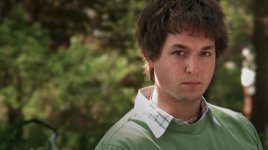
Here is my Take on it.
Here is my Take on it.
Color corrected Blacks, White and middle Grey. Secondary correction consisted of a mask to the face. Brought the red/magenta down a little, lowered the gamma a touch. Applied an overall diffusion, saturation adjustment and a vignette,
Here is my Take on it.
Color corrected Blacks, White and middle Grey. Secondary correction consisted of a mask to the face. Brought the red/magenta down a little, lowered the gamma a touch. Applied an overall diffusion, saturation adjustment and a vignette,
Attachments
Last edited:
PaPa
Major Contributor
Papa, I actually prefer your take on it (the 1st one) vs. Matt, looks much more filmlike to me. There is still a golden tone to it though.
A good thing to discuss would be under what conditions those magenta patches appear on the skintone. This problem might be beyond simple CC. If we can determine a combination of in-camera preset, lighting conditions and post CC to eliminate it, we'll be on our way.
Disjecta has made a preset called NOMAGENTA. Haven't given it a shot but might be worth a look?
Jim Montgomery
Well-known member
Better? (replaced image above)
PaPa
Major Contributor
definitely better, but now everything is crushed too much. The nice thing about the reference frame is that the blacks aren't crushed all that much and the skin tones are flat(ish) and consistent. But bright at the same time, thats what im going after ( yes i know it's not film... no need to reply with that response.) WE are getting closer so it is achievable.
Jim Montgomery
Well-known member
Easy enough to fix (see above)