color correcting surf footage

Paunch

Well-known member
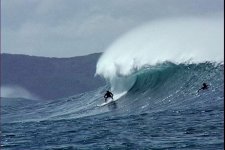
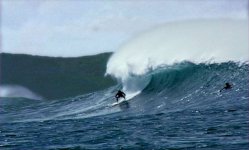
I really am green when it comes to color correction, I was going to get my film out the door at the end of the month but now realize that there are a lot of issues with color, brightness and contrast in specific parts of the frame that need major adjustments and I know nothing about this and pretty much need to learn it.....I just can't release my film if it's not done properly from beginning to end. Anyway here's a frame grab, the white balance was way off, I tried the quick color corrector adjusting the white balance on the white portion of the wave but that really didn't look great at all. Any ideas on how to correct this particular shot to make it look decent?
 
Last edited:
i think that was shot off wahamaia bay the rocks shooting almost shooting into the sun. i think it is to much light when the wave breaks. did you try a polarizer and set manual exposer . another guess was shot on fx1? but don,t see it as a white balance problem. different nd filters might have helped ,hard to tell from a screen grab. with surf you can get good color then the wave breaks and the white of the wash overpowers the auto irus washing out all the color. camera can,t keep up in auto . if you nd and polorize down to a ?2.8 then it will be have some where to go when the wash brightness hits .will react quicker to like a 8.0 .
 
no polarizer, was with the DVX100 with the century telephoto adapter.

if i remember that day it was pretty backlit, and it was a bad white balance for sure....nd's were on, nothing was on auto...exposure was around 4 or so.

nice guess, it was outer reef nicaragua shot from a boat on a pretty good sized day....too bad all of my footage from that day looks like this, maybe black an white.....
 
i did try to do a fast color correct and white balance on the water...but it came out really grey


click on the link that says "a scene from el centro" ....that's not the title but some menso thought it sounded better or some shite.....this footage is a bit more washed out than usual from the compression....and yes i know its shakey, was a rough day at sea shooting from quite a distance in a boat.
 
Last edited:
Here is a quick Primary CC. Is this where you want to go? You could still do some Secondary work on the Mountain sky background to remove some of the noise and probably add a vignette overall.
 

Attachments

  • n520195519_1172697_7583.jpg
    n520195519_1172697_7583.jpg
    44.3 KB · Views: 0
Last edited:
that looks a bit better, looks a little more the way god intended it to be...yeah i was just going for a natural look....if you don't mind my asking what exactly did you do ??

t
 
As it was a still image I did all the CC in Photoshop, but it can be applied to After Effects or whatever.

Using Curves:

1) Drop the black level, used the man swimming, to single digits, low teens

2) Raised the white level, using the wave crest as reference, to 220's

3) Lowered the overall gamma a little

4) Increased blue in the water by using the blue channel gamma.

Still could use some contrast adjustments, but would probably handle that with a vignette. and the mountain could be brought down a little as well. Select it by using Hue/Sat mask and lowering its gamma even further while still retaining the blue hue.

Hope that helps
 
wow . what a difference . thats what it might have looked like if you had just white balanced off a white card on the boat instead of trying to set it off the white water. i am sure that would give you a better look. in the hvx200 the scene file settings bringing up the colors works great. it is much easyer to work on a pics than video . p.s. there is a surf film fest in new york in sept. must be submitted by june 20th . check it out. i am trying to finish mine in time.
 
Levels is generally the first "tool" you should always go to before any CC/Grading or Effects.
 
As it was a still image I did all the CC in Photoshop, but it can be applied to After Effects or whatever.

Using Curves:

1) Drop the black level, used the man swimming, to single digits, low teens

2) Raised the white level, using the wave crest as reference, to 220's

3) Lowered the overall gamma a little

4) Increased blue in the water by using the blue channel gamma.

Still could use some contrast adjustments, but would probably handle that with a vignette. and the mountain could be brought down a little as well. Select it by using Hue/Sat mask and lowering its gamma even further while still retaining the blue hue.

Hope that helps


how can i do this in premiere pro cs3? I cheked out luma curves but am not really sure how to adjust the white levels......or is that just using the levels effect ???
 
Let me play with it a little, been a long time since I have been in PP.

OK here is a project file, will send via email (need address), the setting have been overdone a little so you can better see the adjustments in the effects window. Some caveats

I could not find if PP had scopes.

This is a single frame, not the whole clip. Being that single frame I can't see the real resolution nor the clip without compression.

This is only intended to point you in the right direction.

For true color correction to need to use color correcting tools, not a NLE.

But given that here is your starting point. If you want and your budget allows I would be happy to work on this for you.

Below is a grab from the PP Project

Jim
 

Attachments

  • Sequence_01.jpg
    Sequence_01.jpg
    45.7 KB · Views: 0
Last edited:
PP has full set of scopes and also Color Correcting Tools in abundance so not sure why you would suggest not to do the job in an NLE ...unless you are suggesting some of the CC specific plugins available.
 
He has been given some good advice and examples so now he can have his own fun learning how to use the tools he already has.
 
word, i'll probably just stick with the 3 way color corrector....some of it just comes down to really bad back lighting and such...I fixed most of the footage with the 3 way color corrector.....there are just a few shots like the example provided that are pretty trashed..

Thanks for the offer Jim....I don't think my budget can cover that...


shooter do you know where I could find some information/tutorials on CC for PPro? I haven't had much luck finding any in depth information on this subject.
 
Last edited:
Back
Top